-
-
-
-
-
Storage
-
Mount point storage
-
This content has been machine translated dynamically.
Dieser Inhalt ist eine maschinelle Übersetzung, die dynamisch erstellt wurde. (Haftungsausschluss)
Cet article a été traduit automatiquement de manière dynamique. (Clause de non responsabilité)
Este artículo lo ha traducido una máquina de forma dinámica. (Aviso legal)
此内容已经过机器动态翻译。 放弃
このコンテンツは動的に機械翻訳されています。免責事項
이 콘텐츠는 동적으로 기계 번역되었습니다. 책임 부인
Este texto foi traduzido automaticamente. (Aviso legal)
Questo contenuto è stato tradotto dinamicamente con traduzione automatica.(Esclusione di responsabilità))
This article has been machine translated.
Dieser Artikel wurde maschinell übersetzt. (Haftungsausschluss)
Ce article a été traduit automatiquement. (Clause de non responsabilité)
Este artículo ha sido traducido automáticamente. (Aviso legal)
この記事は機械翻訳されています.免責事項
이 기사는 기계 번역되었습니다.책임 부인
Este artigo foi traduzido automaticamente.(Aviso legal)
这篇文章已经过机器翻译.放弃
Questo articolo è stato tradotto automaticamente.(Esclusione di responsabilità))
Translation failed!
Mount point storage
The Mount Point Storage section allows platform administrators to enable or disable Mount Point storage types for the platform.
Navigate to System Configuration > Integrations > Mount Point Storage.
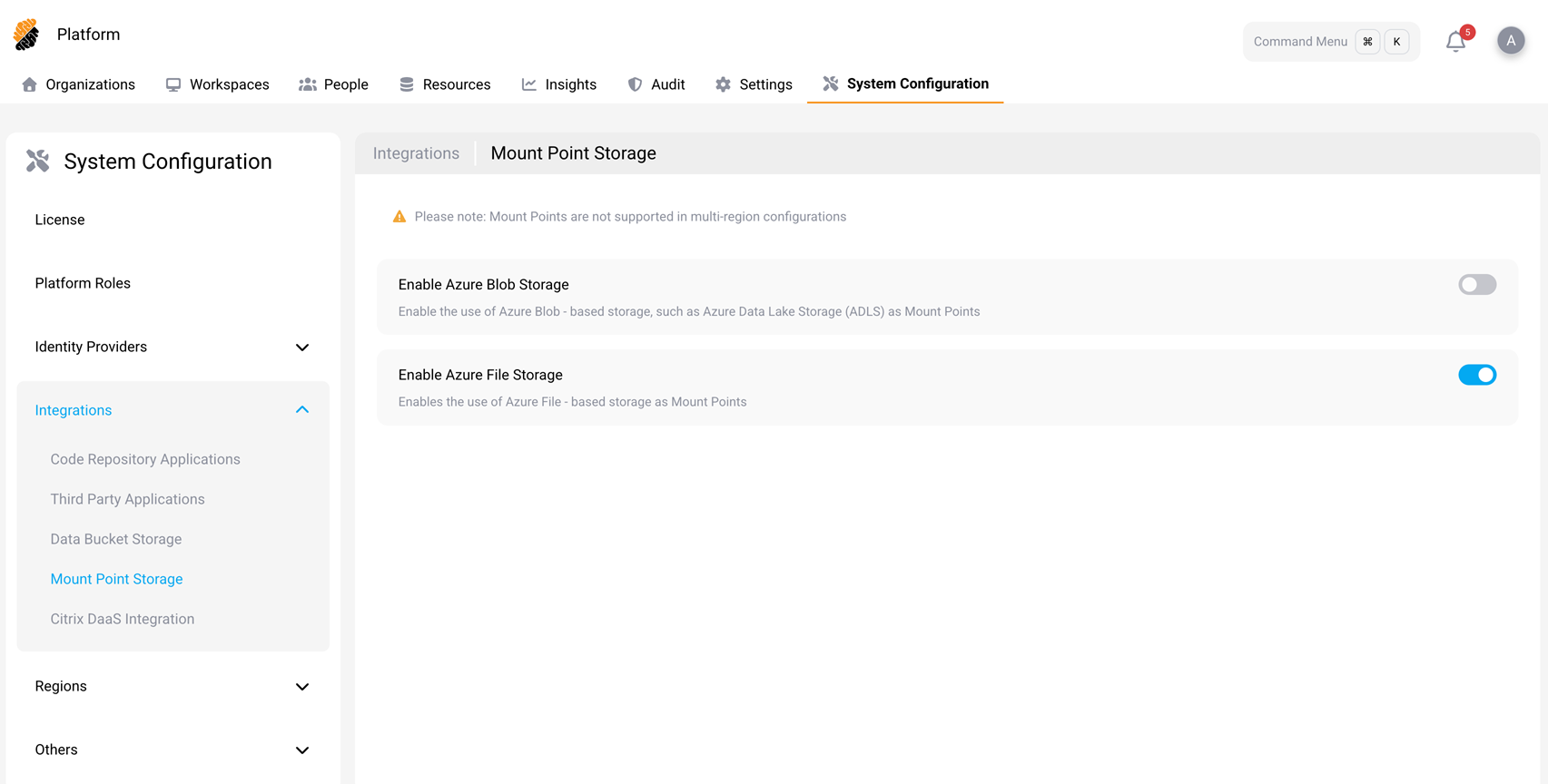
The preceding screenshot is taken from an Azure cluster. An AWS cluster shows one switch, Enable AWS File Storage, in place of the two Azure switches.
Warning
Mount Points are not supported in multi-region configurations.
Which storage types appear
The switches on this page depend on the cloud that backs Mount Points, and that cloud is detected rather than
chosen. The platform reads the CSI provisioners of the Mount Point storage classes present on the cluster:
efs.csi.aws.com means AWS, and file.csi.azure.com means Azure. Nothing on this page sets the provider, and a
cluster is treated as backed by one cloud only.
- An Azure cluster shows Enable Azure File Storage, which enables Azure File-based storage as Mount Points. It also shows Enable Azure Blob Storage, for Azure Blob-based storage such as Azure Data Lake Storage (ADLS). That switch is not available yet. It cannot be turned on, and the platform rejects a request to create an Azure Blob Mount Point.
-
An AWS cluster shows one switch, Enable AWS File Storage, which enables both Amazon Elastic File System
(EFS) and Amazon S3 Files. There is no separate switch for each backend, so you cannot allow one and block the
other from this page. The backend a Mount Point uses is decided by the
provisioningModeparameter on the storage class you author —efs-apfor Amazon EFS,s3files-apfor Amazon S3 Files — so a project owner chooses the backend by choosing the storage class. Give each storage class a name that makes the backend obvious. See Configure SecurSpaces for AWS Mount Points. - A cluster holding both AWS and Azure Mount Point storage classes shows no switches. The provider cannot be resolved, the feature is withdrawn from users, and the page reports the conflict and lists the providers it detected. Remove one cloud’s Mount Point storage classes and revisit the page.
- A cluster with no eligible Mount Point storage class also shows no switches. The page reports that no eligible storage class was detected, and the list of detected providers is empty. An empty list means nothing was recognized. Two entries mean the mixed-cloud conflict described earlier.
Enable a storage type
- Navigate to System Configuration > Integrations > Mount Point Storage.
- Turn on the switch for the storage type you want.
When a storage type is enabled, project owners can create Mount Points of that type, and developers can attach them to workspaces. When it is turned off, the Add Mount Point button and the rest of the create flow are hidden, and no new Mount Points of that type can be created.
Warning
Turning a storage type off does not disconnect storage that is already in use. The platform checks the switch only when a Mount Point is created, so a workspace that already has one attached keeps mounting it, with the same read and write access, after the switch is off. Existing Mount Point configurations are not deleted either, and they become available again if you turn the switch back on. To cut off access, delete the Mount Point, or remove it from each workspace and workspace template that uses it.
The project and workspace views give no reason when Mount Points are unavailable. They simply hide the option. Open this page first when a user reports that Mount Points have disappeared.
AWS storage classes
For AWS storage, an administrator must also provide eligible Kubernetes storage classes for the backing storage. Project owners see only supported storage classes when they create or attach AWS Mount Points.
AWS Mount Points require AWS resources that Citrix SecurSpaces™ does not create, including the file system, per-Availability-Zone mount targets, IAM roles, and the storage classes themselves. The AWS storage type does not appear here until an eligible AWS storage class exists on the cluster. See Prepare AWS storage for Mount Points.
Note
After you add or remove a Mount Point storage class, allow about 30 seconds before this page reflects the change. The platform caches the detected provider and the list of eligible storage classes for that long. No restart is needed, so do not restart pods or force a rollout while you wait.
Related information
- Mount Points, for creating and using Mount Points within a project
- Prepare AWS storage for Mount Points
- Configure SecurSpaces for AWS Mount Points
- Choose between data buckets and mount points
Share
Share
This Preview product documentation is Citrix Confidential.
You agree to hold this documentation confidential pursuant to the terms of your Citrix Beta/Tech Preview Agreement.
The development, release and timing of any features or functionality described in the Preview documentation remains at our sole discretion and are subject to change without notice or consultation.
The documentation is for informational purposes only and is not a commitment, promise or legal obligation to deliver any material, code or functionality and should not be relied upon in making Citrix product purchase decisions.
If you do not agree, select I DO NOT AGREE to exit.