This content has been machine translated dynamically.
Dieser Inhalt ist eine maschinelle Übersetzung, die dynamisch erstellt wurde. (Haftungsausschluss)
Cet article a été traduit automatiquement de manière dynamique. (Clause de non responsabilité)
Este artículo lo ha traducido una máquina de forma dinámica. (Aviso legal)
此内容已经过机器动态翻译。 放弃
このコンテンツは動的に機械翻訳されています。免責事項
이 콘텐츠는 동적으로 기계 번역되었습니다. 책임 부인
Este texto foi traduzido automaticamente. (Aviso legal)
Questo contenuto è stato tradotto dinamicamente con traduzione automatica.(Esclusione di responsabilità))
This article has been machine translated.
Dieser Artikel wurde maschinell übersetzt. (Haftungsausschluss)
Ce article a été traduit automatiquement. (Clause de non responsabilité)
Este artículo ha sido traducido automáticamente. (Aviso legal)
この記事は機械翻訳されています.免責事項
이 기사는 기계 번역되었습니다.책임 부인
Este artigo foi traduzido automaticamente.(Aviso legal)
这篇文章已经过机器翻译.放弃
Questo articolo è stato tradotto automaticamente.(Esclusione di responsabilità))
Translation failed!
How it works
Citrix SecurSpaces™ is a cloud-native platform for hosting Cloud Development Environments (CDEs). It runs entirely on Kubernetes, either in your own cloud account or on your own hardware, and can run fully air-gapped. Development environments are containerized and Linux based, and nothing is installed on the developer’s device.
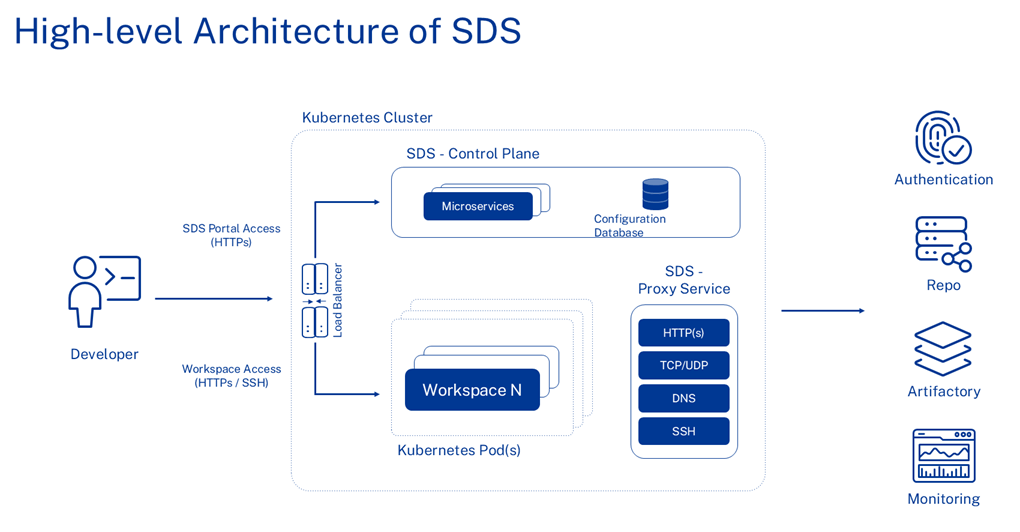
The platform has three parts:
- The control plane. A set of microservices and a configuration database. The control plane holds organizations, projects, policies, resources, and workspace state. It does not carry the developer’s code.
- Workspaces. Each workspace is a Kubernetes pod running a container image, with its own CPU, memory, and disk allocation. Workspaces are created from templates, and are paused when idle and deleted according to your retention settings.
- The SecurSpaces proxy service. All traffic leaving a workspace passes through it — HTTP and HTTPS, TCP and UDP, DNS, and SSH. This is where credentials are injected, network policy is applied, and traffic is recorded.
Because every path in and out of a workspace terminates in the SecurSpaces proxy service, the platform can give developers access to repositories, registries, and internal services without ever placing long-lived credentials on the developer’s device.
How developers connect
Developers reach a workspace in one of two ways:
- In the browser. VS Code for the Web is served from the workspace over HTTPS. Nothing is installed locally, so any managed or unmanaged device can be used.
- From a local IDE or terminal. VS Code Desktop, JetBrains Gateway, Cursor, Kiro, and Windsurf connect over SSH, as does a plain terminal.
The browser path is the one that supports the full set of data loss prevention controls, because the platform renders the session. See Connect over SSH, and Supported IDEs for versions and limitations.
Component overview
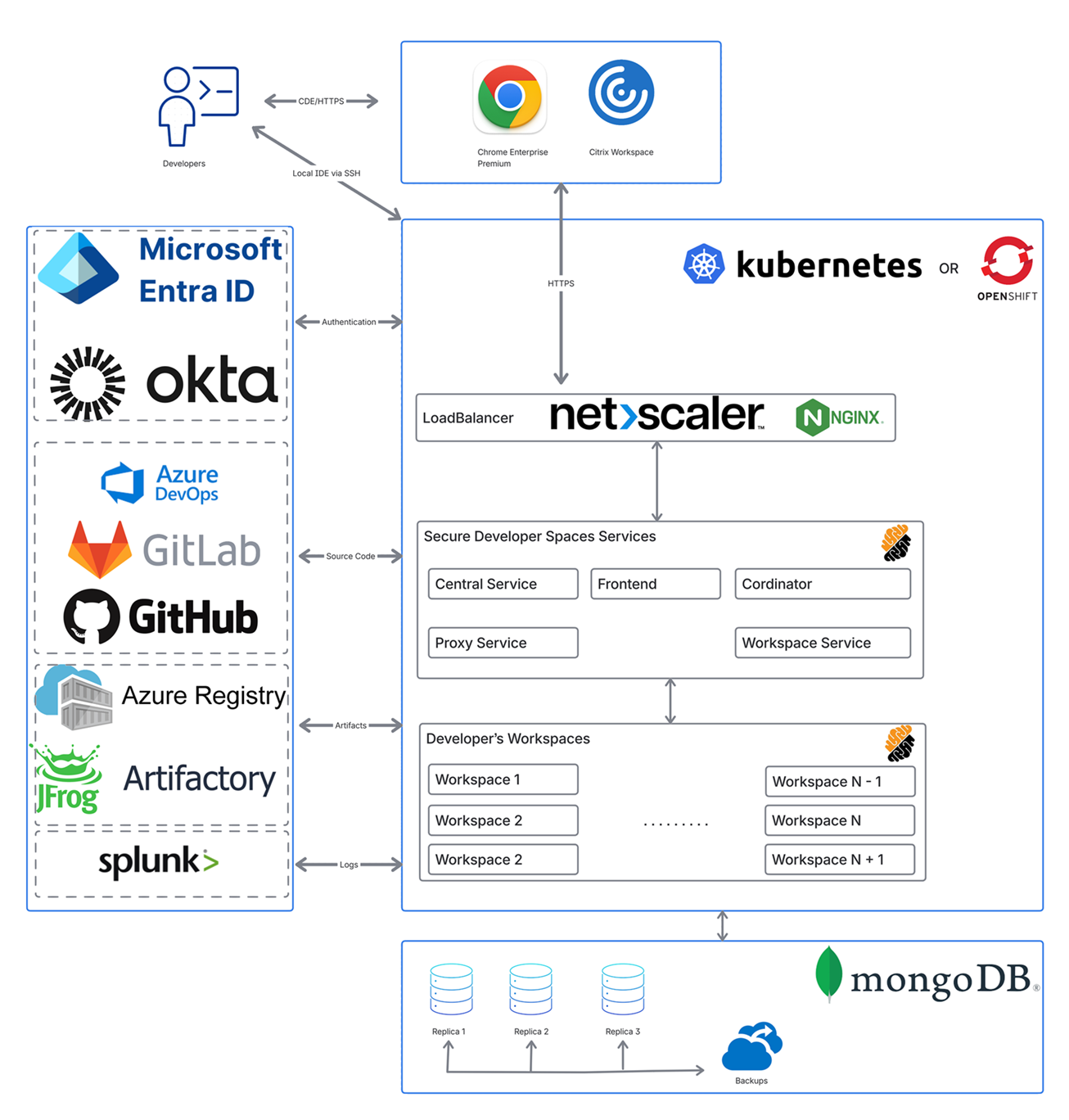
The following table describes the key architectural components and the technologies each one supports.
| Component | Description | Supported Technologies |
|---|---|---|
| Platform | Cloud-native, container-based environment (CDE) | Kubernetes or Red Hat OpenShift. See Deployment guides. |
| Load Balancing | Traffic management and ingress control | NetScaler CPX (recommended, and deployed by the SecurSpaces chart), NGINX, HAProxy, or the Kubernetes Gateway API. |
| Database | Metadata and workspace state storage | MongoDB |
| Authentication | Multi-factor and identity provider integration | Google OAuth, Microsoft OAuth, SAML, SCIM, and OpenID Connect (OIDC). |
| Source Code | Integrations with version control systems | GitHub, GitLab, and Bitbucket (self-hosted and managed); Azure DevOps (managed). |
| Artifacts | Container image management and credential storage | Any OCI-compatible container registry (for example, JFrog Artifactory, Amazon ECR, or Google Artifact Registry); HashiCorp Vault for secrets and credentials. |
| Logs | System and workspace telemetry | System Analytics and the Event Log Catalog for audit trails. Supports SIEM integration using Common Event Format (CEF). |
For infrastructure sizing and network requirements, see System requirements.
How a workspace starts
A single-region deployment resolves a workspace within one cluster. A multi-region deployment can place a workspace in a region close to the developer, or in a region required by data residency rules, while keeping one control plane and one entry point.
The following diagram shows a developer in the default region opening a workspace that lives in the US region.
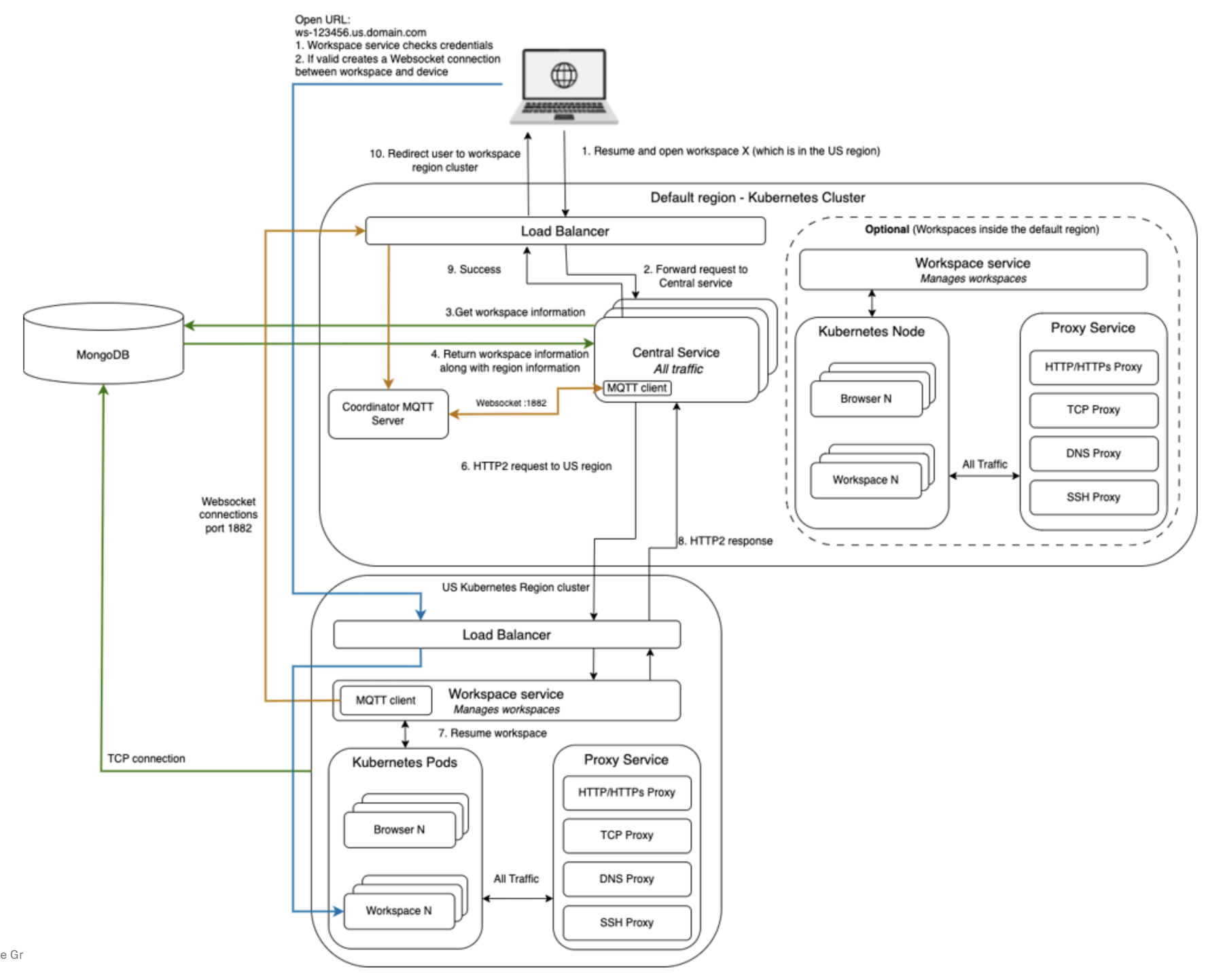
The diagram numbers this sequence 1–4 and 6–10.
- The developer resumes and opens a workspace. The request arrives at the load balancer in the default region.
- The load balancer forwards the request to the central service.
- The central service requests the workspace record from MongoDB.
- MongoDB returns the workspace information, including the region the workspace belongs to.
- The central service sends an HTTP/2 request to the cluster in the US region.
- The workspace service in that region resumes the workspace pod.
- The region returns an HTTP/2 response.
- The default region reports success.
- The developer is redirected to the cluster in the workspace’s own region.
The developer’s browser then opens the workspace URL directly against that region, for example
ws-123456.us.domain.com. The workspace service checks the developer’s credentials and, if they are valid,
establishes a WebSocket connection between the workspace and the device. From that point the session runs
against the regional cluster, and traffic in and out of the workspace passes through the SecurSpaces proxy service in
that region.
Two supporting channels run continuously and are not part of the numbered sequence:
- Coordination. The workspace service in each region maintains an MQTT client connection to the coordinator MQTT server in the default region, over WebSocket on port 1882. It appears on the diagram as the unnumbered WebSocket link. This is how the control plane reaches regions it does not own.
- State. Regional clusters hold a TCP connection to MongoDB, so workspace state is recorded centrally regardless of which region runs the workspace.
Workspaces can also run in the default region. That is optional, and a deployment can keep the default region for the control plane alone.
Deployment guides
SecurSpaces can be deployed on any Kubernetes-compatible infrastructure, including public cloud, on-premises hardware, and hybrid environments. The following guides cover common deployment targets:
To evaluate SecurSpaces on a single VM instead, see Deploy an evaluation environment.
The 1-Click VM
A production installation of SecurSpaces runs on a Kubernetes cluster that you build, with a registry and a database that you provide. That is the right shape for real users, and too much work for an evaluation. The 1-Click VM removes that work by running the whole platform on one virtual machine: a single-node K3s cluster with the platform services, the database and NetScaler ingress.
The same installer builds it in two ways. In the cloud, the installer creates the VM itself with Terraform, and
configures DNS and TLS. For a local VM, the installer cannot reach your hypervisor, so it generates a deployment script
instead. You run the script on the VM, and the installer maps an assigned try.sds.citrix.com hostname to the VM’s IP
address. The hostname is what makes the TLS certificate valid, which is why you use it rather than the IP address.
Because of this split, a local deployment involves two machines. The installer host prepares the deployment, and the target host runs it. They are kept separate because the target host must start clean: the script installs its own K3s and container runtime, and conflicts with any that are already there.
The trade-off is a platform with no redundancy and no upgrade path. The 1-Click VM is built to be created, evaluated and thrown away. A pilot with real users belongs on a cluster. See Deploy to a cluster.
Related information
Share
Share
This Preview product documentation is Citrix Confidential.
You agree to hold this documentation confidential pursuant to the terms of your Citrix Beta/Tech Preview Agreement.
The development, release and timing of any features or functionality described in the Preview documentation remains at our sole discretion and are subject to change without notice or consultation.
The documentation is for informational purposes only and is not a commitment, promise or legal obligation to deliver any material, code or functionality and should not be relied upon in making Citrix product purchase decisions.
If you do not agree, select I DO NOT AGREE to exit.