-
-
オンプレミス製品の登録
-
-
This content has been machine translated dynamically.
Dieser Inhalt ist eine maschinelle Übersetzung, die dynamisch erstellt wurde. (Haftungsausschluss)
Cet article a été traduit automatiquement de manière dynamique. (Clause de non responsabilité)
Este artículo lo ha traducido una máquina de forma dinámica. (Aviso legal)
此内容已经过机器动态翻译。 放弃
このコンテンツは動的に機械翻訳されています。免責事項
이 콘텐츠는 동적으로 기계 번역되었습니다. 책임 부인
Este texto foi traduzido automaticamente. (Aviso legal)
Questo contenuto è stato tradotto dinamicamente con traduzione automatica.(Esclusione di responsabilità))
This article has been machine translated.
Dieser Artikel wurde maschinell übersetzt. (Haftungsausschluss)
Ce article a été traduit automatiquement. (Clause de non responsabilité)
Este artículo ha sido traducido automáticamente. (Aviso legal)
この記事は機械翻訳されています.免責事項
이 기사는 기계 번역되었습니다.책임 부인
Este artigo foi traduzido automaticamente.(Aviso legal)
这篇文章已经过机器翻译.放弃
Questo articolo è stato tradotto automaticamente.(Esclusione di responsabilità))
Translation failed!
オンプレミス製品をCitrix Cloud™に登録
Citrix Cloudを介したショートコードアクティベーションを使用して、オンプレミスのCitrix製品を簡単に登録できます。製品によっては、この8桁のコードは製品のインストールプロセス中、または製品の管理コンソールを実行するときに生成される場合があります。製品が登録を促すと、製品はCitrix Cloudからコードを要求して表示します。その後、このコードをコピーして貼り付けるか、Citrix Cloudに手動で入力できます。
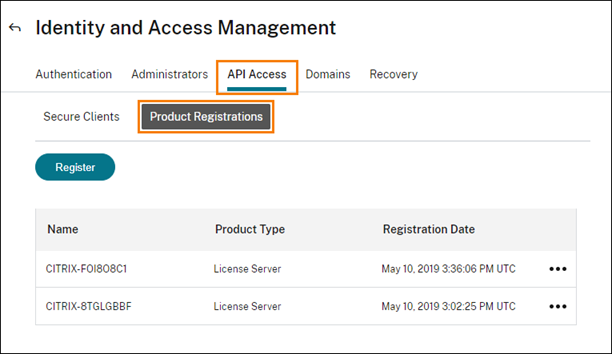
登録後、製品登録ページ(IDおよびアクセス管理 > APIアクセス > 製品登録)には、登録済み製品が配置されているサーバーが表示されます。
-
-
Citrix Cloudに登録できるオンプレミス製品には、次のものがあります。
- Citrix Connector™ Appliance for Cloud Services
- Citrix Federated Authentication Service
- Citrix License Server
- Citrix Virtual Apps and Desktops(Citrix Analytics for Performance™でサイトを登録する場合)
注:
この記事では、オンプレミス製品をCitrix Cloudに登録する手順について説明します。製品固有の要件については、その製品のドキュメントを参照してください。
製品の登録
- Citrix Cloudメニューから、IDおよびアクセス管理を選択します。
-
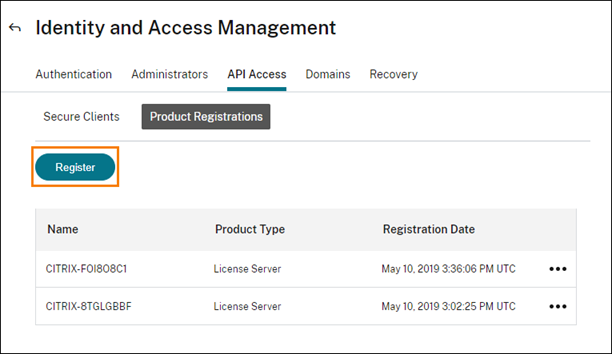
APIアクセス > 製品登録を選択し、次に登録を選択します。
- Citrix製品の8文字の英数字コードを入力し、続行をクリックします。
- 登録の詳細を確認し、登録をクリックします。
製品登録の削除
登録済みのCitrix製品を実行しているサーバーを環境から削除しても、製品登録ページには引き続きサーバーが表示されます。Citrix Cloudからサーバーを削除するには、次の手順を使用します。必要に応じて、後で製品を再度登録して、製品登録ページにサーバーを表示できます。
- 製品登録ページから、削除するサーバーを見つけます。
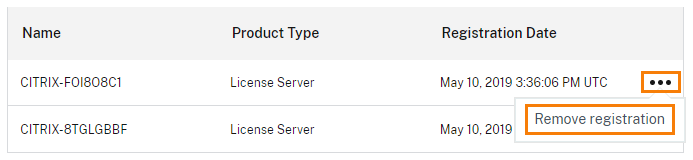
- 省略記号ボタンをクリックし、登録の削除を選択します。
- プロンプトが表示されたら、削除を選択します。
共有
共有
This Preview product documentation is Citrix Confidential.
You agree to hold this documentation confidential pursuant to the terms of your Citrix Beta/Tech Preview Agreement.
The development, release and timing of any features or functionality described in the Preview documentation remains at our sole discretion and are subject to change without notice or consultation.
The documentation is for informational purposes only and is not a commitment, promise or legal obligation to deliver any material, code or functionality and should not be relied upon in making Citrix product purchase decisions.
If you do not agree, select I DO NOT AGREE to exit.