Advanced SAML Scenarios and correct use of cip_forest and cip_domain within the SAML Assertion
This article describes Citrix Cloud or store advanced SAML configurations involving multiple connected Active Directory Forests and Domains. This article is intended for large enterprises with complex AD deployments and should be implemented by architect-level Citrix Cloud, IdP, and AD administrators. The most common use of this advanced SAML configuration is in Mergers and Acquisitions scenarios where a large enterprise is formed from many smaller organizations with different AD infrastructure, multiple forests, and different populations of AD BackEnd users with different UPNs. Conditional Authentication is also often required in Mergers and Acquisitions scenarios.
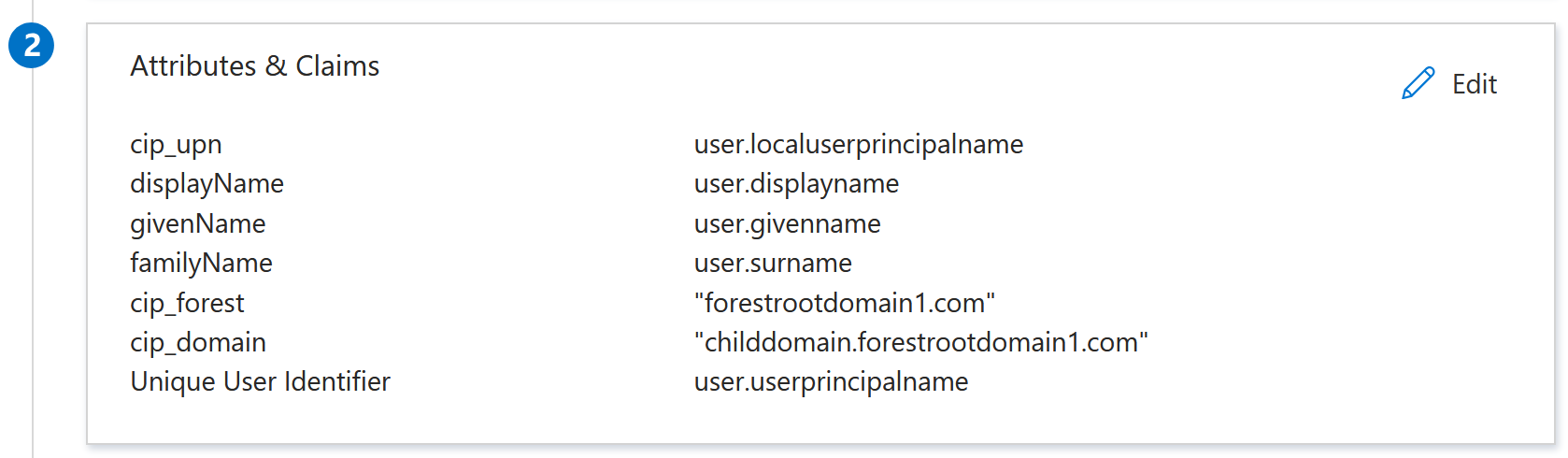
The optional cip_forest and cip_domain claims give the Citrix Cloud administrator greater control over which Citrix Cloud Connectors are used to look up AD backend user accounts during SAML authentication. Citrix Cloud with SAML supports many advanced account mapping use cases, which are not possible with other Citrix Cloud federated OIDC authentication methods such as Okta IdP or Entra ID IdP.
Prerequisites
- Use the default Citrix Cloud SAML flow, which uses AD identities to authenticate the end user.
- An extensive understanding of your AD forest or domain infrastructure and where your store end user’s identities are.
- Citrix Cloud Connectors joined to the correct AD forest and domain and joined at the correct AD domain level.
- Knowledge of the existing resource locations and Citrix Cloud Connectors that are already configured within your Citrix Cloud tenant.
- Multiple AD forests connected to Citrix Cloud should not have any Active Directory trusts between them.
- An understanding of what a front-end (Entra ID, Okta, Duo) and BackEnd user (AD) identity means.
- Front-end and BackEnd user identities must be linked through matching UPNs. Linking a pair of front end and BackEnd user identities that do NOT have matching UPNs is NOT supported.
- An understanding of where each UPN suffix resides inside Active Directory and whether a particular UPN suffix is ambiguous and exists in multiple connected AD forests.
- DaaS VDAs should be AD domain joined.
- DaaS Applications and Desktops should be published to AD Identities.
- Universal AD groups are mandatory when mapping delivery group resources to AD groups in DaaS.
-
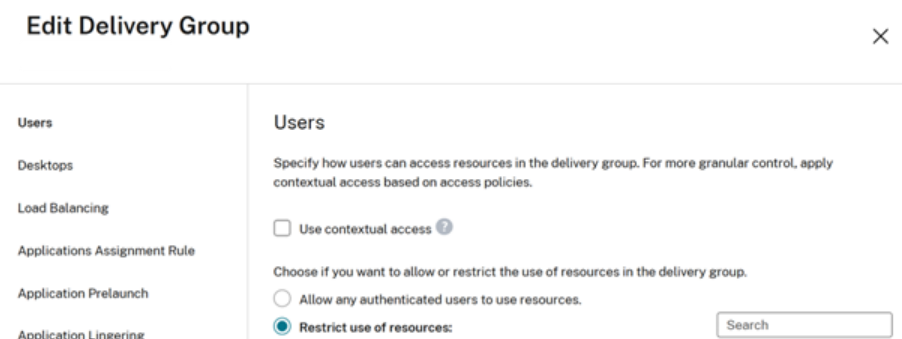
DaaS delivery groups must be set to “Restrict use of resources” and should be assigned to the correct Universal AD groups. The use of “Allow any authenticated users to use resources” within DaaS delivery groups is NOT supported.
-
FAS servers joined to the correct AD Forest and domain joined at the correct AD level. FAS servers are needed for SSON to AD domain joined VDAs during DaaS launches.
- You might also be required to implement Conditional Authentication if you have multiple SAML apps and you require one SAML app per connected AD forest. Each SAML app might require a different set of values for cip_forest and cip_domain in Mergers and Acquisitions scenarios.
FAQ
If I am sending cip_sid in the SAML assertion do I need to also send cip_forest and cip_domain optional claims?
No. If your SAML application is configured to send the cip_sid claim and it is included in the SAML assertion, then Citrix Cloud will always be able to correctly identify which forest and domain the AD backend user is in. cip_forest and cip_domain are not required.
Important:
- SAML scenarios where sending cip_sid in the SAML assertion is not possible and might require the use of cip_forest and cip_domain instead.
- Front-end users that contain the incorrect SID, which doesn’t match the SID of the Backend AD user mapped inside DaaS delivery groups.
- Front-end users that have no embedded SID at all such as native Okta, Entra ID, or Duo users that were not created inside the IdP through AD import tools.
What is an AD Implicit UPN suffix?
The implicit UPN is automatically created by Active Directory and is based on the user’s sAMAccountName and the forest’s DNS name. Implicit UPNs are always unique within an AD forest because they are derived from the sAMAccountName and the domain’s DNS name, which are unique within the AD forest. For Example @rootforestdomain.local
What is an AD Explicit (ALT) UPN suffix?
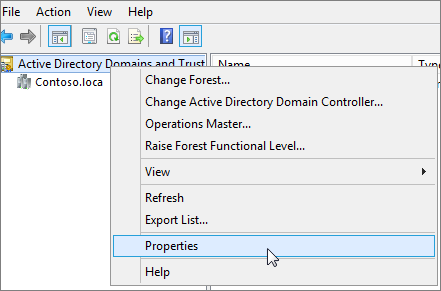
An explicit UPN suffix is a custom domain name added by AD administrators in Active Directory Domains and Trusts. For Example @rootforestdomain.local
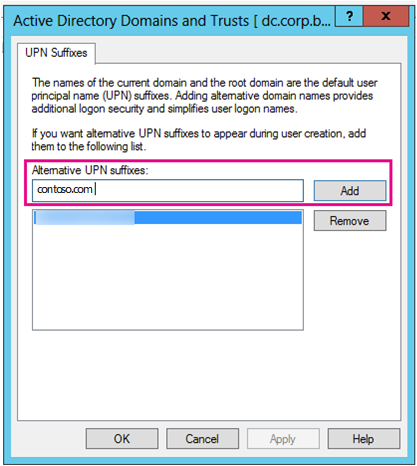
Important:
Windows AD PowerShell allows you to create AD users with any UPN suffix you specify even if that UPN suffix does not exist inside your AD forest. The alternative UPN Suffix that you want to use MUST exist within the AD forest as the Citrix Cloud Connectors depend on this list to look up the backend account users. If the alternative UPN suffix is not configured in the AD forest as shown in the screen shot above, then Citrix Cloud will not be able to match your front-end identity to an appropriate BackEnd AD account.
What is UPN ambiguity and why is it a problem for Citrix Cloud and DaaS?
UPN ambiguity is a situation that can arise if duplicateuser@domain.com exists in 2 or more AD forests connected to Citrix Cloud. The UPN suffix @domain.com alone, cannot be used to determine the correct AD backend user when two versions of duplicateuser@domain.com exist. This can cause DaaS resources to fail to enumerate at all, or incorrect DaaS resources published using AD domain joined VDAs might show inside the store.
Why are universal AD groups a requirement?
Universal AD groups are stored in the Global Catalog (GC), making them visible to all domain controllers throughout the forest. This allows them to be used for assigning permissions to resources located in any domain within the same forest.
Important:
The use of AD Universal Groups is a requirement for all SAML configurations not just advanced configurations involving cip_forest and cip_domain. Using other AD group types such as global can lead to failed resource enumerations in store.
It is recommended you read this Microsoft article regarding AD group scope.
Why is the use of “Allow any authenticated users to use resources” not recommended within DaaS delivery groups?
Configuring Allow any authenticated users to use resources will cause resources published using AD domain joined VDA’s to appear inside store for AD user identities, which are not inside the same domain and forest. Launching resources from VDA’s domain joined in Forest 2 using a store AD end user identity in Forest 1 will not succeed.
Can I send just cip_forest on its own or just cip_domain on its own in the SAML assertion?
No. If you want to specify a particular AD forest and domain context for the backend user lookup you must provide both optional claims in the SAML assertion.
When specifying a value for cip_forest what UPN suffix should I use?
The Implicit UPN suffix for the AD forest should be used. Do not specify a value of an ALT UPN suffix that has been added to the AD forest inside the cip_forest claim. This is because there are AD topologies where the same ALT UPN suffix might have been added to more than one AD forest connected to Citrix Cloud. The Implicit UPN suffix and DN is never ambiguous to Citrix Cloud unless two different AD forests with the same DN such as DC=duplicate,DC=com are connected to Citrix Cloud (an unlikely scenario).
When should the values for cip_forest and cip_domain be the same or different from each other?
Scenario 1: Your Citrix Cloud Connectors are domain joined at the forest root level and the backend AD account users reside within the root domain within the connected AD forest.
cip_domain and cip_forest should have the same value.
cip_forest = “forestrootdomain.com”
cip_domain = “forestrootdomain.com”
Scenario 2: Your Citrix Cloud Connectors are domain joined to a child domain in the AD forest hierarchy. The backend AD users exist within “childdomain.forestrootdomain.com” within your AD forest.
cip_domain and cip_forest should have different values.
cip_forest = “forestrootdomain.com”
cip_domain = “childdomain.forestrootdomain.com”
Can I hardcode the values of cip_forest and cip_domain within the SAML assertion?
Yes, but only if the entire population of BackEnd AD users, which are mapped to DaaS resources reside in the same AD forest. Hard coding the values of cip_forest and cip_domain requires every front-end user to have their corresponding backend AD accounts in the same AD forest and domain.
Can I specify different values for cip_forest and cip_domain within the SAML assertion dynamically?
Yes if your SAML provider allows this through claims transformation rules. If you have different populations of front-end users with different UPN suffixes it is possible to specify the values of cip_forest and cip_domain dynamically using switching conditions like group membership. This is possible within Entra ID SAML applications and might also be possible in other SAML IdPs that support claims transform rules.
Where should I put my FAS servers so launch SSON to AD domain joined VDAs succeeds?
FAS servers should be domain joined and configured within each of the backend AD forests where the BackEnd AD accounts reside. It is recommended you domain join your FAS servers at the AD forest root domain level.
AD Topologies where cip_forest and cip_domain are required in the SAML assertion
Scenario 1: The SAML end user’s UPN is ambiguous and exists in multiple AD forests connected to Citrix Cloud
-
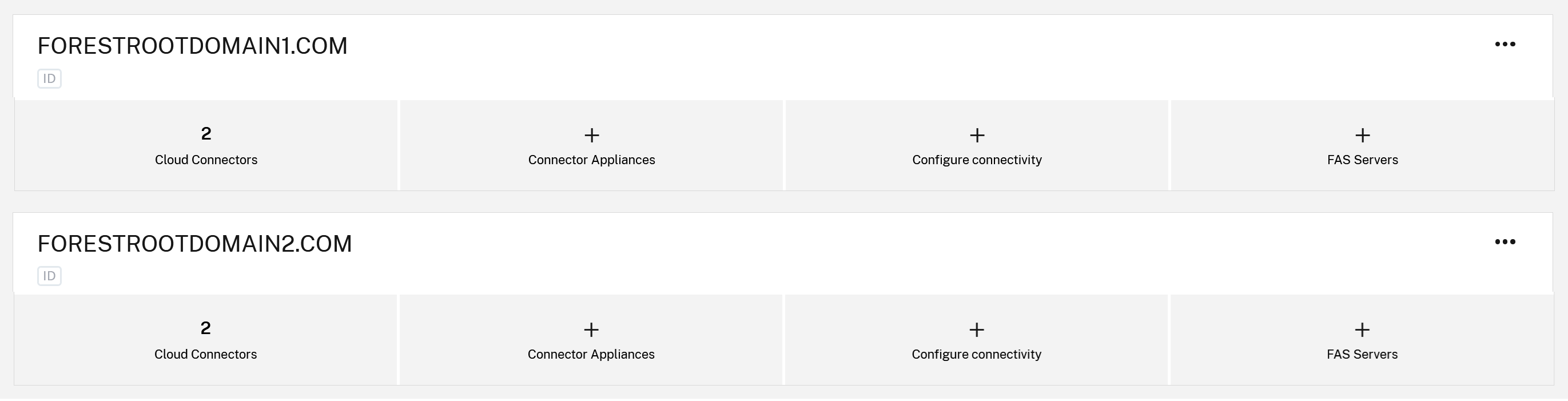
The Citrix Cloud tenant has two or more resource locations and multiple AD forests or domains connected to Citrix Cloud.
- ResourceLocation1 contains Citrix Cloud Connectors, which are domain joined to AD forestrootdomain1.com at the root forest level.
- ResourceLocation2 contains Citrix Cloud Connectors that are domain joined to AD forestrootdomain2.com at the root forest level.
- forestrootdomain1.com and forestrootdomain2.com both have the same UPN @domain.com suffix.
- Duplicate users might also exist inside forestrootdomain1.com and forestrootdomain2.com with the same UPN
duplicateuser@domain.combut different SID and OID values.
Problem: the attempt to look up the correct backend AD account using username@duplicatesuffix.com does not always return the correct AD BackEnd user due to UPN ambiguity. Citrix Cloud cannot determine which AD forest and Citrix Cloud Connectors to use so the wrong DaaS resources might be shown in store or no DaaS resources are returned at all.
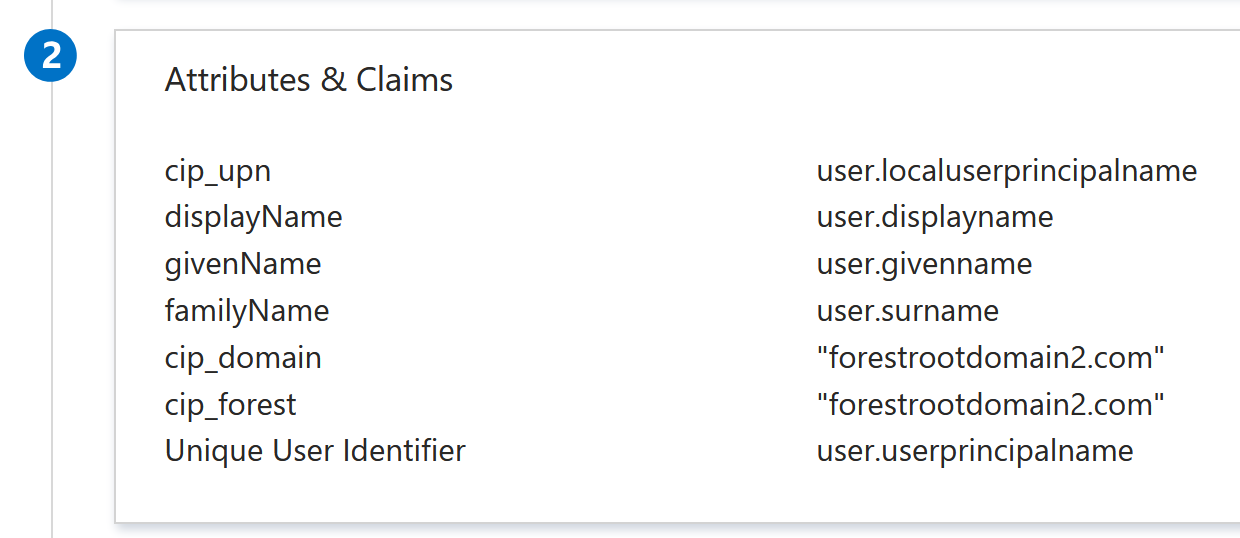
Solution: configure two different SAML applications, one for each connected AD forest and include the corresponding cip_domain and cip_forest values for the correct AD forest in the SAML assertion. This provides Citrix Cloud with the additional forest and domain context to ensure the correct BackEnd AD user is “looked up” when username@duplicatesuffix.com exists in multiple connected forests.
SAML App 1 forestrootdomain1.com:
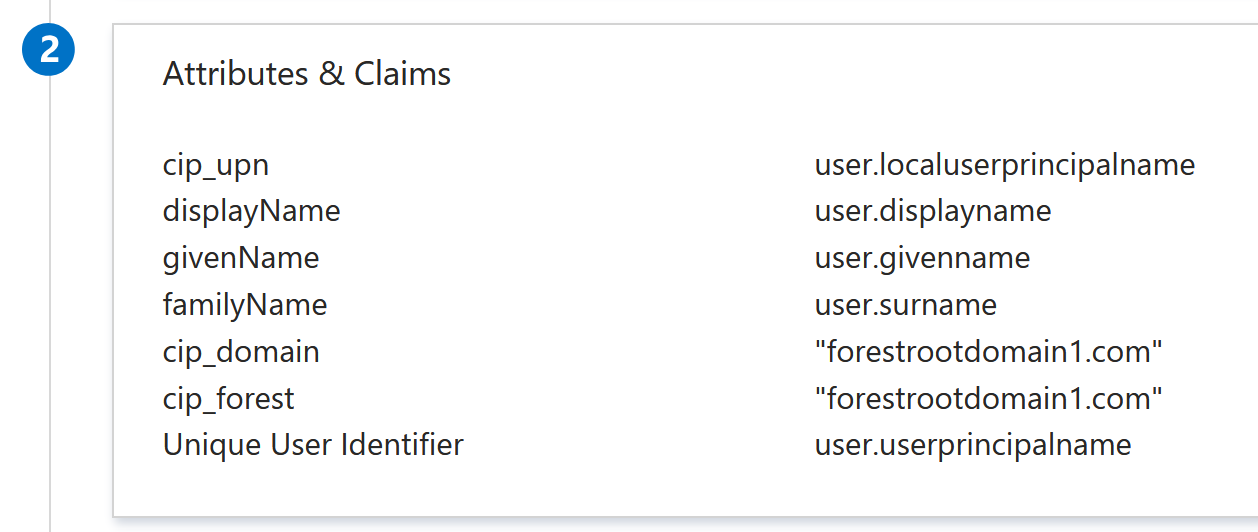
SAML App 2 forestrootdomain2.com:
Map the two DaaS delivery groups correctly using the correct AD backend groups.
Scenario 2: Cloud Connectors joined at child domain level and store users at child domain level
Citrix Cloud tenant has a resource location, which contains two Citrix Cloud Connectors, which are domain joined at the “childdomain.forestrootdomain.com” level instead of the recommended “forestrootdomain.com” level. store users exist inside the childdomain.forestrootdomain.com child domain. Users are configured to use the root domain UPN suffix such as username@forestrootdomain.com.
Problem: Citrix Cloud performs the AD account lookup using “forestrootdomain.com”, which does not match a connected AD domain.
Solution: Specify the child domain context in the SAML assertion so that the AD account user is “looked up” from the correct AD child domain and forest context.
cip_forest = forestrootdomain.com
cip_domain = childdomain.forestrootdomain.com