
Actions for devices
-- applies to device lists in all views --
Via a device list you have access to your devices and can, for example, send commands. All available actions can be found in the Actions context-menu of a device.
Performing an action for a device
-
To the right of a device, click
 .
.
-
From the context-menu, choose an action.
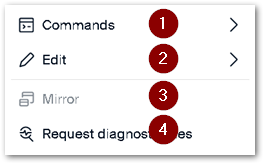 |
|
|---|---|
| 1 | Execute or schedule a [Scout] command on the device |
| 2 | Rename, delete or move the device |
| 3 | Mirror the device |
| 4 | Retrieve diagnostic data |
For enrolled devices in UniconOS Management Cloud, the menu also has an Enrollment entry with Revoke certificate. It appears only while the device's certificate is active.
Note:
You may also use drag-and-drop operations to move devices between OUs.
Performing actions on multiple devices
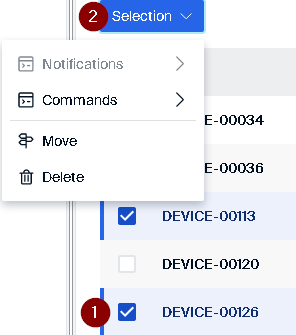
For enrolled devices in UniconOS Management Cloud, the Selection menu also offers Revoke certificates, which revokes the active certificates of every enrolled device in the selection and skips the rest. See Enrollment settings for how devices are enrolled and how certificates work.
Note:
To remove the selection of devices, click the minus icon above the selection column.