This content has been machine translated dynamically.
Dieser Inhalt ist eine maschinelle Übersetzung, die dynamisch erstellt wurde. (Haftungsausschluss)
Cet article a été traduit automatiquement de manière dynamique. (Clause de non responsabilité)
Este artículo lo ha traducido una máquina de forma dinámica. (Aviso legal)
此内容已经过机器动态翻译。 放弃
このコンテンツは動的に機械翻訳されています。免責事項
이 콘텐츠는 동적으로 기계 번역되었습니다. 책임 부인
Este texto foi traduzido automaticamente. (Aviso legal)
Questo contenuto è stato tradotto dinamicamente con traduzione automatica.(Esclusione di responsabilità))
This article has been machine translated.
Dieser Artikel wurde maschinell übersetzt. (Haftungsausschluss)
Ce article a été traduit automatiquement. (Clause de non responsabilité)
Este artículo ha sido traducido automáticamente. (Aviso legal)
この記事は機械翻訳されています.免責事項
이 기사는 기계 번역되었습니다.책임 부인
Este artigo foi traduzido automaticamente.(Aviso legal)
这篇文章已经过机器翻译.放弃
Questo articolo è stato tradotto automaticamente.(Esclusione di responsabilità))
Translation failed!
REST API
The Citrix SecurSpaces™ REST API exposes the platform’s resources for automation: workspaces, projects, organizations, resources, users, and reporting. Anything the console does to a platform resource, the API can do.
The specification is served by your own deployment, at https://<your-sds-hostname>/api. That copy is
the authoritative one, because it matches the version you are running. This page covers what the
specification does not tell you: how to reach it, how to authenticate, and how the endpoints are arranged.
Note:
The REST API is controlled by a platform feature flag, which a platform administrator turns on. See Turn features on or off. Only users signed in to the platform can open the API documentation.
Open the API documentation
- Sign in to SecurSpaces.
- Select your profile picture at the top right of the screen to open the account menu.
- Select REST API.
Or browse directly to https://<your-sds-hostname>/api.
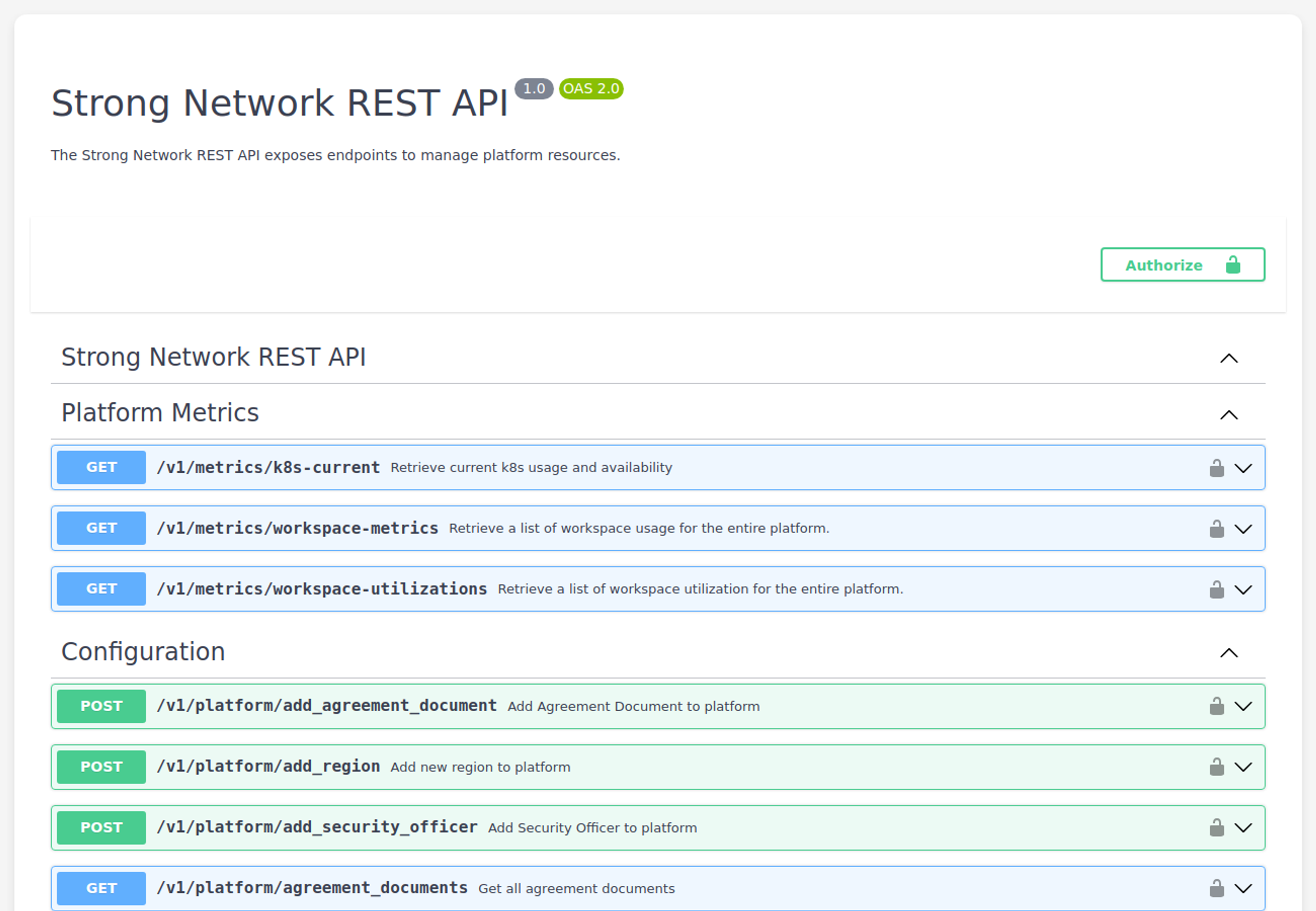
The page is an interactive specification browser. You can expand any operation to see its parameters, request body, and response schema, and call it directly from the page once you have authorized.
Authenticate with an API key
The API authenticates with an API key, sent in the Authorization header:
| Scheme | API key |
| Parameter name | Authorization |
| Location | Request header |
Create a key in Profile > Security > API Keys. See Security.
A key carries the identity of the user who created it, so a request can only do what that user could do in the console. Treat it like a password, and revoke it from the same page if it is exposed.
To try operations from the documentation page itself, select Authorize and provide your key.
How the endpoints are organized
The API mirrors the platform hierarchy. Most resources exist at more than one scope, and the path tells you which one you are addressing:
| Scope | Path prefix | What it addresses |
|---|---|---|
| Platform | /v1/platform/... |
Deployment-wide configuration, regions, agreements, platform users and resources |
| Organization | /v1/organizations/{organizationId}/... |
Everything belonging to one organization |
| Project | /v1/projects/{projectId}/... |
Everything belonging to one project |
So a data bucket, for example, is reachable at project, organization, and platform level, with the same shape at each. Choosing the scope is usually the first decision when you write against this API.
Alongside those, several resource families sit at the top level:
| Path | Covers |
|---|---|
/v1/workspaces, /v1/personal_workspaces
|
Workspaces, and the caller’s own workspaces |
/v1/workspace-images |
Container images available to workspaces |
/v1/network-policies |
Network policy definitions |
/v1/data-buckets |
Data buckets |
/v1/metrics |
Usage and reporting data |
/v1/groups |
Groups |
Within the documentation page, operations are grouped by area — configuration, users, workspaces, resources, metrics, and status — at each scope.
The specification
| Format | OpenAPI 2.0 (Swagger) |
| Current version | 1.1 |
| Content type | application/json |
Version 1.1 defines 207 paths and 258 operations. Those figures move with the product, so treat your own deployment’s specification as authoritative rather than this page.
Select Download OpenAPI JSON on the API page to save the specification. Use it to generate a client, to diff versions during an upgrade, or to drive contract tests.
The API page also lists what changed in the current version, including behavior changes that do not alter any route or schema — for example, a request that was previously accepted and silently ignored now being rejected. Read that section before an upgrade: a client can break without any endpoint having changed.
Endpoints used by IDE extensions
Workspace API responses include the vscode_version_id and vscode_version_auto_update fields, so
administrators and integrations can identify the VS Code version assigned to a workspace. For a description
of these fields, see
IDE versions.
IDE extensions can also use these personal workspace endpoints:
-
GET /v1/personal_workspaces/{workspaceId}returns details for a personal workspace, including attached repositories, mount points, and data buckets. -
DELETE /v1/personal_workspaces/{workspaceId}deletes a personal workspace belonging to the signed-in user. -
GET /v1/personal_workspaces/{workspaceId}/connection_detailsreturns what an extension needs to open a connection.
https://<your-sds-hostname>/version.json is served by the platform frontend rather than by the REST API. An
extension can read it to check capability flags before calling version-specific endpoints, without
authenticating first.
Manage VSCode versions through the API
The API includes VSCode version endpoints for automating the same version-management workflows available in the console. Use them to standardize IDE versions across scopes, import versions from a custom registry, and set a default version as part of an upgrade or environment build pipeline.
Version operations are available at these scope roots:
- Platform:
/v1/vscode-versions - Organization:
/v1/organizations/{organizationId}/vscode-versions - Project:
/v1/projects/{projectId}/vscode-versions
Each scope supports:
-
GETto list versions. -
POSTto import a version from a registry by image tag. -
PATCH /{versionId}/nameto rename a version. -
DELETE /{versionId}to delete a version. -
POST /{versionId}/defaultto set the scope default.
Platform-level custom registry management is also available through GET /v1/vscode-registries,
POST /v1/vscode-registries, PATCH /v1/vscode-registries/{registryId}/name, and
DELETE /v1/vscode-registries/{registryId}.
The endpoints enforce the same scope and permission checks as the console. A custom VSCode registry name must be unique within its scope, and each scope can have one custom registry.
For background about how IDE versions are resolved and used by workspaces, see IDE versions.
Related information
- Security — create and revoke API keys
- Licensing — enabling the REST API
- Roles and permissions — what a key can do
- SDS CLI reference
Share
Share
This Preview product documentation is Citrix Confidential.
You agree to hold this documentation confidential pursuant to the terms of your Citrix Beta/Tech Preview Agreement.
The development, release and timing of any features or functionality described in the Preview documentation remains at our sole discretion and are subject to change without notice or consultation.
The documentation is for informational purposes only and is not a commitment, promise or legal obligation to deliver any material, code or functionality and should not be relied upon in making Citrix product purchase decisions.
If you do not agree, select I DO NOT AGREE to exit.