
Device certificate enrollment
Device certificates must be enrolled for Always On configurations to ensure that devices can consistently and securely connect to the network.
The following steps are involved in device certificate enrollment:
-
The Active Directory Enterprise Certificate Authority issues a Device Certificate for machine authentication.
-
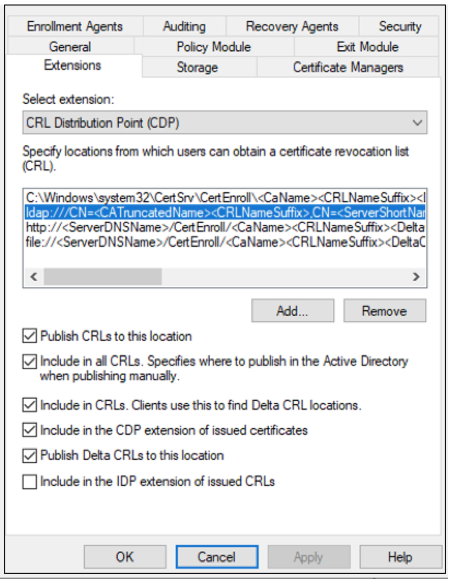
The certificate authority must have the LDAP URL published for the CRL distribution point (CDP) extension.
-
A certificate template in this certificate authority must be created to enroll the device certificate with the following details.
-
Open the certification template snap-in and duplicate either the Computer or Workstation Authentication (preferred) template.
-
Provide a new name for the certificate.
-
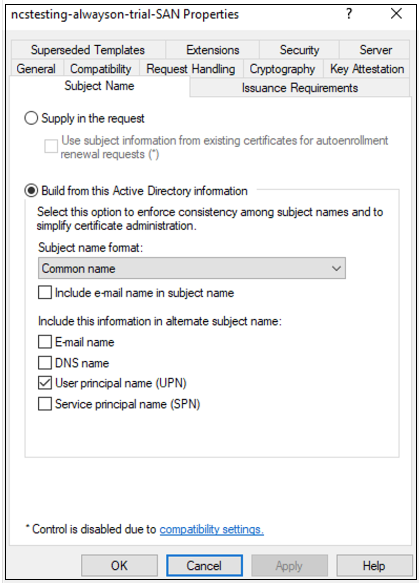
Switch to the Subject Name tab, change the Subject name format setting to Common name, and check User Principal Name (UPN) to be included in the alternate subject name.
-
Switch to the Security tab and add a security group (containing only computer accounts) to which you want to autoenroll the new certificate template. Select the added group and select Allow for Autoenroll.
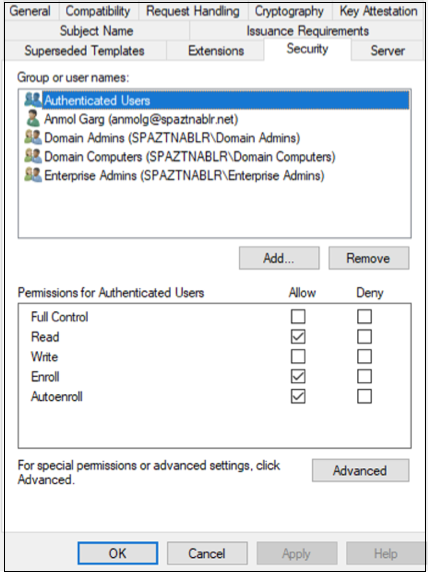 Note:In the preceding image, Authenticated Users (all computer objects) are permitted to enroll or autoenroll the new certificate template.
 -
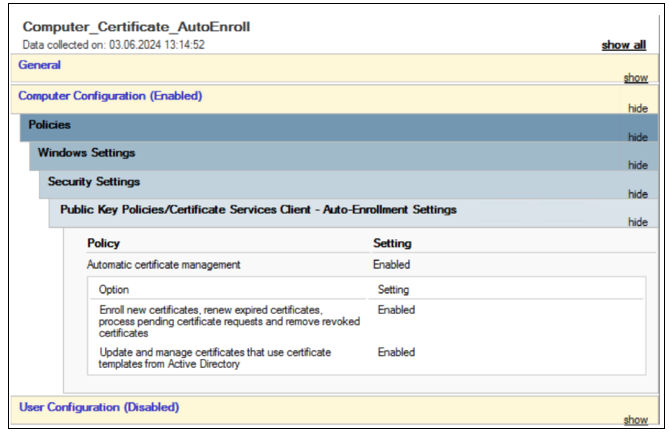
(Optional) Create a group policy object (GPO) that allows for auto certificate enrollment and bind it to an organization unit (OU) or at the domain level.
-