This content has been machine translated dynamically.
Dieser Inhalt ist eine maschinelle Übersetzung, die dynamisch erstellt wurde. (Haftungsausschluss)
Cet article a été traduit automatiquement de manière dynamique. (Clause de non responsabilité)
Este artículo lo ha traducido una máquina de forma dinámica. (Aviso legal)
此内容已经过机器动态翻译。 放弃
このコンテンツは動的に機械翻訳されています。免責事項
이 콘텐츠는 동적으로 기계 번역되었습니다. 책임 부인
Este texto foi traduzido automaticamente. (Aviso legal)
Questo contenuto è stato tradotto dinamicamente con traduzione automatica.(Esclusione di responsabilità))
This article has been machine translated.
Dieser Artikel wurde maschinell übersetzt. (Haftungsausschluss)
Ce article a été traduit automatiquement. (Clause de non responsabilité)
Este artículo ha sido traducido automáticamente. (Aviso legal)
この記事は機械翻訳されています.免責事項
이 기사는 기계 번역되었습니다.책임 부인
Este artigo foi traduzido automaticamente.(Aviso legal)
这篇文章已经过机器翻译.放弃
Questo articolo è stato tradotto automaticamente.(Esclusione di responsabilità))
Translation failed!
Assigned desktop power management
Power status
The desktop tile may displays the power status if:
- The machine catalog has a single-session OS where the Desktop Experience is set to Connect to the same (static) desktop each time the users log in..
- The machine catalogue must be configured as power managed.
- The machine is published by Citrix DaaS or Citrix Virtual Apps™ and Desktops 2511 or higher.
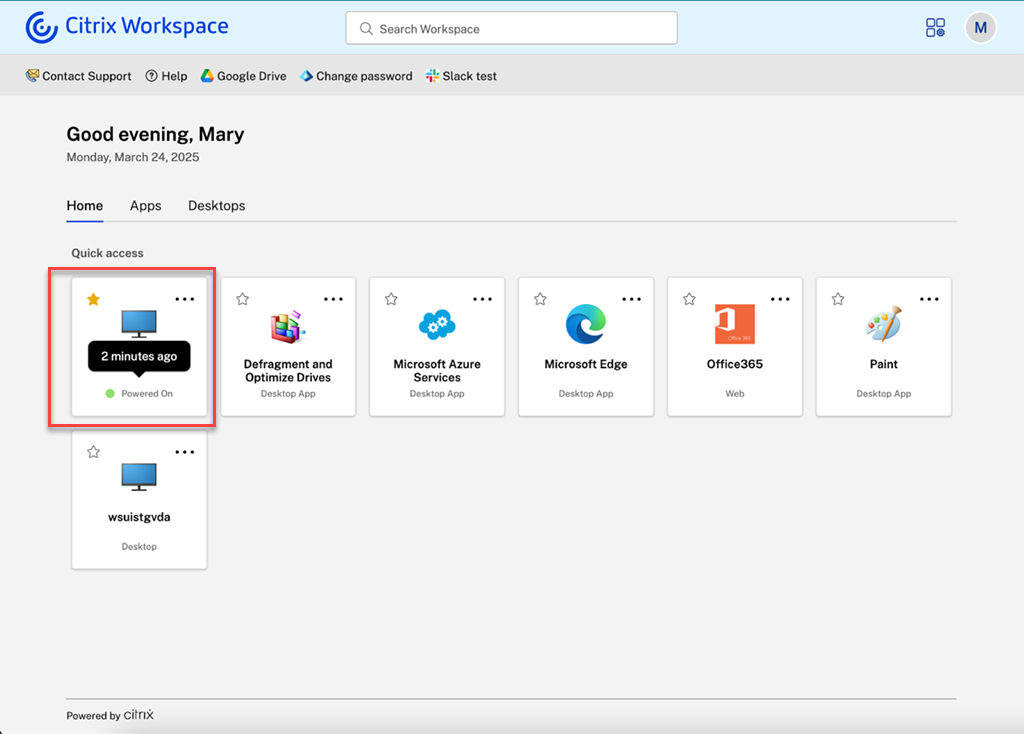
The following power statuses may be displayed:
-
Powered off: The machine has been shut down and is not currently running.
-
In hibernation: The machine is in a hibernation state, where its current session is saved to disk, and the machine is using minimal power.
-
Powering on: A machine that was in the Powered Off or In hibernation has been recently started but is not yet ready to use.
-
Powered on: The desktop is running.
-
Ready: The desktop has registered with the delivery controller and is ready to launch.
-
Shutting down: The user has initiated a shut down.
If you have enabled the detailed desktop tile then in addition the following states may be displayed:
-
Under Maintenance — Your desktop is temporarily unavailable due to maintenance scheduled by your IT administrator
-
Unavailable — Your desktop cannot be accessed at this time
-
Active - A session is currently running on this desktop.
The status is refreshed every two minutes or when the user clicks the ellipsis menu on the desktop tile. When the user hovers over the power state it displays when the last refresh occurred.
Known issues
- When you launch one of multiple power-managed desktops, the store might show inconsistent power statuses for the other desktops until the first desktop completes launching. [WSUI-10870]
Power actions
The More options menu (ellipsis icon) on the tile provides users with access to relevant actions. For power managed assigned machines there are additional actions that depend on the current power state of the resource.
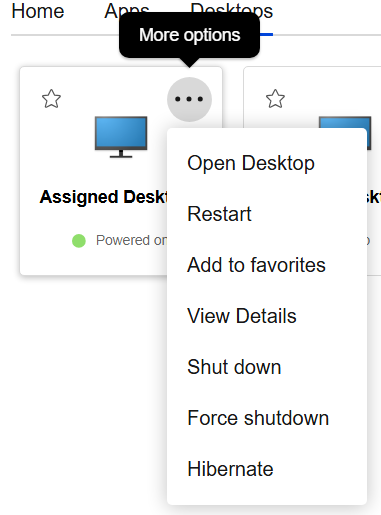
These actions might include:
- Open Desktop - Launch or reconnect to the desktop.
- Troubleshoot - Checks for any issues that could cause launch failures.
- Restart - Initiates a force restart. Only available for assigned power managed desktops.
- Log out - Logs out of the desktop. Only available if the user has a logged in session.
- Disconnect - Disconnects from desktop. Only available if the user has an active session.
- Shut down - Initiates a graceful shutdown. Only available for assigned power managed desktops.
- Force shutdown - Force powers off the machine. Only available for assigned power managed desktops.
- Hibernate - Puts the dedicated desktop into a hibernation state. Only available for assigned power managed desktops where hibernation is enabled.
- Resume - Wakes the dedicated desktop from a hibernated state. Only available for assigned power managed desktops where hibernation is enabled.
You can configure which power actions are available using delivery group access policy rules. To configure the rules, call Set-BrokerAccessPolicyRule with the following parameters:
| Power action | Parameter | Notes |
|---|---|---|
| Restart | -AllowRestart |
|
| Shutdown | -AllowShutDown |
Requires CVAD 2607 or higher |
| Hibernate | -AllowShutDown |
Requires CVAD 2607 or higher |
| Force shutdown | -AllowTurnOff |
Requires CVAD 2607 or higher |
Note:
If Force Shutdown is disabled for end users, Restart is also disabled.
Share
Share
In this article
This Preview product documentation is Citrix Confidential.
You agree to hold this documentation confidential pursuant to the terms of your Citrix Beta/Tech Preview Agreement.
The development, release and timing of any features or functionality described in the Preview documentation remains at our sole discretion and are subject to change without notice or consultation.
The documentation is for informational purposes only and is not a commitment, promise or legal obligation to deliver any material, code or functionality and should not be relied upon in making Citrix product purchase decisions.
If you do not agree, select I DO NOT AGREE to exit.