
Secure access to MCP servers
Citrix SecurAccess™ ZTNA now provides secure, controlled access to MCP servers for AI agents. Administrators can register an MCP server once, and SecurAccess ZTNA provides a standard proxy address that agents use to connect to the server. All agent traffic flows through SecurAccess ZTNA, allowing access and security policies to be consistently enforced.
Administrators can control:
-
Access to MCP servers - Specify which users and groups can connect to each MCP server.
-
Tool access - Control which tools and users are permitted to invoke an MCP server.
-
Tool discovery - Control which users and groups can discover and view the list of tools available on an MCP server.
Supported agent types
-
Desktop AI agents. See Desktop agents.
-
Cloud agents
-
Gemini enterprise. See Gemini Enterprise.
-
Autonomous agents. See Secure access to MCP servers for autonomous AI agents.
-
OAuth 2.0 support for MCP servers
SecurAccess ZTNA supports OAuth 2.0 user delegation with bearer-token passthrough for MCP server access.
The agent obtains an OAuth access token from the MCP server's authorization server on behalf of the user. SecurAccess ZTNA extracts the OAuth access token from the MCP request and uses it to retrieve the user's email address from the MCP server's configured UserInfo endpoint. It then resolves additional claims associated with that email and evaluates all applicable policies before forwarding the request to the MCP server with the original token.
To enable OAuth 2.0 access, the administrator registers an OAuth application with the MCP server's authorization server and provides the following details when registering the MCP server. For details, see Register an MCP server.
-
Authorization URL and token URL
-
Client ID and client secret
-
OAuth scopes
-
PKCE settings
For Gemini Enterprise, configure the Custom MCP connector with these OAuth settings and set the MCP Server URL to the SecurAccess ZTNA proxy address.
Note:
The MCP server must expose a user information (UserInfo) endpoint that returns the user's email address so that SecurAccess ZTNA can identify the user.
Register an MCP server
Register an MCP server with SecurAccess ZTNA to generate a standard proxy address that AI agents use to connect to the server.
-
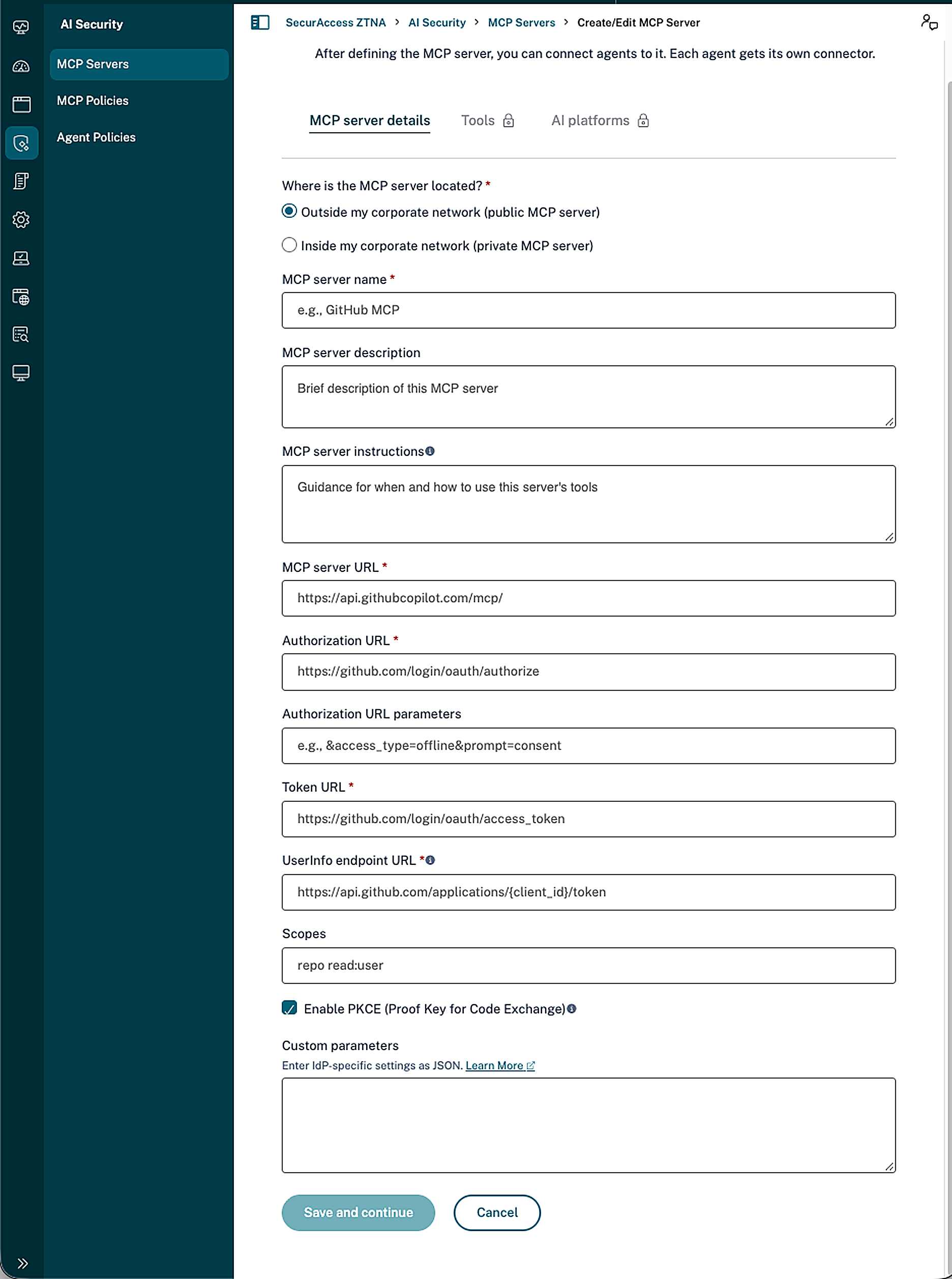
In the SecurAccess ZTNA console, go to AI Security > MCP Servers and select Add MCP server.
-
Under Where is the MCP server located? select one of the following:
-
Outside my corporate network (public MCP server)
-
Inside my corporate network (private MCP server)
-
-
Enter the MCP server name.
-
(Optional). Enter an MCP server description and MCP server instructions. Instructions provide guidance on when and how to use the server's tools.
-
Enter the MCP server URL. The URL must start with https://.
-
Enter the server's sign-in details. For more information, see OAuth 2.0 support for MCP servers.
-
Authorization URL
-
Authorization URL parameters (optional)
-
Token URL
-
UserInfo endpoint URL
-
Scopes
-
-
(Optional). Select Enable PKCE (Proof Key for Code Exchange).
-
(Optional). Add Custom parameters in JSON format for identity-provider-specific configuration. For details see Custom parameters.
-
Click Save.
-
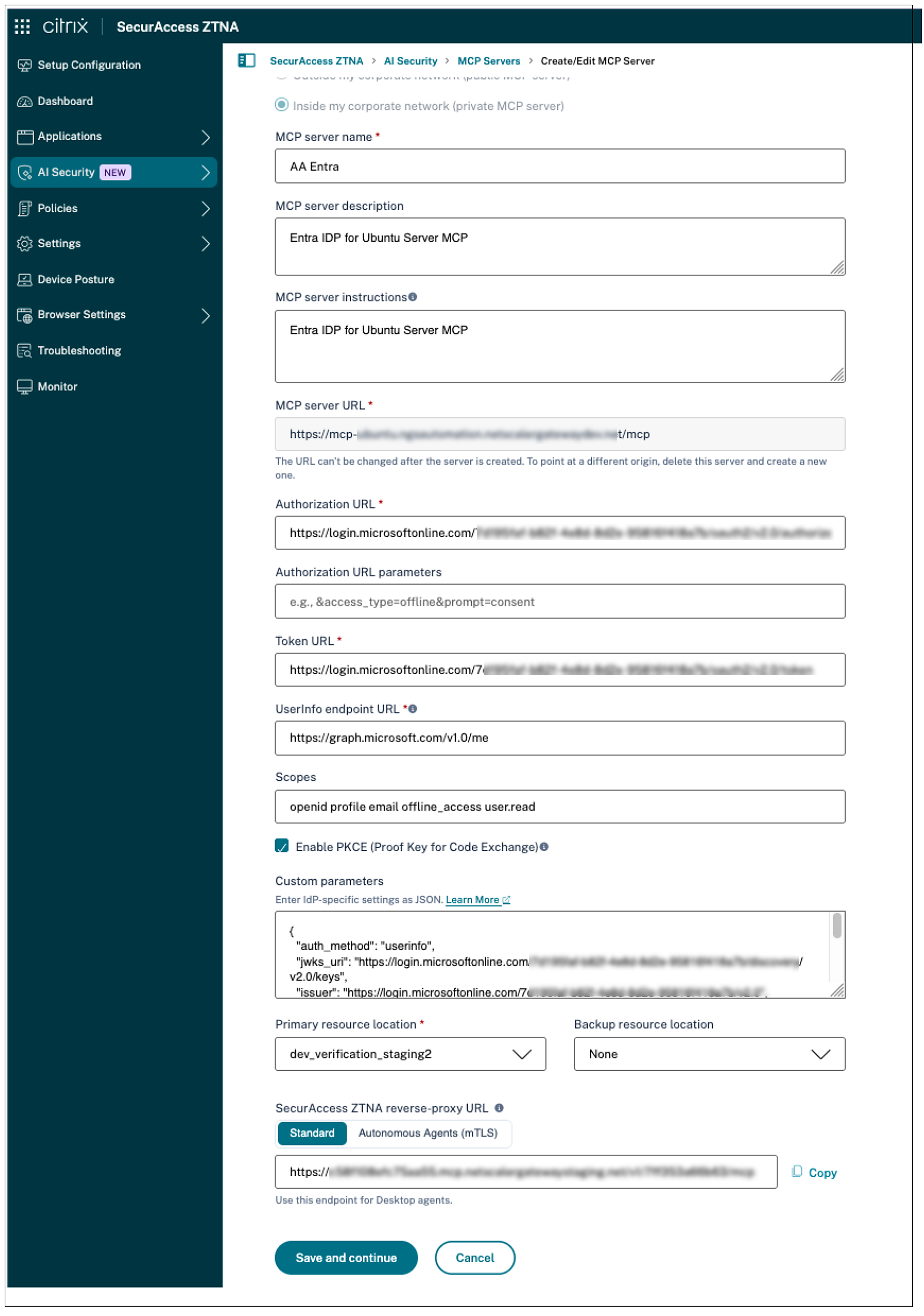
For internal MCP servers: Select the Primary Resource Location and, optionally, a Secondary Resource Location through which SecurAccess ZTNA can reach the MCP server.
-
Click Save to complete the configuration.
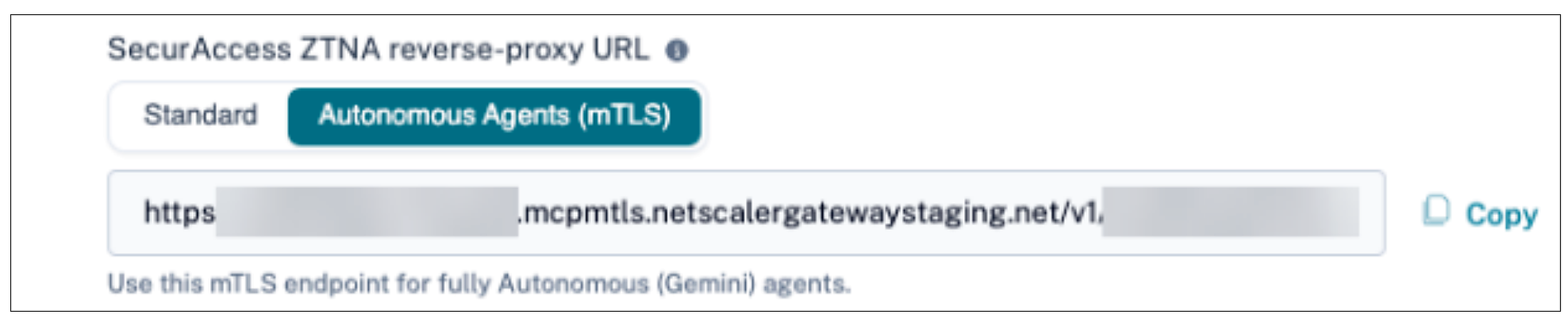
After you register a server, SecurAccess ZTNA generates a proxy address for the MCP server and displays it in the server configuration. The proxy address is auto-generated and cannot be changed.
Custom parameters
The following table lists the custom parameters in JSON format for identity-provider-specific configuration.
| Field name | Allowed/example values | Description |
|---|---|---|
| auth_method | user info (default) OR jwt | How the caller is identified |
| user info resolves the user from the IdP UserInfo/email endpoint (standard path)
jwt validates the agent's signed token (Autonomous Agents / mTLS path).
|
||
| Any other value on the standard path is rejected. | ||
| issuer | the IdP's issuer URL (for example, https://github.com/login/oauth, your Entra/Okta issuer) | Expected token issuer (iss). SecurAccess ZTNA requires the token's is to match. |
| This is needed for the desktop agents and autonomous-agents path. | ||
| directory_name | Azure AD or Okta | The Citrix Cloud directory the user's email is resolved in, to get the userOID + groups that policies match on. |
| idp_specific_params.email_key | a field name; default email | The key to read the user's email from the IdP's UserInfo response.
That email is the identity used for lookup + policy.
|
| idp_specific_params.expected_audience | the MCP resource's audience | Required JWT aud; mandatory on the JWT path. |
| Blocks replay of a token minted for another audience. | ||
| idp_specific_params.expected_azp | an OAuth client id | Optional azp hardening. When set, binds the token to a specific client. |
| jwks_uri | the issuer's JWKS URL | Issuer key endpoint. SecurAccess ZTNA caches the keys and verifies the JWT signature offline. |