
Citrix Secure Private Access Terraform provider
Managing Secure Private Access™ configurations manually through a UI can be time‑consuming, error‑prone, and difficult to scale across environments. Customers adopting infrastructure‑as‑code practices need a way to automate Secure Private Access configuration, enforce consistency, and integrate Secure Private Access changes into CI/CD pipelines.
The Citrix Secure Private Access Terraform provider enables customers to provision, configure, and manage Secure Private Access resources programmatically using Terraform. It allows Secure Private Access environments to be managed consistently, repeatedly, and at scale as part of an infrastructure‑as‑code workflow.
The Citrix Secure Private Access Terraform provider is applicable to:
-
Citrix Secure Private Access cloud deployments.
-
Customers using Terraform for infrastructure or configuration management.
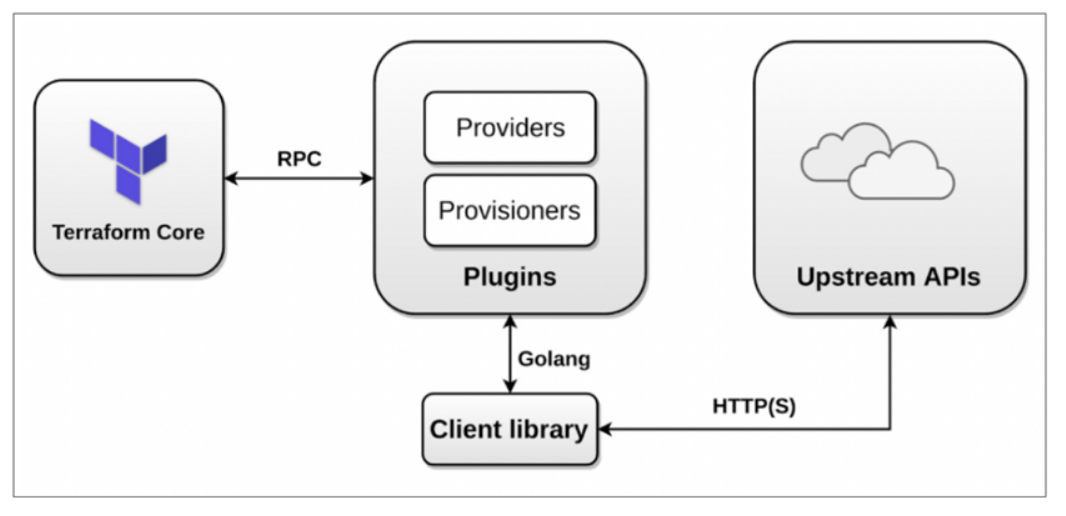
The following diagram shows the Terraform provider architecture:
Key benefits
The Citrix Secure Private Access Terraform provider exposes Secure Private Access resources as Terraform-managed objects. Customers can define the Secure Private Access configuration declaratively, version it alongside application infrastructure, and apply changes in a predictable manner.
The key benefits of using this solution are:
-
Infrastructure‑as‑code management for Secure Private Access.
-
Consistent configuration across environments (dev, test, prod).
-
Reduced manual effort and configuration drift.
-
Easy integration with CI/CD pipelines and GitOps workflows.
-
Faster onboarding and repeatable deployments.
Use case
You can use the Citrix Secure Private Access Terraform provider for the following use cases:
-
Automate onboarding of new applications/policies into Secure Private Access.
-
Standardize Secure Private Access configuration across multiple environments.
-
Recreate or recover Secure Private Access environments using versioned Terraform state.
-
Integrate Secure Private Access configuration changes into existing Terraform workflows.
-
Enable DevOps teams to manage access policies alongside infrastructure.
-
Migrate Secure Private Access configuration from trial tenant to production tenant.
-
Merge Secure Private Access configuration of 2 customers for acquisition scenarios.
System requirements
Ensure that the following system requirements are met:
-
Terraform v1.3 or later.
-
Access to a Citrix Secure Private Access tenant.
-
Network connectivity to Citrix Cloud™ APIs.
Prerequisites
Before using the Citrix Secure Private Access Terraform Provider, ensure that the following prerequisites are met:
-
You have an active Citrix Secure Private Access subscription.
-
You have permissions to manage Secure Private Access resources in your Citrix tenant.
-
Terraform is installed and available in your environment.
-
API credentials or authentication method for Citrix Cloud is configured.
Permissions
The Service Principal Authentication account used by Terraform must have permissions to:
-
Create, update, and delete Secure Private Access resources.
-
Read the existing Secure Private Access configuration for state reconciliation.
Installation
Terraform configuration
With the Terraform provider, Secure Private Access configuration can be managed outside the Citrix UI. Customers can continue using the UI if needed, but Terraform is the recommended approach for automated and large‑scale deployments.
To use the Terraform provider for Secure Private Access, you must define the provider in your Terraform configuration as follows:
terraform {
   required_providers {
     citrixspa = {
       source = "citrix/citrixspa"
       version = `<version>`
     }
   }
 }

 provider "citrixspa" {
   base_url      = "<https://api.cloud.com/accessSecurity>"  # for commercial deployment
   customer_id   = "xxxxxxxxxxxxx" # the CC customer id
   client_id     = "xxxxxxxxxxxxx" # client id of service principal
   client_secret = "xxxxxxxxxxxxx" # client secret of service principal
 }
Once the provider is configured, you can define Secure Private Access resources using Terraform resource blocks and apply them using standard Terraform commands, such as:
-
terraform plan -
terraform apply
Note:
The Terraform provider is enabled by default after it is declared in the Terraform configuration and initialized.
Troubleshooting issues
-
The
terraform applyoperation fails with authentication errors.Cause: Invalid or missing Citrix Cloud credentials.Solution: Verify provider authentication configuration and permissions. -
Unexpected changes detected in
terraform plan.Cause: Configuration drifts due to manual UI changes.Solution: Align changes through Terraform and refresh state if needed.
Limitations
-
Not all Secure Private Access features might be available in the initial provider release.
-
Changes made directly in the UI might cause Terraform state drift.
-
The
terraform destroyoperations might not remove all dependent resources automatically.
Important considerations
-
Terraform state files might contain sensitive configuration data and must be stored securely (for example, remote backends).
-
We recommend that you manage Secure Private Access resources using Terraform exclusively after adoption.
-
We strongly recommend pinning the provider version to avoid unexpected changes.
-
Always review
terraform planoutput before applying changes.