
Identity providers
Let your users sign in with accounts they already have, and keep your user list in sync automatically. In Identity Providers, you connect Citrix SecurSpaces™ to your organization's identity systems.
Find these settings at System Configuration > Identity Providers.
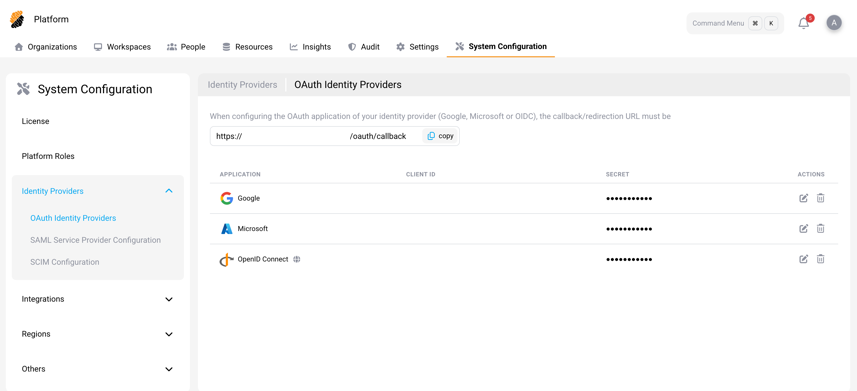
You can set up three types of provider:
OAuth Identity Providers
Choose the OAuth providers your users sign in with, such as Google, Microsoft (Azure), or any OpenID Connect provider.
To set one up, follow the matching guide:
Account continuity after an email change
For Google, Microsoft, and generic OpenID Connect sign-in, SecurSpaces matches the provider's stable user identifier before matching the email address. SecurSpaces records that identifier during a successful, verified provider sign-in. After that, an email change can still lead to the same account, with its existing projects and workspaces. This doesn't automatically convert local password accounts to provider accounts.
To change an address, update it in the identity provider, keep the same provider user identity, and have the user sign in again. The new domain must still meet the platform's sign-in rules. SecurSpaces updates the account email if the address isn't already used by another account.
If duplicate accounts already share a provider identifier, sign-in selects the oldest account; it doesn't merge the accounts or their resources. Ask your platform administrator to resolve duplicates. SAML continues to match by email because its configured identifier isn't assumed to remain stable after a rename.
Registered sign-in domains are matched without regard to letter case. This doesn't relax the requirement to register and authorize the domain.
SAML Service Provider Configuration
Connect SecurSpaces to your SAML identity provider so users authenticate through it. Upload your provider's metadata from a URL or an XML file, and the platform handles the rest.
For step-by-step instructions, see SAML.
SCIM Configuration
Keep users and groups current without manual work. With SCIM, your identity provider adds and removes users for you. Generate an authorization token here, then give it to your SCIM provider to link the two.
For step-by-step instructions, see SCIM.