
Give users access to Knowledge Worker Agent
This guide shows you how to add Knowledge Worker Agent to a workspace's access items, so users can open it with one click.
Knowledge Worker Agent runs as a service inside the workspace. SecurSpaces starts it and makes its port available through a custom access item. Without one, Knowledge Worker Agent isn't started, and users can't reach it.
Before you start
You need:
-
A workspace image that contains Knowledge Worker Agent, at
/usr/bin/knowledge-worker-agent. This is the case for the Knowledge Worker Agent image, and for your own image if you copy the binary into it. See Add Knowledge Worker Agent to your own workspace image. -
Permission to edit the workspace, or the workspace template it's created from.
-
The icon for the access item, if you want one. The Knowledge Worker Agent repository has it in its
Assetsfolder, asicon-512.png,icon-192.png, andicon.svg.
Add the access item
Add it to the workspace template, so every workspace created from the template has it. To give access to one workspace only, add it to that workspace instead.
-
Open the workspace template, or the workspace, for editing.
-
In the Basic Info step, find Workspace Access, and add a custom access item.
-
Fill in the fields:
Field Value Notes Name Chat, or another nameRequired. Shown on the access button. Icon icon-512.pngfrom theAssetsfolderOptional. Select Upload, and choose the file. Command /usr/bin/knowledge-worker-agentRequired. Starts Knowledge Worker Agent. Open Port 8765Required. Must match KWA_PORT, if you set it.Health Probe Leave empty Health Timeout 0 -
Save the access item, then save the workspace or template.
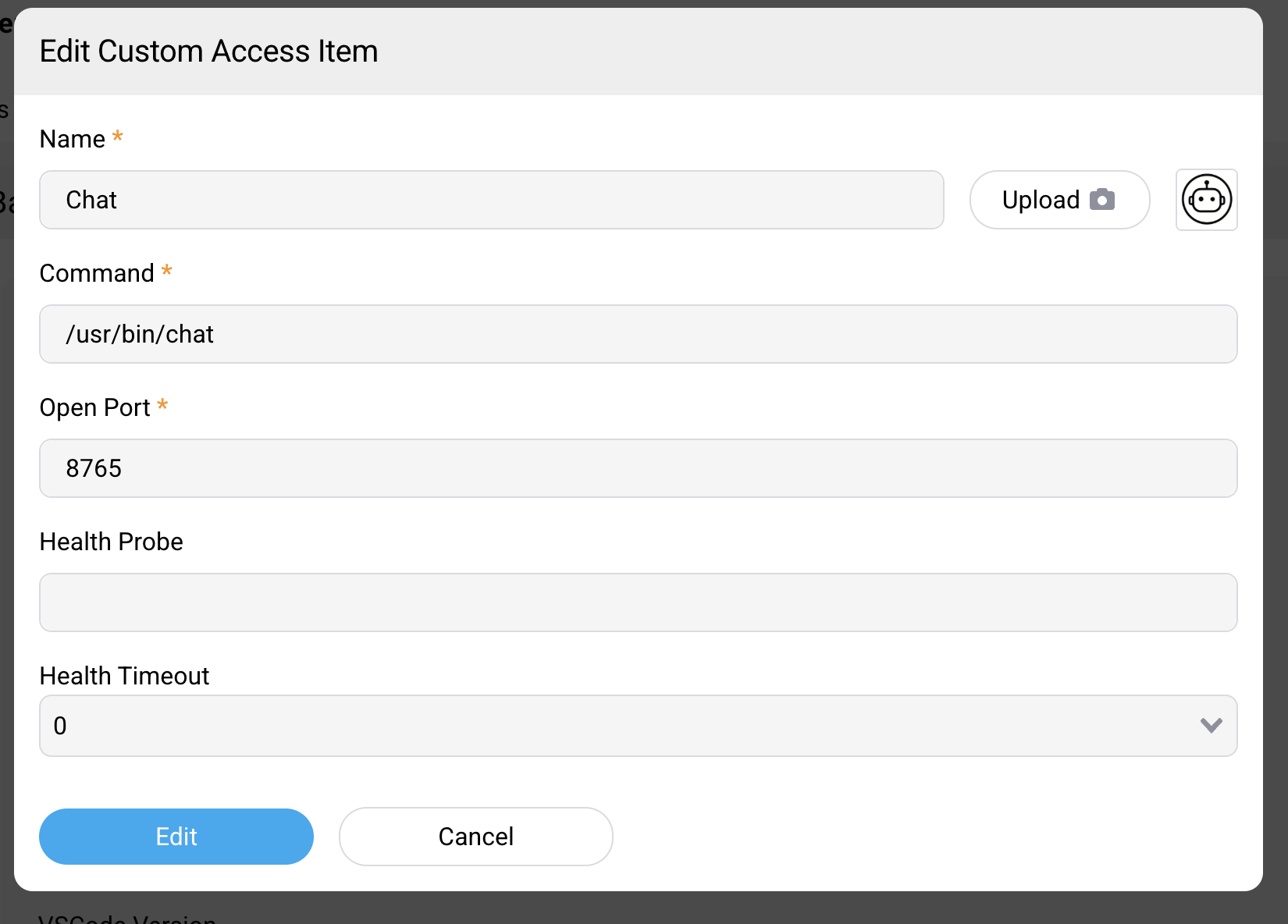
Images built before the binary was renamed have it at
/usr/bin/chat. Current images keep /usr/bin/chat as a link to the binary, so an access item that uses it still works.
Names and ports must be unique within a workspace. The port can't be one the platform reserves for its own services. For the other options of custom access items, see Custom access items.
Check that it works
-
Start a workspace from the template, or restart the workspace you edited.
-
Select the access item.
Knowledge Worker Agent opens. The first time, chats may take a few seconds to become available while it prepares opencode.
If the access item is missing, it isn't on that workspace or its template. If it's there but doesn't open, check that Open Port matches
KWA_PORT. For more checks, see Troubleshoot Knowledge Worker Agent.