
Regions
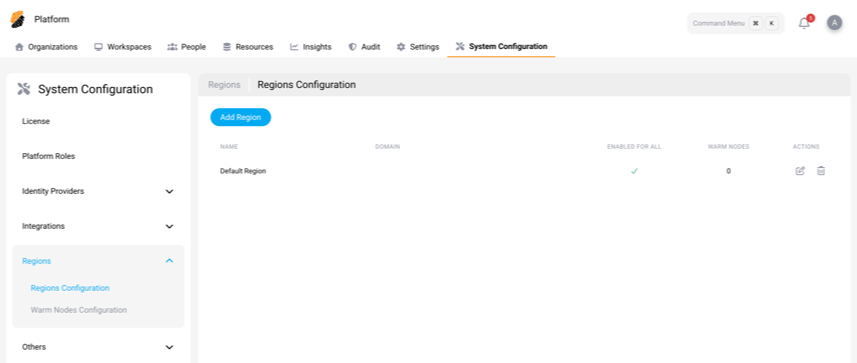
Run workspaces closer to your users. In Regions, you set up the regions and warm nodes for a multi-region deployment of Citrix SecurSpaces™.
Find these settings at System Configuration > Regions.
Note:
Regions appears only when Multi Region is turned on for your license.
There are two pages:
Regions Configuration
Add the regions where workspaces can run. For each region, give it a unique name and domain, then decide who can use it:
-
Enable for All — Everyone on the platform can use the region.
-
Limit it to specific organizations, projects, or users.
Note:
If a region isn't enabled for all and no organizations, projects, or users are selected, no one can use it.
For deployment prerequisites and setup, see Deploy SecurSpaces in Multiple Regions.
Note:
Mount points are supported only in the primary region. A workspace that uses a mount point cannot be moved to another region, and the region cannot be changed while one is attached. See Choose between data buckets and mount points.
Register an external region
Before starting or upgrading an external region, check that its proxy domain is registered separately from the central deployment.
-
Open System Configuration > Regions in the central console.
-
Check that Default Region uses the central deployment's proxy domain.
-
Add or correct the external region's entry with a unique name and its full proxy domain.
-
Match that domain to
region.proxyHostnamein the external region's Helm configuration. -
Set
region.isExternalRegiontotruein that configuration.
At startup, the workspace service and proxy resolve the region by the complete domain, ignoring letter case. A partial match doesn't count. If the domain isn't registered, belongs to Default Region, or can't be looked up, the services stop rather than run with another region's identity. An explicitly configured numeric
REGION_ID takes precedence over domain lookup.
If startup reports that the region isn't registered, correct its entry in the central console. If the domain belongs to Default Region, restore the central proxy domain there and register the external domain separately. The pods can recover on their next restart after the registration is corrected.
Warm Nodes Configuration
Keep a pool of ready-to-go nodes in a region with warm nodes. Because the nodes are already provisioned, workspaces start faster instead of waiting for new nodes to spin up.