
On-boarding new devices / standard
New devices that you want to connect via the Scout Cloud Gateway to your Scout Server need to be configured to the gateway (except when using uPilot) once via the First Configuration Wizard.
| Requires |
|---|
| The Scout Cloud Gateway is configured and users are authorized via one of the supported authentication methods. |
-
Switch on your device. If the device is not in initial state, reset the device configuration. To do so, on the system bar, open the Command panel and click Factory reset.The First Configuration Wizard starts.
-
Select the display language and keyboard language.
-
Read and accept the license terms.
-
To configure the device's management via Scout Cloud Gateway, select Managed.

-
Enter the address of the Scout Cloud Gateway as FQDN or IP address.Note:If multiple gateway instances are operated in a cluster, it does not matter which of the gateway addresses is entered.
-
If Keycloak is used for authentication, you will be redirected to the Keycloak logon page. Specify and confirm your logon data.After authentication, you will return to the First Configuration Wizard.
-
If Active Directory is used for authentication, enter the AD user logon data. The username must be specified as a user principal name (UPN). Example:
mint@int.sampletec-01.com The relevant connection data are transferred via the Scout Cloud Gateway to the AD server. The AD user is checked, the Scout Server and OU are identified.
-
If the Scout Cloud Gateway authentication is used, enter the 16-digit token you have received from your administrator.The relevant connection data are transferred to the Scout Cloud Gateway and verified.
-
Click Finish.
If the OU ID of the AD group or of the account definition for SCG authentication is invalid, the device enters the default OU that is set under Preferences > Devices in UniconOS Management Board. This is also true if authentication is done via Keycloak or token.
From UniconOS Management 2611, the device also enters the default OU if its OU is protected by a password or hidden, because the gateway doesn't send the password of the OU. To admit such devices as in earlier versions, set Devices that join a protected or hidden OU without sending its password to Scout Server to Accept and log, see Devices in the UniconOS Management Board guide.
The gateway address, username, Scout Server, and assigned OU are displayed in a summary.
| |  |
|
The configuration data are transferred from the Scout Cloud Gateway to the device and the device is restarted.
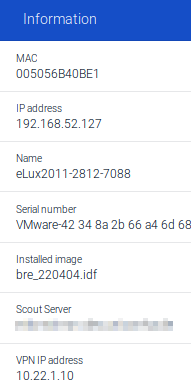
The device is connected to its Scout Server via the gateway. In addition to its local IP address, the device receives a VPN IP address.
The figure on the right shows the Configuration panel of the device after the First Configuration Wizard has been completed.
The device is shown in the WebAdmin interface in the Devices view with status connected (after short delay).
The flow chart below shows the communication of the onboarding process of a device via the Scout Cloud Gateway and via AD.
