
场景 4
此场景介绍如何为特定用户组启用 App Protection。
以下步骤允许您为特定组的用户启用 App Protection:
-
选择要为其用户启用 App Protection 策略的 Active Directory 用户组。在此示例中,Active Directory 用户组为 ProductManagers。
-
配置 Broker 访问策略规则:
-
按照 Citrix 博客 Citrix Cloud PowerShell 自动化入门 中所述,安装 Citrix PowerShell SDK 并连接到云 API。
-
运行命令
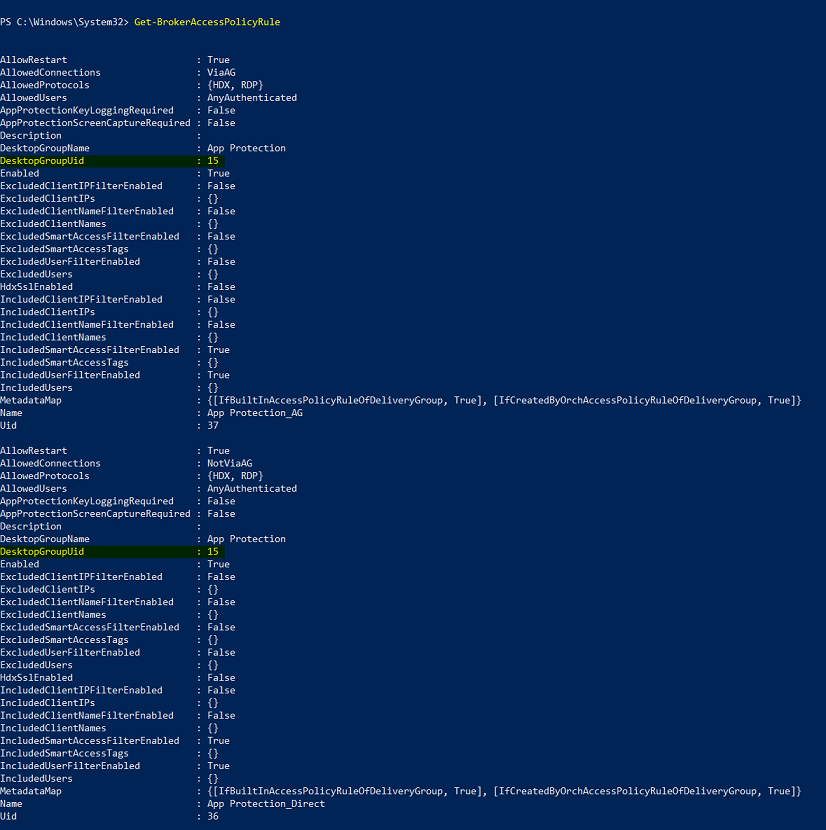
Get-BrokerAccessPolicyRule。将显示所有现有交付组的所有 Broker 访问策略列表。 -
找到要更改的交付组的 DesktopGroupUid。
-
使用以下命令获取仅应用于特定交付组的策略:
Get-BrokerAccessPolicyRule -DesktopGroupUid 7 -
要为 ProductManagers 用户组中的用户启用 App Protection 策略,请运行以下命令:
New-BrokerAccessPolicyRule "Example Rule Name_1" -DesktopGroupUid 7 -AllowedConnections AnyViaAG -AllowedProtocols HDX -AllowedUsers Filtered -AppProtectionScreenCaptureRequired $true -IncludedUserFilterEnabled $true -IncludedUsers domain.com\ProductManagers -
要为不属于 ProductManagers 用户组的用户禁用 App Protection 策略,请运行以下命令:
New-BrokerAccessPolicyRule "Example Rule Name_2" -DesktopGroupUid 7 -AllowedConnections AnyViaAG -AllowedProtocols HDX -AllowedUsers Filtered -AppProtectionScreenCaptureRequired $false-ExcludedUserFilterEnabled $true -ExcludedUsers domain.com\ProductManagers
-
-
验证:如果 Citrix Workspace 应用程序已打开,请退出。以 ProductManagers Active Directory 用户组中的用户身份登录 Citrix Workspace 应用程序。启动受保护的资源,您会看到应用程序保护已禁用。退出 Citrix Workspace 应用程序,然后以不属于 ProductManagers Active Directory 用户组的用户身份再次登录。启动受保护的资源,您会看到应用程序保护已启用。