-
-
-
-
-
Secure Mail プッシュ通知用の EWS を使用した証明書ベース認証の構成
This content has been machine translated dynamically.
Dieser Inhalt ist eine maschinelle Übersetzung, die dynamisch erstellt wurde. (Haftungsausschluss)
Cet article a été traduit automatiquement de manière dynamique. (Clause de non responsabilité)
Este artículo lo ha traducido una máquina de forma dinámica. (Aviso legal)
此内容已经过机器动态翻译。 放弃
このコンテンツは動的に機械翻訳されています。免責事項
이 콘텐츠는 동적으로 기계 번역되었습니다. 책임 부인
Este texto foi traduzido automaticamente. (Aviso legal)
Questo contenuto è stato tradotto dinamicamente con traduzione automatica.(Esclusione di responsabilità))
This article has been machine translated.
Dieser Artikel wurde maschinell übersetzt. (Haftungsausschluss)
Ce article a été traduit automatiquement. (Clause de non responsabilité)
Este artículo ha sido traducido automáticamente. (Aviso legal)
この記事は機械翻訳されています.免責事項
이 기사는 기계 번역되었습니다.책임 부인
Este artigo foi traduzido automaticamente.(Aviso legal)
这篇文章已经过机器翻译.放弃
Questo articolo è stato tradotto automaticamente.(Esclusione di responsabilità))
Translation failed!
Citrix Secure Mailプッシュ通知用のEWSによる証明書ベース認証の構成
-
Citrix Secure Mailプッシュ通知を機能させるには、以下を実行する必要があります。
-
Exchange Serverを証明書ベース認証用に構成します。この要件は、Citrix Secure HubがCitrix Endpoint Managementに証明書ベース認証で登録されている場合に特に必要です。
- Exchangeメールサーバー上のActive SyncおよびExchange Web Services (EWS) 仮想ディレクトリを証明書ベース認証で構成します。
これらの構成を完了しない限り、Citrix Secure Mailプッシュ通知のサブスクリプションは失敗し、Citrix Secure Mailでバッジの更新は行われません。
この記事では、証明書ベース認証を構成する手順について説明します。構成は、Exchange Server上のEWS仮想ディレクトリに対して特に適用されます。
構成を開始するには、以下を実行します。
-
EWS仮想ディレクトリがインストールされているサーバーにログオンします。
-
IISマネージャーコンソールを開きます。
-
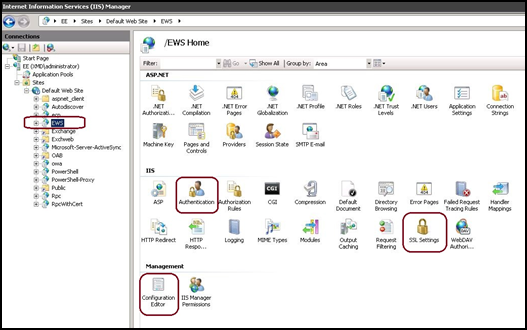
Default Web Siteの下で、EWS仮想ディレクトリをクリックします。
認証、SSL、構成エディターのスナップインは、IISマネージャーコンソールの右側にあります。
-
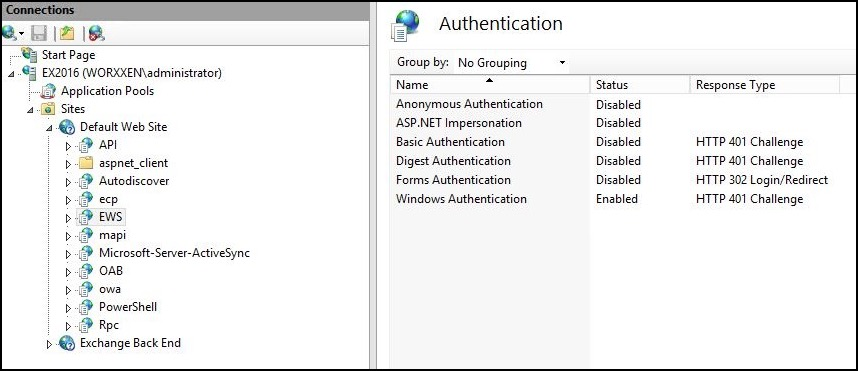
EWSの認証設定が次の図に示すように構成されていることを確認します。
-
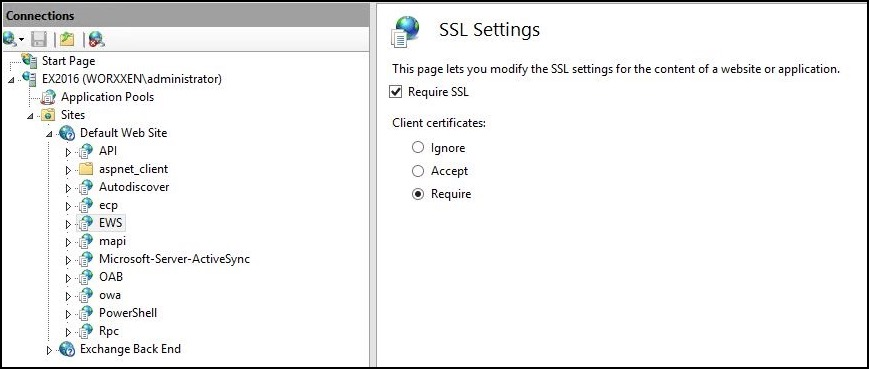
EWS仮想ディレクトリのSSL設定を構成します。
-
Require SSLチェックボックスをオンにします。
-
クライアント証明書の下で、Requireをクリックします。または、他のEWSメールクライアントがユーザー名とパスワードを使用してExchange Serverに認証する場合、Acceptをクリックします。
-
-
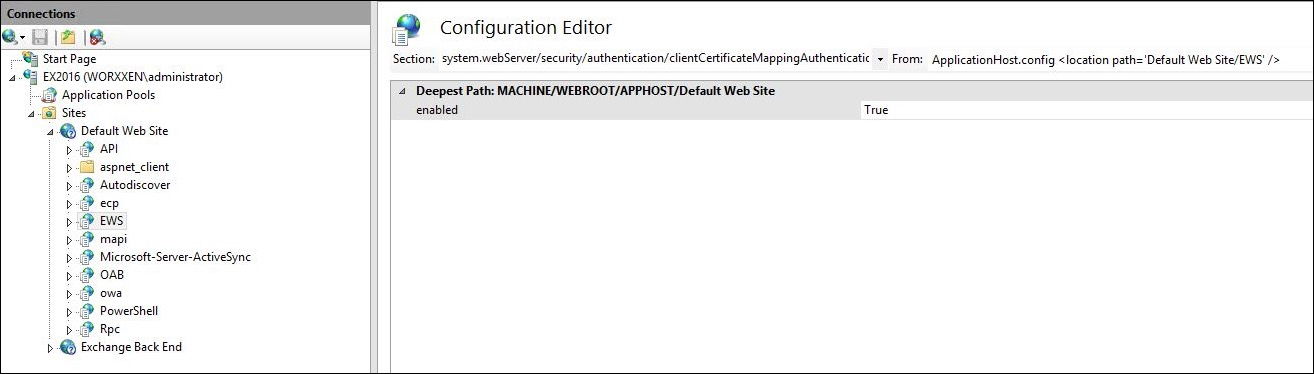
構成エディターをクリックします。セクションドロップダウンリストで次のセクションに移動します。
- system.webServer/security/authentication/clientCertificateMappingAuthentication
-
enabledの値をTrueに設定します。
-
構成エディターをクリックします。セクションドロップダウンリストで次のセクションに移動します。
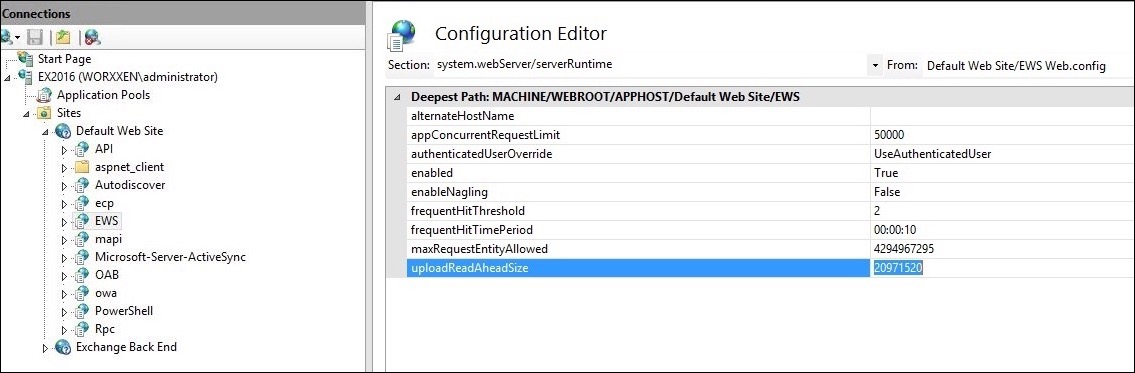
- system.webServer/serverRuntime
-
uploadReadAheadSizeの値を10485760 (10 MB) または20971520 (20 MB)、または組織で必要とされる値に設定します。
重要:
この値を正しく設定しないと、EWSプッシュ通知のサブスクライブ中に証明書ベース認証がエラーコード413で失敗する可能性があります。
この値を0に設定しないでください。
詳細については、Microsoftの記事「Microsoft IIS server runtime」を参照してください。
iOSプッシュ通知に関するCitrix Secure Mailの問題のトラブルシューティングの詳細については、このCitrixサポート知識センターの記事を参照してください。
関連情報
共有
共有
この記事の概要
This Preview product documentation is Citrix Confidential.
You agree to hold this documentation confidential pursuant to the terms of your Citrix Beta/Tech Preview Agreement.
The development, release and timing of any features or functionality described in the Preview documentation remains at our sole discretion and are subject to change without notice or consultation.
The documentation is for informational purposes only and is not a commitment, promise or legal obligation to deliver any material, code or functionality and should not be relied upon in making Citrix product purchase decisions.
If you do not agree, select I DO NOT AGREE to exit.