使用 WEM API 和 Windows PowerShell 自动备份配置集
作为 Workspace Environment Management™ (WEM) 管理员,您可能需要定期备份配置集,以防止设置丢失。例如,您可能希望每 12 小时触发一次备份,并在本地自动管理备份文件。使用 WEM 公共 API 和 Windows PowerShell,您可以实现该目标。
一般工作流程如下:
-
申请 Citrix Cloud™ API 客户端
-
编写 PowerShell 脚本以备份配置集
-
配置计划任务以运行脚本
先决条件
开始之前,请确保您知道您的 Citrix® 客户 ID 和相关的 API 基本 URL。
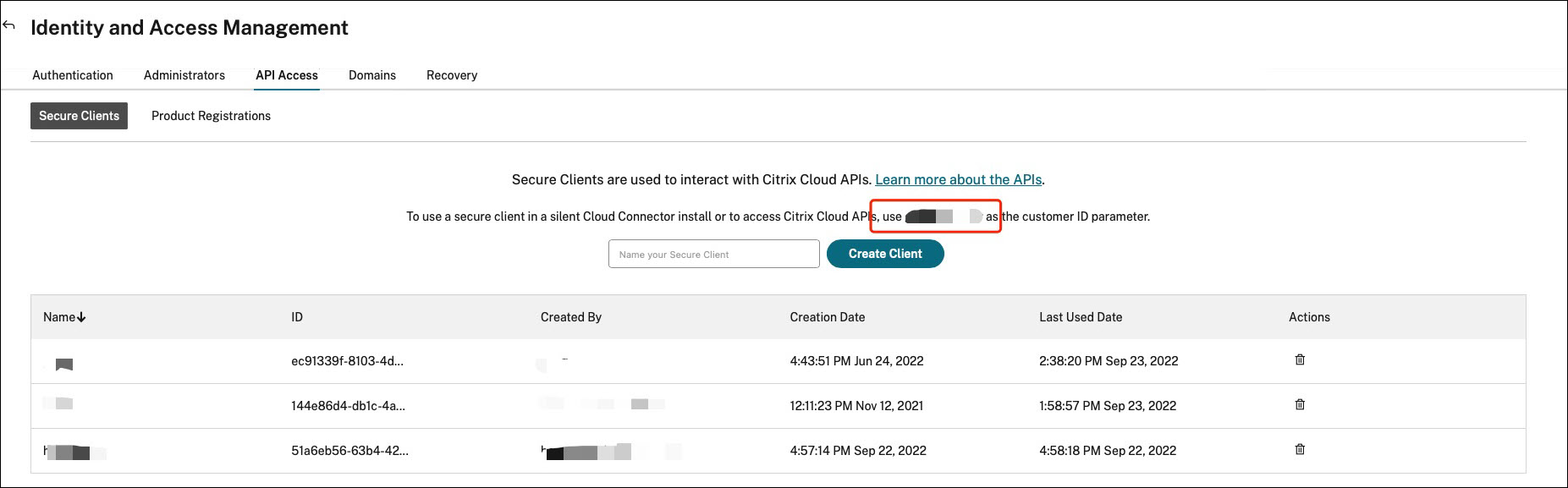
登录 Citrix Cloud,导航到 身份和访问管理 > API 访问,然后找到您的 Citrix 客户 ID。
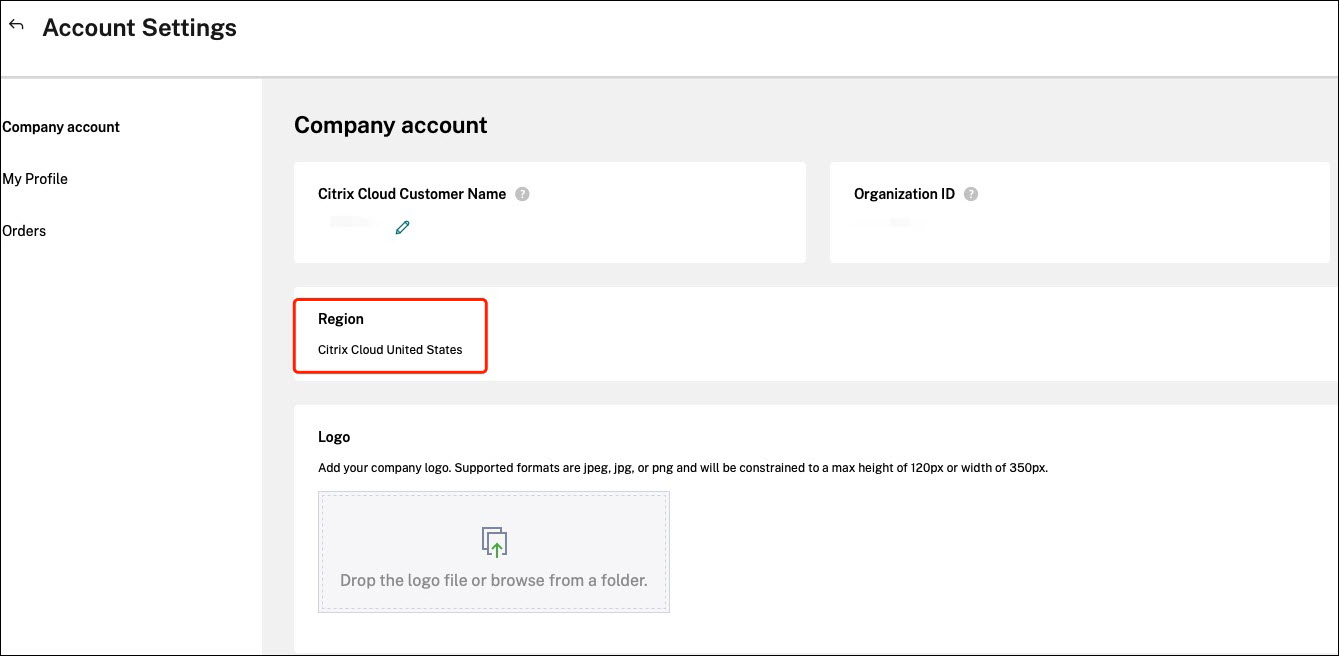
API 基本 URL(包括 Citrix Auth API 基本 URL 和 WEM API 基本 URL)与您连接的 Citrix Cloud 区域相关。区域在您加入 Citrix Cloud 时确定。您也可以在帐户设置中查询您的区域。
您可以通过查看下表找到 API 基本 URL。
| 区域 | Citrix Auth API 基本 URL | WEM API 基本 URL |
|---|---|---|
| 美国 (US) | api-us.cloud.com | api.wem.cloud.com |
| 欧盟 (EU) | api-eu.cloud.com | eu-api.wem.cloud.com |
| 亚太南部 (AP-S) | api-ap-s.cloud.com | aps-api.wem.cloud.com |
| 日本 (JP) | api.citrixcloud.jp | jp-api.wem.citrixcloud.jp |
有关 API 基本 URL 的更多信息,请参阅 Citrix Cloud API 入门 和 WEM API 概述。
申请 Citrix Cloud API 客户端
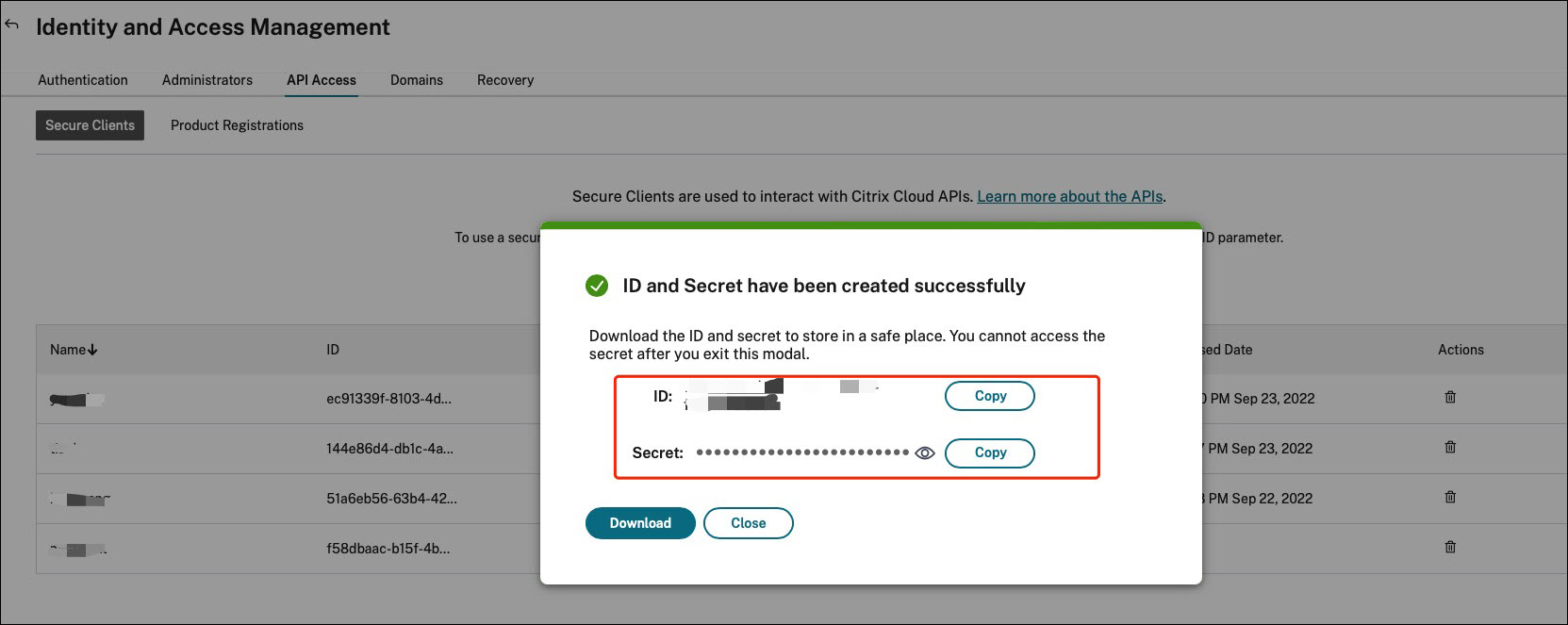
导航到 身份和访问管理 > API 访问。键入安全客户端的名称,单击创建客户端,然后将安全客户端 ID 和客户端密钥保存在本地。
编写 PowerShell 脚本以备份您的配置集
使用以下 PowerShell 脚本并将其另存为
Invoke-WEMConfigSetBackupAPI.ps1。请务必替换脚本开头的变量。
 # replace the variables before running the script

 $CitrixCustomerId = 'your-citrix-customer-id'
 $CitrixAuthAPIBaseURL = 'api-us.cloud.com'
 $CitrixWEMAPIBaseURL = 'api.wem.cloud.com'
 $ClientId = 'your-api-client-id'
 $ClientSecret = 'your-api-client-secret'

 $ConfigSetsToBackUp = @('Default Site', 'MyConfigSet') # leave it empty if you want to back up all configuration sets
 $FolderToSaveBackup = 'C:\ProgramData'

 # get bearer token

 $ErrorActionPreference = 'Stop'

 $URL = "https://${CitrixAuthAPIBaseURL}/cctrustoauth2/${CitrixCustomerId}/tokens/clients"
 $Body = "grant_type=client_credentials&client_id=${ClientId}&client_secret=${ClientSecret}"
 $Response = Invoke-RestMethod -Method 'Post' -Uri $URL -Body $Body -ContentType 'application/x-www-form-urlencoded'

 $BearerToken = $Response.access_token

 if ([string]::IsNullOrEmpty($BearerToken))
 {
     throw 'Cannot retrieve bearer token.'
 }

 Write-Host "Retrieved bearer token successfully."

 # back up WEM configuration sets

 if (-not (Test-Path -Path $FolderToSaveBackup -PathType 'Container'))
 {
     throw 'The folder to save backup not exists.'
 }

 $Headers = @{
     'Citrix-CustomerId' = $CitrixCustomerId
     'Accept' = 'application/json'
     'Authorization' = "CWSAUTH bearer=${BearerToken}"
 }

 if ($ConfigSetsToBackUp.Count -eq 0 -or $ConfigSetsToBackUp -eq $null)
 {
     $URL = "https://${CitrixWEMAPIBaseURL}/services/wem/sites"
     $Response = Invoke-RestMethod -Method 'Get' -Uri $URL -Headers $Headers
     $ConfigSetsToBackUp = $Response.items |% { $_.name }
 }

 $ConfigSetsToBackUp | ForEach-Object {
     Write-Host "Backing up configuration set ""$_"""
     $URL = "https://${CitrixWEMAPIBaseURL}/services/wem/sites/%24export?name=$_"
     Write-Host "GET $URL"
     $Response = Invoke-RestMethod -Method 'Get' -Uri $URL -Headers $Headers
     $Timestamp = Get-Date -Format "yyyyMMddHHmmss"
     $Response | ConvertTo-Json -Depth 10 | Out-File (Join-Path $FolderToSaveBackup "${_}-${Timestamp}.json")
 }
有关持有者令牌的更多信息,请参阅 Citrix Cloud API 入门。
有关使用 WEM API 备份配置集的更多信息,请参阅 导出 WEM 配置集 API。
注意:
每个持有者令牌在一小时后过期。为避免频繁调用 Citrix Cloud 身份验证 API 和 WEM API,请缓存持有者令牌并在备份持续时间少于一小时的情况下重复使用它。
如果遇到错误 504 Gateway Time-out,则可能意味着您的配置集过大,导致备份时间超过 1 分钟的 API 超时限制。在这种情况下,请尝试改用以下 PowerShell 脚本。请注意,此脚本使用的 API 目前尚未公开,并且这些 API 将来可能会发生变化。
 # replace the variables before running the script

 $CitrixCustomerId = 'your-citrix-customer-id'
 $CitrixAuthAPIBaseURL = 'api-us.cloud.com'
 $CitrixWEMAPIBaseURL = 'api.wem.cloud.com'
 $ClientId = 'your-api-client-id'
 $ClientSecret = 'your-api-client-secret'

 $ConfigSetsToBackUp = @('Default Site', 'MyConfigSet') # leave it empty if you want to back up all configuration sets
 $FolderToSaveBackup = 'C:\ProgramData'

 # get bearer token

 $ErrorActionPreference = 'Stop'

 $URL = "https://${CitrixAuthAPIBaseURL}/cctrustoauth2/${CitrixCustomerId}/tokens/clients"
 $Body = "grant_type=client_credentials&client_id=${ClientId}&client_secret=${ClientSecret}"
 $Response = Invoke-RestMethod -Method 'Post' -Uri $URL -Body $Body -ContentType 'application/x-www-form-urlencoded'

 $BearerToken = $Response.access_token

 if ([string]::IsNullOrEmpty($BearerToken))
 {
     throw 'Cannot retrieve bearer token.'
 }

 Write-Host "Retrieved bearer token successfully."

 # back up WEM configuration sets

 if (-not (Test-Path -Path $FolderToSaveBackup -PathType 'Container'))
 {
     throw 'The folder to save backup not exists.'
 }

 $Headers = @{
     'Citrix-CustomerId' = $CitrixCustomerId
     'Accept' = 'application/json'
     'Authorization' = "CWSAUTH bearer=${BearerToken}"
 }

 $URL = "https://${CitrixWEMAPIBaseURL}/services/wem/sites"
 $Response = Invoke-RestMethod -Method 'Get' -Uri $URL -Headers $Headers
 $Sites = $Response.items

 if ($ConfigSetsToBackUp -ne $null -and $ConfigSetsToBackUp.Count -gt 0)
 {
     $Sites = $Sites | Where-Object { $_.name -in $ConfigSetsToBackUp }
 }

 $Sites | ForEach-Object {
     $Name = $_.name
     Write-Host "Backing up configuration set `"$Name`""
     $URL = "https://${CitrixWEMAPIBaseURL}/services/wem/export/site?async=true"
     $FolderName = "BACKUPFOLDER-" + [Guid]::NewGuid().ToString()
     $Body = @{
         folderName = $FolderName
         id = $_.id
         name = $_.name
         type = 'Configuration set'
     } | ConvertTo-Json
     $Response = Invoke-RestMethod -Method 'Post' -Uri $URL -Headers $Headers -Body $Body -ContentType 'application/json; charset=utf-8'

     Write-Host "Waiting for the backup job to complete..."
     $URL = "https://${CitrixWEMAPIBaseURL}/services/wem/export/site/recentJobs"
     do
     {
         Start-Sleep -Seconds 5
         $Response = Invoke-RestMethod -Method 'Get' -Uri $URL -Headers $Headers
         $BackupJob = $Response.backup[0]
         $IsOnGoing = $BackupJob.id -eq $_.id -and $BackupJob.status -eq 'Running'
     } while ($IsOnGoing)

     $URL = "https://${CitrixWEMAPIBaseURL}/services/wem/export/site/contentView?name=${FolderName}"
     $Response = Invoke-RestMethod -Method 'Get' -Uri $URL -Headers $Headers

     $Timestamp = Get-Date -Format "yyyyMMddHHmmss"
     $Response | ConvertTo-Json -Depth 10 | Out-File (Join-Path $FolderToSaveBackup "${Name}-${Timestamp}.json") -Encoding utf8

     $URL = "https://${CitrixWEMAPIBaseURL}/services/wem/export?prefix=site%2F${FolderName}%2F"
     $Response = Invoke-RestMethod -Method 'Delete' -Uri $URL -Headers $Headers
 }
配置计划任务以运行脚本
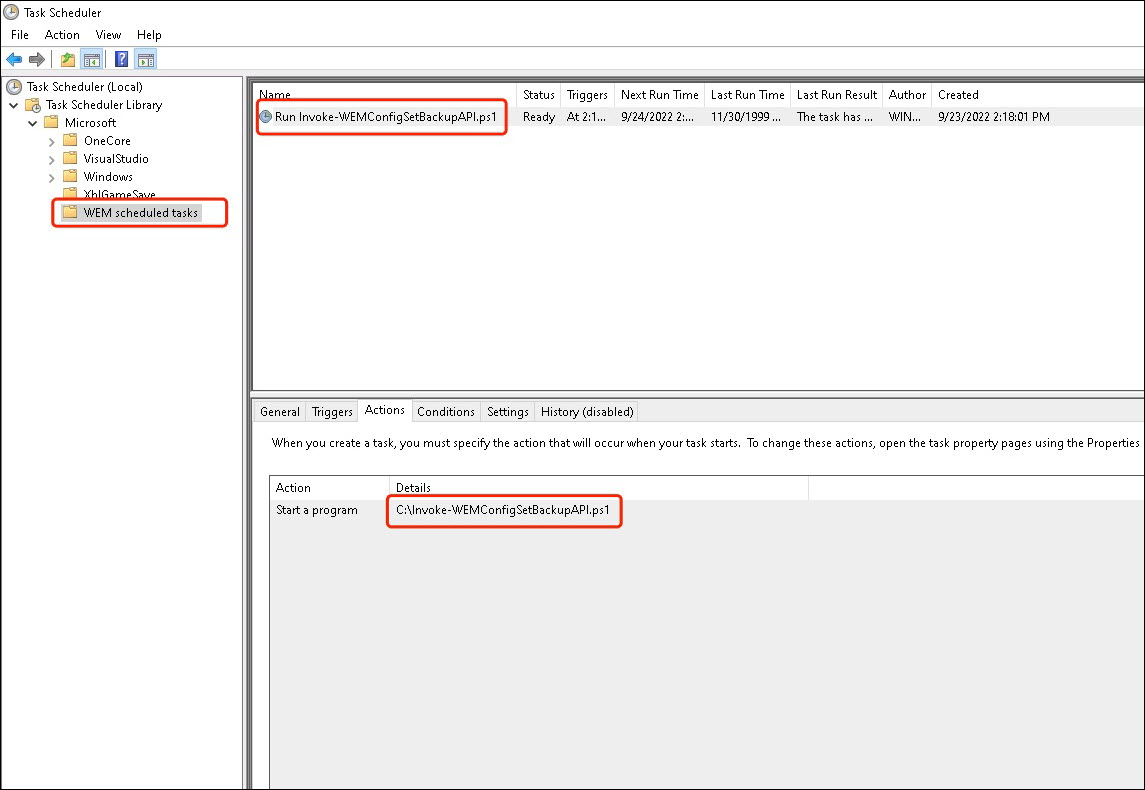
在可以访问 Citrix Cloud 的计算机上,从 Windows 开始菜单启动
Task Scheduler 或从 Windows 命令提示符启动 taskschd.msc。
您可以创建一个名为
WEM scheduled task 的文件夹。
在该文件夹中,创建一个名为
launch Invoke-WEMConfigSetBackupAPI.ps1 的任务。添加一个新触发器 每 12 小时重复一次,持续 1 天,并添加一个启动脚本 Invoke-WEMConfigSetBackupAPI.ps1 的新操作。