WEM API と Windows PowerShell を使用して構成セットを自動的にバックアップする
Workspace Environment Management™ (WEM) 管理者として、設定が失われるのを防ぐために、構成セットを定期的にバックアップする必要がある場合があります。たとえば、12 時間ごとにバックアップをトリガーし、バックアップファイルをローカルで自動的に管理したい場合があります。WEM パブリック API と Windows PowerShell を使用すると、その目標を達成できます。
一般的なワークフローは次のとおりです。
-
Citrix Cloud™ API クライアントを申請する
-
構成セットをバックアップするための PowerShell スクリプトを作成する
-
スクリプトを実行するようにスケジュールされたタスクを構成する
前提条件
開始する前に、Citrix® お客様 ID と関連する API ベース URL を把握していることを確認してください。
Citrix お客様 ID(/en-us/workspace-environment-management/service/media/customerid.jpg)
リージョン(/en-us/workspace-environment-management/service/media/region.jpg)
API ベース URL は、次の表を確認することで見つけることができます。
| リージョン | Citrix Auth API ベース URL | WEM API ベース URL |
|---|---|---|
| 米国 (US) | api-us.cloud.com | api.wem.cloud.com |
| 欧州連合 (EU) | api-eu.cloud.com | eu-api.wem.cloud.com |
| アジア太平洋南部 (AP-S) | api-ap-s.cloud.com | aps-api.wem.cloud.com |
| 日本 (JP) | api.citrixcloud.jp | jp-api.wem.citrixcloud.jp |
APIベースURLの詳細については、「Citrix Cloud APIの使用を開始する」および「WEM APIの概要」を参照してください。
Citrix Cloud APIクライアントを申請する
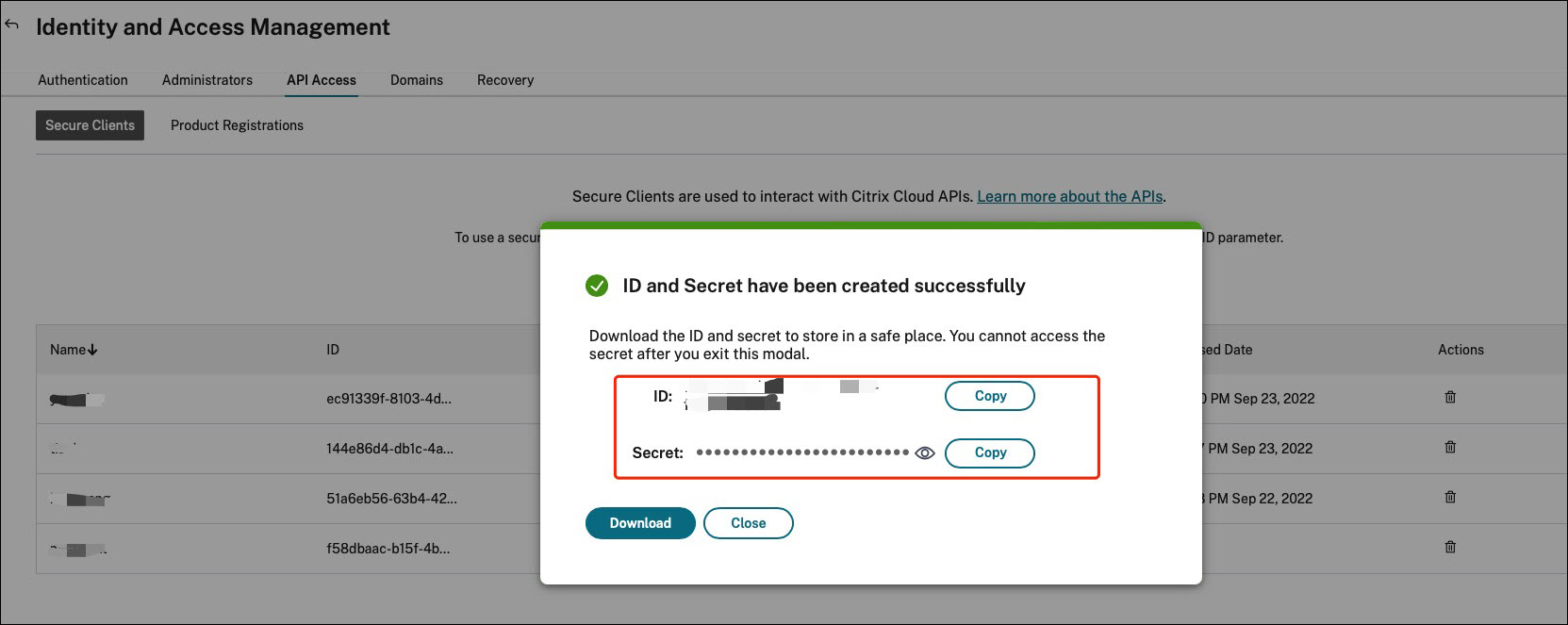
IDおよびアクセス管理 > APIアクセスに移動します。セキュアクライアントの名前を入力し、クライアントの作成をクリックして、セキュアクライアントIDとクライアントシークレットをローカルに保存します。
構成セットをバックアップするためのPowerShellスクリプトを作成する
以下のPowerShellスクリプトを使用し、
Invoke-WEMConfigSetBackupAPI.ps1として保存します。スクリプトの冒頭にある変数を必ず置き換えてください。
 # replace the variables before running the script

 $CitrixCustomerId = 'your-citrix-customer-id'
 $CitrixAuthAPIBaseURL = 'api-us.cloud.com'
 $CitrixWEMAPIBaseURL = 'api.wem.cloud.com'
 $ClientId = 'your-api-client-id'
 $ClientSecret = 'your-api-client-secret'

 $ConfigSetsToBackUp = @('Default Site', 'MyConfigSet') # leave it empty if you want to back up all configuration sets
 $FolderToSaveBackup = 'C:\ProgramData'

 # get bearer token

 $ErrorActionPreference = 'Stop'

 $URL = "https://${CitrixAuthAPIBaseURL}/cctrustoauth2/${CitrixCustomerId}/tokens/clients"
 $Body = "grant_type=client_credentials&client_id=${ClientId}&client_secret=${ClientSecret}"
 $Response = Invoke-RestMethod -Method 'Post' -Uri $URL -Body $Body -ContentType 'application/x-www-form-urlencoded'

 $BearerToken = $Response.access_token

 if ([string]::IsNullOrEmpty($BearerToken))
 {
     throw 'Cannot retrieve bearer token.'
 }

 Write-Host "Retrieved bearer token successfully."

 # back up WEM configuration sets

 if (-not (Test-Path -Path $FolderToSaveBackup -PathType 'Container'))
 {
     throw 'The folder to save backup not exists.'
 }

 $Headers = @{
     'Citrix-CustomerId' = $CitrixCustomerId
     'Accept' = 'application/json'
     'Authorization' = "CWSAUTH bearer=${BearerToken}"
 }

 if ($ConfigSetsToBackUp.Count -eq 0 -or $ConfigSetsToBackUp -eq $null)
 {
     $URL = "https://${CitrixWEMAPIBaseURL}/services/wem/sites"
     $Response = Invoke-RestMethod -Method 'Get' -Uri $URL -Headers $Headers
     $ConfigSetsToBackUp = $Response.items |% { $_.name }
 }

 $ConfigSetsToBackUp | ForEach-Object {
     Write-Host "Backing up configuration set ""$_"""
     $URL = "https://${CitrixWEMAPIBaseURL}/services/wem/sites/%24export?name=$_"
     Write-Host "GET $URL"
     $Response = Invoke-RestMethod -Method 'Get' -Uri $URL -Headers $Headers
     $Timestamp = Get-Date -Format "yyyyMMddHHmmss"
     $Response | ConvertTo-Json -Depth 10 | Out-File (Join-Path $FolderToSaveBackup "${_}-${Timestamp}.json")
 }
ベアラートークンの詳細については、Citrix Cloud API の概要を参照してください。
WEM API を使用した構成セットのバックアップの詳細については、WEM 構成セット API のエクスポートを参照してください。
注:
各ベアラートークンは1時間後に期限切れになります。Citrix Cloud 認証 API および WEM API の頻繁な呼び出しを避けるため、ベアラートークンをキャッシュし、バックアップ期間が1時間未満の場合は再利用してください。
エラー 504 Gateway Time-out が発生した場合、構成セットが大きすぎて、バックアップ時間が1分間の API タイムアウトを超えている可能性があります。このような場合は、代わりに以下の PowerShell スクリプトを使用してみてください。このスクリプトは現在公開されていない API を使用しており、これらの API は将来変更される可能性があることに注意してください。
 # replace the variables before running the script

 $CitrixCustomerId = 'your-citrix-customer-id'
 $CitrixAuthAPIBaseURL = 'api-us.cloud.com'
 $CitrixWEMAPIBaseURL = 'api.wem.cloud.com'
 $ClientId = 'your-api-client-id'
 $ClientSecret = 'your-api-client-secret'

 $ConfigSetsToBackUp = @('Default Site', 'MyConfigSet') # leave it empty if you want to back up all configuration sets
 $FolderToSaveBackup = 'C:\ProgramData'

 # get bearer token

 $ErrorActionPreference = 'Stop'

 $URL = "https://${CitrixAuthAPIBaseURL}/cctrustoauth2/${CitrixCustomerId}/tokens/clients"
 $Body = "grant_type=client_credentials&client_id=${ClientId}&client_secret=${ClientSecret}"
 $Response = Invoke-RestMethod -Method 'Post' -Uri $URL -Body $Body -ContentType 'application/x-www-form-urlencoded'

 $BearerToken = $Response.access_token

 if ([string]::IsNullOrEmpty($BearerToken))
 {
     throw 'Cannot retrieve bearer token.'
 }

 Write-Host "Retrieved bearer token successfully."

 # back up WEM configuration sets

 if (-not (Test-Path -Path $FolderToSaveBackup -PathType 'Container'))
 {
     throw 'The folder to save backup not exists.'
 }

 $Headers = @{
     'Citrix-CustomerId' = $CitrixCustomerId
     'Accept' = 'application/json'
     'Authorization' = "CWSAUTH bearer=${BearerToken}"
 }

 $URL = "https://${CitrixWEMAPIBaseURL}/services/wem/sites"
 $Response = Invoke-RestMethod -Method 'Get' -Uri $URL -Headers $Headers
 $Sites = $Response.items

 if ($ConfigSetsToBackUp -ne $null -and $ConfigSetsToBackUp.Count -gt 0)
 {
     $Sites = $Sites | Where-Object { $_.name -in $ConfigSetsToBackUp }
 }

 $Sites | ForEach-Object {
     $Name = $_.name
     Write-Host "Backing up configuration set `"$Name`""
     $URL = "https://${CitrixWEMAPIBaseURL}/services/wem/export/site?async=true"
     $FolderName = "BACKUPFOLDER-" + [Guid]::NewGuid().ToString()
     $Body = @{
         folderName = $FolderName
         id = $_.id
         name = $_.name
         type = 'Configuration set'
     } | ConvertTo-Json
     $Response = Invoke-RestMethod -Method 'Post' -Uri $URL -Headers $Headers -Body $Body -ContentType 'application/json; charset=utf-8'

     Write-Host "Waiting for the backup job to complete..."
     $URL = "https://${CitrixWEMAPIBaseURL}/services/wem/export/site/recentJobs"
     do
     {
         Start-Sleep -Seconds 5
         $Response = Invoke-RestMethod -Method 'Get' -Uri $URL -Headers $Headers
         $BackupJob = $Response.backup[0]
         $IsOnGoing = $BackupJob.id -eq $_.id -and $BackupJob.status -eq 'Running'
     } while ($IsOnGoing)

     $URL = "https://${CitrixWEMAPIBaseURL}/services/wem/export/site/contentView?name=${FolderName}"
     $Response = Invoke-RestMethod -Method 'Get' -Uri $URL -Headers $Headers

     $Timestamp = Get-Date -Format "yyyyMMddHHmmss"
     $Response | ConvertTo-Json -Depth 10 | Out-File (Join-Path $FolderToSaveBackup "${Name}-${Timestamp}.json") -Encoding utf8

     $URL = "https://${CitrixWEMAPIBaseURL}/services/wem/export?prefix=site%2F${FolderName}%2F"
     $Response = Invoke-RestMethod -Method 'Delete' -Uri $URL -Headers $Headers
 }
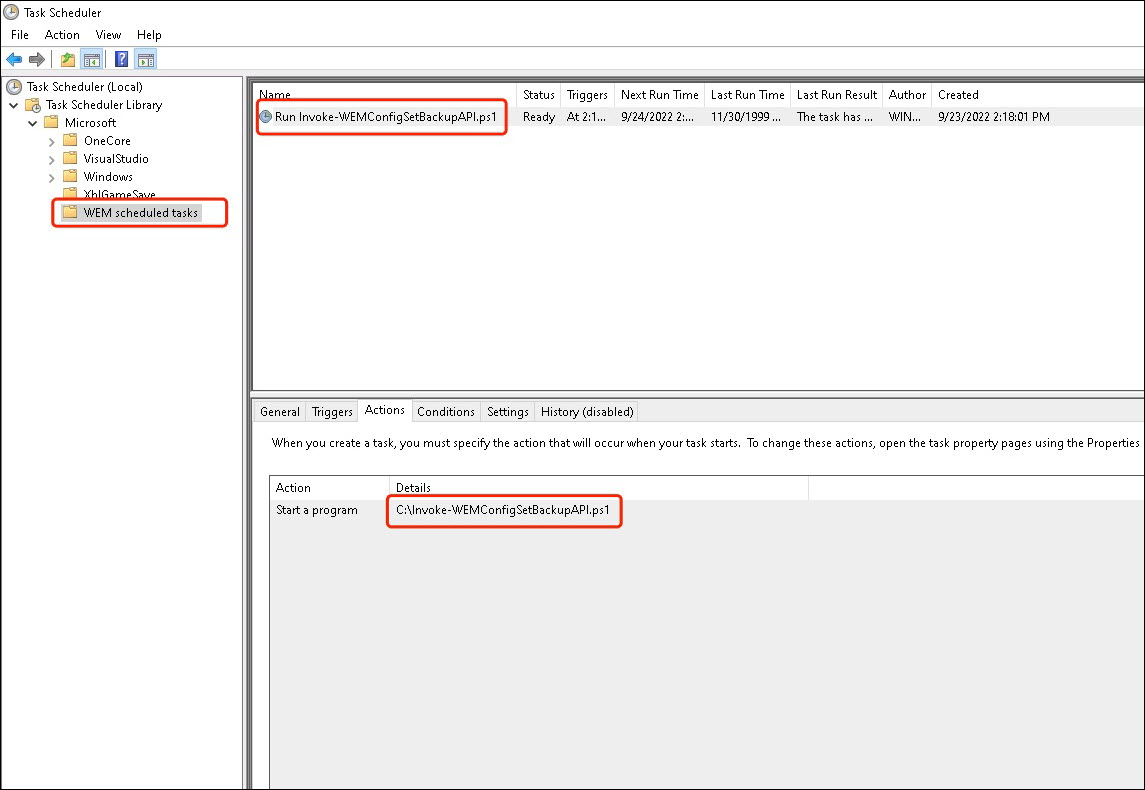
スクリプトを実行するようにスケジュールされたタスクを構成する
Citrix Cloud にアクセスできるマシンで、Windows のスタートメニューから
Task Scheduler を起動するか、Windows コマンドプロンプトから taskschd.msc を起動します。
WEM scheduled task という名前のフォルダを作成できます。
そのフォルダ内に、
launch Invoke-WEMConfigSetBackupAPI.ps1 という名前のタスクを作成します。新しいトリガー 12時間ごとに1日間繰り返す を追加し、スクリプト Invoke-WEMConfigSetBackupAPI.ps1 を開始する新しいアクションを追加します。