
On-premises StoreFront™ Authentication Reference Architectures for Citrix DaaS™
While Citrix® StoreFront Cloud can meet the requirements for most use cases of Citrix DaaS (formerly Citrix Virtual Apps and Desktops™ service), there are some use cases and requirements that need StoreFront to be hosted in the customer's data center or resource locations. This article describes high level architectures and how the components interact with various authentication scenarios supported by Active Directory designs. This article assumes StoreFront and Gateway components are hosted together in each data center.
Reasons to maintain on-premises StoreFront
-
Support clients that do not have internet connectivity.
-
Enable Local Host Cache functionality for increased resiliency.
-
Domain pass-through and smart card authentication.
-
Deep customizations such as store plug-ins.
-
Hosting multiple StoreFront stores with different configurations.
Parent-Child Domains as Resource Domains
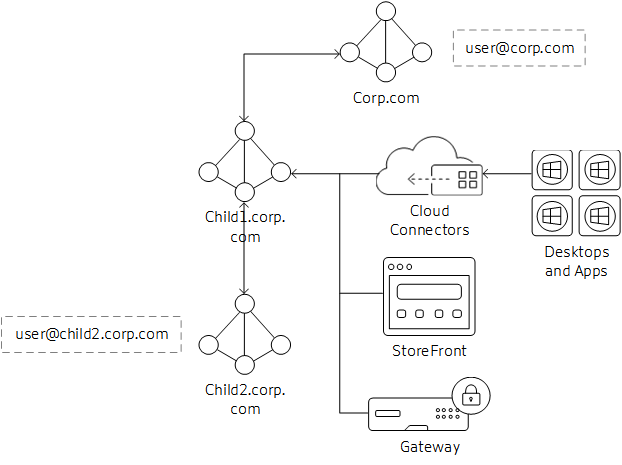
In this scenario, the child domain is acting as the resource domain for Virtual Desktop Agents (VDAs) and StoreFront instances. The parent domain holds the users that will be accessing the resources in the child domain.
-
Cloud Connectors are joined to child domain only. The two-way transitive trust between child and parent domain allows the Cloud Connectors to communicate with the Global Catalog in the parent domain.
-
StoreFront is joined to the child domain. Stores are configured for Username/Password and Pass-through from Citrix Gateway authentication. Username/Password authentication is configured to trust any domain.
-
Citrix Gateway authentication profile is configured for the parent domain to use UPN as the primary logon method. If there are users that need to authenticate from the child domain, the LDAP Authentication profile and policy for the child domain must also be bound to the Gateway vServer.
-
Edit Citrix Gateway Session OS and Web profiles and set Published Applications/Single Sign-On Domain setting blank (may need to set override setting).
Connection Workflow
-
mailto:User@corp.com logs on to Citrix Gateway. Gateway looks up the user through the authentication profile and matches the policy action.
-
Credentials are passed through to StoreFront. StoreFront accepts the credentials and passes them to the Cloud Connectors.
-
Cloud Connectors look up the user object details needed by Citrix Cloud.
-
Cloud Connectors pass identity information to Citrix Cloud and identity tokens authenticate the user and enumerate resources assigned to the user.
-
Cloud Connectors return assigned resources to StoreFront for user enumeration.
-
When the user launches an application or desktop, Citrix Gateway generates a STA ticket request using the configured Cloud Connectors.
-
Citrix Cloud brokers manage the sessions between resource domain Cloud Connectors and VDAs registered in that resource location.
-
Session is established between client, Citrix Gateway. and resolved VDA.
External Trusted Domains to Resource Domain
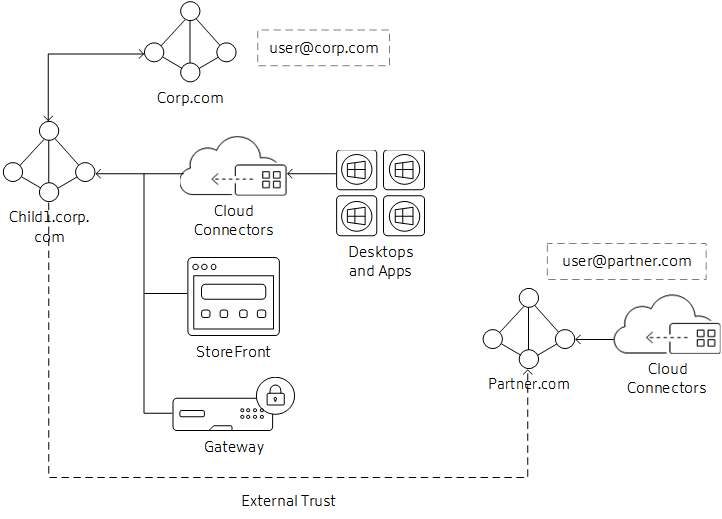
In this scenario, the business partner needs access to resources published to corporate users. The corporate domain is corp.com and the partner domain is partner.com.
-
The corporate domain has an outgoing external trust to the partner domain. Users from the partner domain can authenticate to resources joined to the corporate domain.
-
The Citrix Cloud customer needs two resource locations: one for corp.com Cloud Connectors and the second for partner.com Cloud Connectors. The partner.com Cloud Connectors are needed for Authentication and Identity calls to the domain only; they are not used for brokering VDAs or sessions.
-
The StoreFront server is joined to the corp.com domain. The store is configured with a site that lists the Cloud Connectors in the corp.com domain. Stores are configured for Username/Password and Pass-through from Citrix Gateway authentication. Username/Password authentication is configured to trust any domain.
-
The Citrix Gateway authentication profile is configured for the corp.com domain to use UPN as the primary logon method. Configure a second profile and policy for the partner.com domain to use UPN and bind it to the same Gateway vServer as the corp.com domain.
-
Edit Citrix Gateway Session OS and Web profiles and set Published Applications/Single Sign-On Domain setting blank (may need to set override setting).
Note:
Depending on the location of the external trusted domain, the external domain users may experience longer launch times than resource or parent domain users.
Connection Workflow
-
mailto:User@partner.com logs on to Citrix Gateway. Gateway looks up the user through the authentication profile that matches the UPN lookup and matches the policy action.
-
Credentials are passed through to StoreFront. StoreFront accepts the credentials and passes them to the Cloud Connectors.
-
Cloud Connectors perform the lookup for user object details needed by Citrix Cloud.
-
Cloud Connectors pass identity information to Citrix Cloud and identity tokens authenticate the user and enumerate resources assigned to the user.
-
Cloud Connectors return assigned resources to StoreFront for user enumeration.
-
When the user launches an application or desktop, Citrix Gateway generates a STA ticket request using the configured Cloud Connectors, in this case from child1.corp.com.
-
Citrix Cloud brokers manage the sessions between resource domain Cloud Connectors and VDAs registered in that resource location.
-
The session is established between client, Citrix Gateway, and resolved VDA.
Forest Trust / Shortcut Trust to Resource Domains
Forest and shortcut trust domains are only supported if treated as an external domain trust relationship to the resource domain. For forest trusts, you can follow the same steps that are described in the External Trusted Domains to Resource Domain section. This section may change in the future depending on the supportability of native forest trusts between user and resource domains/forests.