
Google Cloud環境への接続
接続とリソースの作成および管理では、接続を作成するウィザードについて説明します。以下の情報は、Google Cloud環境に固有の詳細を扱っています。
注:
Google Cloud環境への接続を作成する前に、まずGoogle Cloudアカウントをリソースの場所として設定する必要があります。「Google Cloud環境」(/ja-jp/citrix-virtual-apps-desktops/2407/install-configure/install-prepare/gcp.html)を参照してください。
接続の追加
「接続とリソースの作成」(/ja-jp/citrix-virtual-apps-desktops/2407/manage-deployment/connections.html)のガイダンスに従ってください。以下の説明では、ホスティング接続の設定について説明します。
-
管理 > 構成から、左側のペインでホスティングを選択します。
-
アクションバーで**「接続とリソースの追加」**を選択します。
-
接続ページで、新しい接続の作成とCitrix Provisioning™ツールを選択し、次へを選択します。
-
接続の種類。メニューからGoogle Cloudを選択します。
-
接続名。接続の名前を入力します。
-
-
地域ページで、メニューからプロジェクト名を選択し、使用するリソースを含む地域を選択して、次へを選択します。
-
ネットワークページで、リソースの名前を入力し、メニューから仮想ネットワークを選択し、サブセットを選択して、次へを選択します。リソース名は、地域とネットワークの組み合わせを識別するのに役立ちます。名前に*(Shared)*サフィックスが付加された仮想ネットワークは、共有VPCを表します。共有VPCのサブネットレベルのIAMロールを構成した場合、共有VPCの特定のサブネットのみがサブネットリストに表示されます。注:
-
リソース名には1~64文字を含めることができ、空白のみ、または文字
\ / ; : # . * ? = < > | [ ] { } " ' ( ) ' )を含めることはできません。
-
-
「概要」ページで情報を確認し、「完了」を選択して「接続とリソースの追加」ウィンドウを終了します。
接続とリソースを作成すると、作成した接続とリソースが一覧表示されます。接続を構成するには、接続を選択し、アクションバーで該当するオプションを選択します。
同様に、接続の下に作成されたリソースを削除、名前変更、またはテストできます。これを行うには、接続の下のリソースを選択し、アクションバーで該当するオプションを選択します。
サービスエンドポイントのURL
次のURLにアクセスできる必要があります。
-
https://oauth2.googleapis.com -
https://cloudresourcemanager.googleapis.com -
https://compute.googleapis.com -
https://storage.googleapis.com -
https://cloudbuild.googleapis.com
Google Cloudプロジェクト
Google Cloudプロジェクトには基本的に2つのタイプがあります。
-
プロビジョニングプロジェクト: この場合、現在の管理者アカウントがプロジェクト内のプロビジョニングされたマシンを所有します。このプロジェクトはローカルプロジェクトとも呼ばれます。
-
共有VPCプロジェクト: プロビジョニングプロジェクトで作成されたマシンが、共有VPCプロジェクトのVPCを使用するプロジェクト。プロビジョニングプロジェクトに使用される管理者アカウントは、このプロジェクトで限られた権限、具体的にはVPCを使用する権限のみを持ちます。
GCP管理トラフィックのセキュアな環境を作成する
Google CloudプロジェクトへのプライベートGoogleアクセスを許可できます。この実装により、機密データを処理するためのセキュリティが強化されます。これを実現するには、次のいずれかを実行できます。
-
Cloud Build サービスアカウントの VPC サービスコントロールの以下のイングレスルールを含めます。この手順を実行する場合は、GCP マネージドトラフィックのセキュアな環境を作成するための以下の手順に従わないでください。
Ingress Rule 1
 From:
 Identities:
 <ProjectID>@cloudbuild.gserviceaccount.com
 Source > All sources allowed
 To:
 Projects =
 All projects
 Services =
Service name: All services -
プライベートワーカープールを使用している場合は、
CustomPropertiesにUsePrivateWorkerPoolを追加します。プライベートワーカープールの詳細については、プライベートプール概要を参照してください。
GCP管理トラフィックのセキュアな環境を作成するための要件
GCP管理トラフィックのセキュアな環境を作成するための要件は次のとおりです。
-
カスタムプロパティを更新する際は、ホスティング接続がメンテナンスモードであることを確認してください。
-
プライベートワーカープールを使用するには、以下の変更が必要です。
-
Citrix Cloud™ サービスアカウントには、以下の IAM ロールを追加します。
-
Cloud Build サービスアカウント
-
Compute Instance 管理者
-
サービスアカウントユーザー
-
サービスアカウントトークン作成者
-
Cloud Build WorkerPool 所有者
-
-
ホスティング接続の作成に使用するのと同じプロジェクトに、Citrix Cloud サービスアカウントを作成します。
-
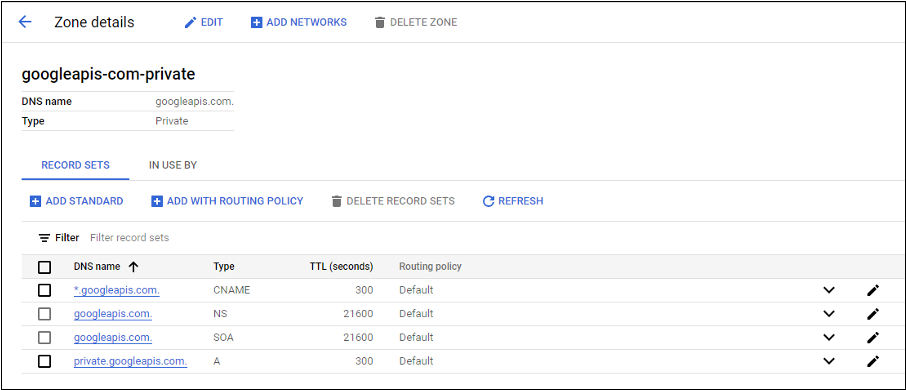
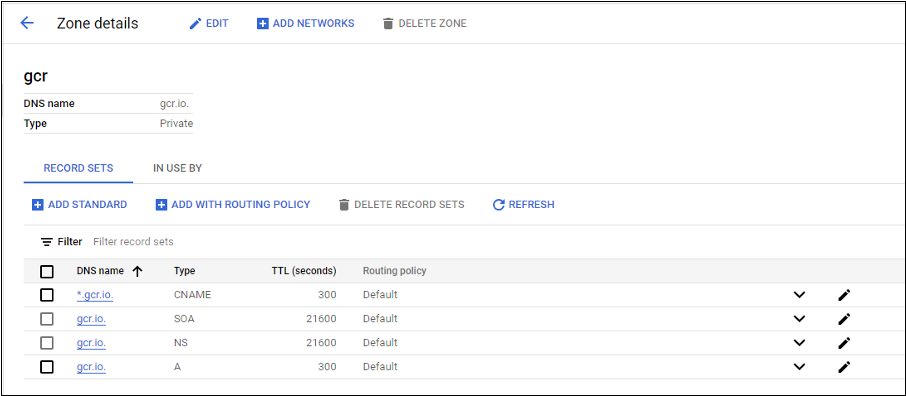
-
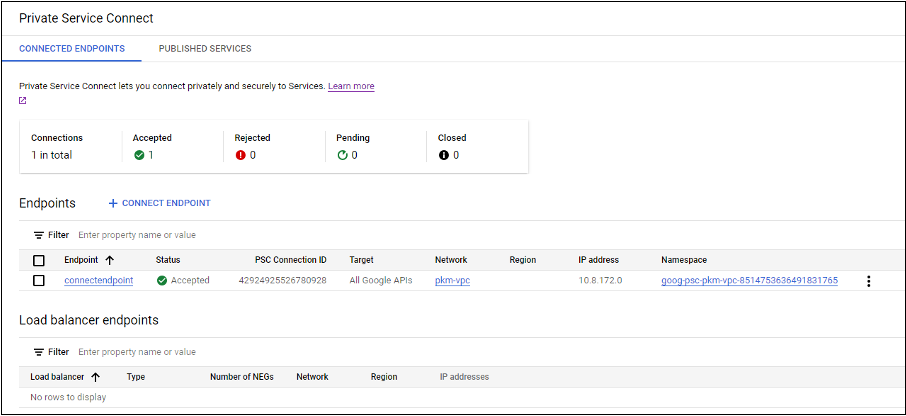
プライベートネットワークアドレス変換 (NAT) を設定するか、プライベートサービス接続を使用します。詳細については、「エンドポイントを介したGoogle APIへのアクセス」を参照してください。
-
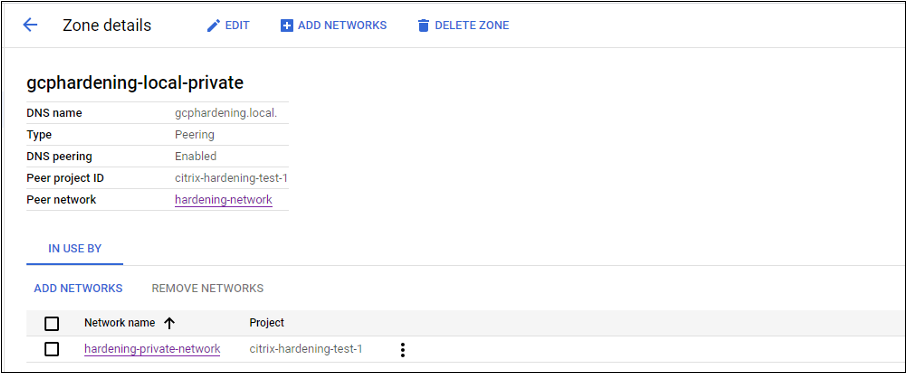
ピアリングされたVPCを使用している場合は、ピアリングされたVPCへのCloud DNSゾーンピアリングを作成します。詳細については、「ピアリングゾーンの作成」を参照してください。
-
VPCサービスコントロールで、APIとVMがインターネットと通信できるようにエグレスルールを設定します。イングレスルールはオプションです。例:
Egress Rule 1
 From:
 Identities:ANY_IDENTITY
 To:
 Projects =
 All projects
 Service =
 Service name: All services
-
プライベートワーカープールを有効にする
プライベートワーカープールを有効にするには、ホスト接続でカスタムプロパティを次のように設定します。
-
Delivery ControllerホストからPowerShellウィンドウを開くか、Remote PowerShell SDKを使用します。Remote PowerShell SDKの詳細については、「SDKとAPI」を参照してください。
-
次のコマンドを実行します。
-
Add-PSSnapin citrix* -
cd XDHyp:\Connections\ -
dir
-
-
接続から
CustomPropertiesをメモ帳にコピーします。 -
プロパティ設定
<Property xsi:type="StringProperty" Name="UsePrivateWorkerPool" Value="True"/>を追加します。例:```
<CustomProperties xmlns:xsi="http://www.w3.org/2001/XMLSchema-instance" xmlns="http://schemas.citrix.com/2014/xd/machinecreation">
<Property xsi:type="StringProperty" Name="UsePrivateWorkerPool" Value="True"/>
</CustomProperties>
``` -
PowerShellウィンドウで、変更されたカスタムプロパティに変数を割り当てます。例:
$customProperty = '<CustomProperties…</CustomProperties>'。 -
$gcpServiceAccount = "<ENTER YOUR SERVICE ACCOUNT EMAIL HERE>"を実行します。 -
$gcpPrivateKey = "<ENTER YOUR SERVICE ACCOUNT PRIVATE KEY HERE AFTER REMOVING ALL INSTANCES OF \n >"を実行します。 -
$securePassword = ConvertTo-SecureString $gcpPrivateKey -AsPlainText -Forceを実行します。 -
既存のホスト接続を更新するには、以下を実行します:
Set-Item -PassThru -Path @('XDHyp:\\Connections\\<ENTER YOUR CONNECTION NAME HERE>') -SecurePassword $securePassword -UserName $gcpServiceAccount -CustomProperties $customProperty
必要なGCP権限
このセクションには、GCP権限の完全なリストが含まれています。機能が正しく動作するように、このセクションに記載されている権限の完全なセットを使用してください。
注:
GCPは、April 29, 2024以降、Cloud Build Servicesのデフォルトの動作とサービスアカウントの使用に変更を導入しています。詳細については、Cloud Build Service Account Changeを参照してください。April 29, 2024より前にCloud Build APIが有効になっている既存のGoogleプロジェクトは、この変更の影響を受けません。ただし、April 29以降も既存のCloud Build Serviceの動作を維持したい場合は、APIを有効にする前に、制約の適用を無効にする組織ポリシーを作成または適用できます。新しい組織ポリシーを設定した場合でも、このセクションの既存の権限と、Before Cloud Build Service Account Changeとマークされている項目に従うことができます。そうでない場合は、既存の権限と、After Cloud Build Service Account Changeとマークされている項目に従ってください。
ホスト接続の作成
-
プロビジョニングプロジェクトにおけるCitrix Cloudサービスアカウントに必要な最小限の権限:
compute.instanceTemplates.list
 compute.instances.list
 compute.networks.list
 compute.projects.get
 compute.regions.list
 compute.subnetworks.list
 compute.zones.list
resourcemanager.projects.get以下のGoogle定義ロールには、上記にリストされている権限があります:-
Compute管理者
-
クラウド データストア ユーザー
-
-
共有VPCプロジェクト内のCitrix Cloudサービスアカウントの共有VPCに必要な追加の権限:
compute.networks.list
 compute.subnetworks.list
resourcemanager.projects.get以下のGoogle定義ロールには、上記にリストされている権限があります:-
コンピュート ネットワーク ユーザー
-
VMの電源管理
電源管理のみのカタログの場合、プロビジョニングプロジェクト内のCitrix Cloudサービスアカウントに必要な最小限の権限:
compute.instanceTemplates.list
 compute.instances.list
 compute.instances.get
 compute.instances.reset
 compute.instances.resume
 compute.instances.start
 compute.instances.stop
 compute.instances.suspend
 compute.networks.list
 compute.projects.get
 compute.regions.list
 compute.subnetworks.list
 compute.zones.list
 resourcemanager.projects.get
 compute.zoneOperations.get
以下のGoogle定義ロールには、上記にリストされている権限があります:
-
Compute 管理者
-
クラウド データストア ユーザー
VMの作成、更新、または削除
-
プロビジョニングプロジェクト内のCitrix Cloudサービスアカウントに必要な最小限の権限:
cloudbuild.builds.create
 cloudbuild.builds.get
 cloudbuild.builds.list
 compute.acceleratorTypes.list
 compute.diskTypes.get
 compute.diskTypes.list
 compute.disks.create
 compute.disks.createSnapshot
 compute.disks.delete
 compute.disks.get
 compute.disks.list
 compute.disks.setLabels
 compute.disks.use
 compute.disks.useReadOnly
 compute.firewalls.create
 compute.firewalls.delete
 compute.firewalls.list
 compute.globalOperations.get
 compute.images.create
 compute.images.delete
 compute.images.get
 compute.images.list
 compute.images.setLabels
 compute.images.useReadOnly
 compute.instanceTemplates.create
 compute.instanceTemplates.delete
 compute.instanceTemplates.get
 compute.instanceTemplates.list
 compute.instanceTemplates.useReadOnly
 compute.instances.attachDisk
 compute.instances.create
 compute.instances.delete
 compute.instances.detachDisk
 compute.instances.get
 compute.instances.list
 compute.instances.reset
 compute.instances.resume
 compute.instances.setDeletionProtection
 compute.instances.setLabels
 compute.instances.setMetadata
 compute.instances.setServiceAccount
 compute.instances.setTags
 compute.instances.start
 compute.instances.stop
 compute.instances.suspend
 compute.machineTypes.get
 compute.machineTypes.list
 compute.networks.list
 compute.networks.updatePolicy
 compute.nodeGroups.list
 compute.nodeTemplates.get
 compute.projects.get
 compute.regions.list
 compute.snapshots.create
 compute.snapshots.delete
 compute.snapshots.list
 compute.snapshots.get
 compute.snapshots.setLabels
 compute.snapshots.useReadOnly
 compute.subnetworks.get
 compute.subnetworks.list
 compute.subnetworks.use
 compute.zoneOperations.get
 compute.zoneOperations.list
 compute.zones.get
 compute.zones.list
 iam.serviceAccounts.actAs
 resourcemanager.projects.get
 storage.buckets.create
 storage.buckets.delete
 storage.buckets.get
 storage.buckets.list
 storage.buckets.update
 storage.objects.create
 storage.objects.delete
 storage.objects.get
 storage.objects.list
 compute.networks.get
 compute.resourcePolicies.use
以下のGoogle定義ロールには、上記にリストされている権限があります:-
Compute 管理者
-
Storage 管理者
-
Cloud Build エディター
-
サービスアカウントユーザー
-
クラウド データストア ユーザー
-
-
Shared VPCプロジェクトのCitrix Cloudサービスアカウントが、Shared VPCプロジェクトのVPCとサブネットワークを使用してホスティングユニットを作成するために必要な追加の権限:
compute.firewalls.list
 compute.networks.list
 compute.projects.get
 compute.regions.list
 compute.subnetworks.get
 compute.subnetworks.list
 compute.subnetworks.use
 compute.zones.list
resourcemanager.projects.get以下のGoogle定義ロールには、上記にリストされている権限があります:-
コンピュートネットワークユーザー
-
クラウド データストア ユーザー
準備指示ディスクをMCSにダウンロードする際に必要な最小限の権限:-
(Cloud Buildサービスアカウントの変更前): これらの権限をプロビジョニングプロジェクトのCloud Buildサービスアカウントに割り当てます。
-
(Cloud Buildサービスアカウントの変更後): これらの権限をプロビジョニングプロジェクトのCloud Computeサービスアカウントに割り当てます。
compute.disks.create
 compute.disks.delete
 compute.disks.get
 compute.disks.list
 compute.disks.setLabels
 compute.disks.use
 compute.disks.useReadOnly
 compute.images.get
 compute.images.list
 compute.images.useReadOnly
 compute.instances.create
 compute.instances.delete
 compute.instances.get
 compute.instances.getSerialPortOutput
 compute.instances.list
 compute.instances.setLabels
 compute.instances.setMetadata
 compute.instances.setServiceAccount
 compute.machineTypes.list
 compute.networks.get
 compute.networks.list
 compute.projects.get
 compute.subnetworks.list
 compute.subnetworks.use
 compute.subnetworks.useExternalIp
 compute.zoneOperations.get
 compute.zones.list
 iam.serviceAccounts.actAs
 logging.logEntries.create
 pubsub.topics.publish
 resourcemanager.projects.get
 source.repos.get
 source.repos.list
 storage.buckets.create
 storage.buckets.get
 storage.buckets.list
 storage.objects.create
 storage.objects.delete
 storage.objects.get
storage.objects.list以下のGoogle定義ロールには、上記にリストされている権限があります:-
Cloud Buildサービスアカウント (Cloud Buildサービスアカウントの変更後はCloud Computeサービスアカウント)
-
Compute Instance 管理者
-
サービスアカウントユーザー
-
-
準備指示ディスクをMCSにダウンロードする際に、Google Cloud BuildサービスがプロビジョニングプロジェクトのCloud Computeサービスアカウントに要求する最小限の権限:
resourcemanager.projects.get
 storage.objects.create
 storage.objects.get
storage.objects.list以下のGoogle定義ロールには、上記にリストされている権限があります:-
コンピュートネットワークユーザー
-
ストレージアカウントユーザー
-
Cloud Datastore 利用者
MCSに準備指示ディスクをダウンロードする際に、共有VPCに必要とされる追加の権限:-
(Cloud Buildサービスアカウントの変更前): これらの権限をプロビジョニングプロジェクトのCloud Buildサービスアカウントに割り当てます。
-
(Cloud Buildサービスアカウントの変更後): これらの権限をプロビジョニングプロジェクトのCloud Computeサービスアカウントに割り当てます。
compute.firewalls.list
 compute.networks.list
 compute.subnetworks.list
 compute.subnetworks.use
resourcemanager.projects.get以下のGoogle定義ロールには、上記にリストされている権限があります:-
Compute Network 利用者
-
ストレージアカウントユーザー
-
Cloud Datastore 利用者
-
-
プロビジョニングプロジェクトのCitrix CloudサービスアカウントのCloud Key Management Service (KMS) に必要となる追加の権限:
cloudkms.cryptoKeys.get
 cloudkms.cryptoKeys.list
 cloudkms.keyRings.get
cloudkms.keyRings.list以下のGoogle定義ロールには、上記にリストされている権限があります:-
Compute KMS 閲覧者
-
一般的な権限
以下は、MCSでサポートされるすべての機能について、プロビジョニングプロジェクトのCitrix Cloudサービスアカウントに対する権限です。これらの権限は、今後の最適な互換性を提供します:
resourcemanager.projects.get
 cloudbuild.builds.create
 cloudbuild.builds.get
 cloudbuild.builds.list
 compute.acceleratorTypes.list
 compute.diskTypes.get
 compute.diskTypes.list
 compute.disks.create
 compute.disks.createSnapshot
 compute.disks.delete
 compute.disks.get
 compute.disks.setLabels
 compute.disks.use
 compute.disks.useReadOnly
 compute.firewalls.create
 compute.firewalls.delete
 compute.firewalls.list
 compute.globalOperations.get
 compute.images.create
 compute.images.delete
 compute.images.get
 compute.images.list
 compute.images.setLabels
 compute.images.useReadOnly
 compute.instanceTemplates.create
 compute.instanceTemplates.delete
 compute.instanceTemplates.get
 compute.instanceTemplates.list
 compute.instanceTemplates.useReadOnly
 compute.instances.attachDisk
 compute.instances.create
 compute.instances.delete
 compute.instances.detachDisk
 compute.instances.get
 compute.instances.list
 compute.instances.reset
 compute.instances.resume
 compute.instances.setDeletionProtection
 compute.instances.setLabels
 compute.instances.setMetadata
 compute.instances.setTags
 compute.instances.start
 compute.instances.stop
 compute.instances.suspend
 compute.instances.update
 compute.instances.updateAccessConfig
 compute.instances.updateDisplayDevice
 compute.instances.updateSecurity
 compute.instances.updateShieldedInstanceConfig
 compute.instances.updateShieldedVmConfig
 compute.machineTypes.get
 compute.machineTypes.list
 compute.networks.list
 compute.networks.updatePolicy
 compute.nodeGroups.list
 compute.nodeTemplates.get
 compute.projects.get
 compute.regions.list
 compute.snapshots.create
 compute.snapshots.delete
 compute.snapshots.list
 compute.snapshots.get
 compute.snapshots.setLabels
 compute.snapshots.useReadOnly
 compute.subnetworks.get
 compute.subnetworks.list
 compute.subnetworks.use
 compute.subnetworks.useExternalIp
 compute.zoneOperations.get
 compute.zoneOperations.list
 compute.zones.get
 compute.zones.list
 resourcemanager.projects.get
 storage.buckets.create
 storage.buckets.delete
 storage.buckets.get
 storage.buckets.list
 storage.buckets.update
 storage.objects.create
 storage.objects.delete
 storage.objects.get
 storage.objects.list
 cloudkms.cryptoKeys.get
 cloudkms.cryptoKeys.list
 cloudkms.keyRings.get
 cloudkms.keyRings.list
 compute.disks.list
 compute.instances.setServiceAccount
 compute.networks.get
 compute.networks.use
 compute.networks.useExternalIp
 iam.serviceAccounts.actAs
 compute.resourcePolicies.use
次のステップ
-
初期展開プロセス中の場合は、「マシンカタログの作成」(/ja-jp/citrix-virtual-apps-desktops/2407/install-configure/machine-catalogs-create.html)を参照してください。
-
Google Cloud Platform (GCP) 固有の情報については、「Google Cloud Platformカタログの作成」(/ja-jp/citrix-virtual-apps-desktops/2407/install-configure/machine-catalogs-create/create-machine-catalog-gcp.html)を参照してください。
詳細情報
-
接続とリソース(/ja-jp/citrix-virtual-apps-desktops/2407/manage-deployment/connections.html)
-
マシンカタログの作成(/ja-jp/citrix-virtual-apps-desktops/2407/install-configure/machine-catalogs-create.html)