-
-
-
-
SAML Main Logout Considerations
-
SAML using Entra ID for Guest and B2B identities for store authentication
-
This content has been machine translated dynamically.
Dieser Inhalt ist eine maschinelle Übersetzung, die dynamisch erstellt wurde. (Haftungsausschluss)
Cet article a été traduit automatiquement de manière dynamique. (Clause de non responsabilité)
Este artículo lo ha traducido una máquina de forma dinámica. (Aviso legal)
此内容已经过机器动态翻译。 放弃
このコンテンツは動的に機械翻訳されています。免責事項
이 콘텐츠는 동적으로 기계 번역되었습니다. 책임 부인
Este texto foi traduzido automaticamente. (Aviso legal)
Questo contenuto è stato tradotto dinamicamente con traduzione automatica.(Esclusione di responsabilità))
This article has been machine translated.
Dieser Artikel wurde maschinell übersetzt. (Haftungsausschluss)
Ce article a été traduit automatiquement. (Clause de non responsabilité)
Este artículo ha sido traducido automáticamente. (Aviso legal)
この記事は機械翻訳されています.免責事項
이 기사는 기계 번역되었습니다.책임 부인
Este artigo foi traduzido automaticamente.(Aviso legal)
这篇文章已经过机器翻译.放弃
Questo articolo è stato tradotto automaticamente.(Esclusione di responsabilità))
Translation failed!
SAML Logout Considerations
For Identity Provider Logout URL (SLO), decide the SAML logout behaviour most appropriate for your organization based on whether the SAML application you wish to connect to Citrix Cloud is also shared by other service providers (SPs) or not.
Citrix recommends creating a new dedicated SAML application within your SAML provider, which is used by only store and/or Citrix Cloud. If you have followed one of Citrix’s SAML application setup guides and you are using a dedicated SAML application for store and/or Citrix Cloud then configuring a Logout URL is always the correct course of action.
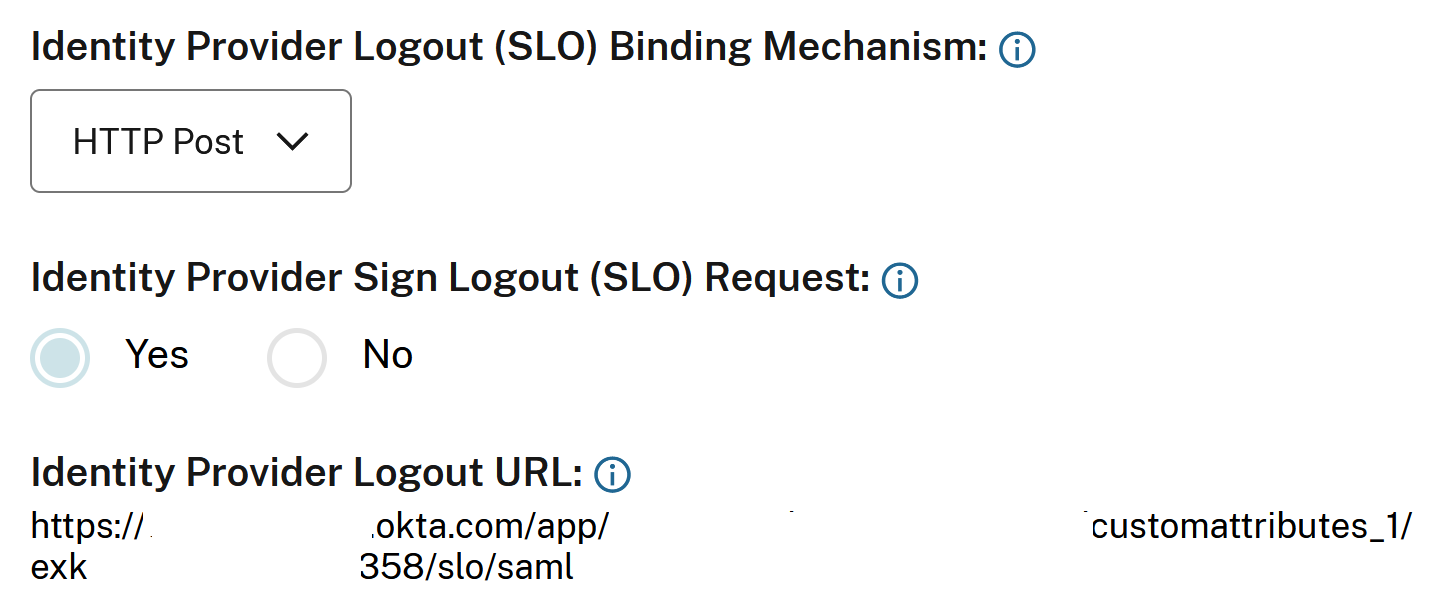
Option1 SLO Configured (Recommended): Users signing out of store and/or Citrix Cloud also sign out of the connected SAML IDP.
Important:
For SAML SLO to succeed you must configure both sides of the SAML connection to support it. Citrix Cloud expects to receive an SLO response from the SAML application indicating the logout succeeded and the user was logged out of the SAML IDP. Ensure your SAML application is configured to send the SLO response back to Citrix Cloud using this SAML logout endpoint
https://saml.cloud.com/saml/logout/callback.
OR
Option 2 SLO not configured: If you want users to stay signed into your SAML application after signing out of store and/or Citrix Cloud, leave the Logout URL field empty inside the Citrix Cloud SAML connection. When an end user performs an explicit logout in the store or Citrix Cloud UI this will only log the user out of store or Citrix Cloud. The user will not be logged out of the SAML IDP and no SLO request will be sent from Citrix Cloud to the SAML application.

Important:
This SAML Connection configuration without a logout URL configured is only recommended if the SAML application connected to Citrix Cloud is shared by other non Citrix service providers (SPs)
Store Session Inactivity Timeout Behaviour
When an end user does not perform any action within stores then the session inactivity timeout will trigger a log off from stores. The stores inactivity timeout is defined in StoreFront Cloud → Customize → Preferences → Store sessions.
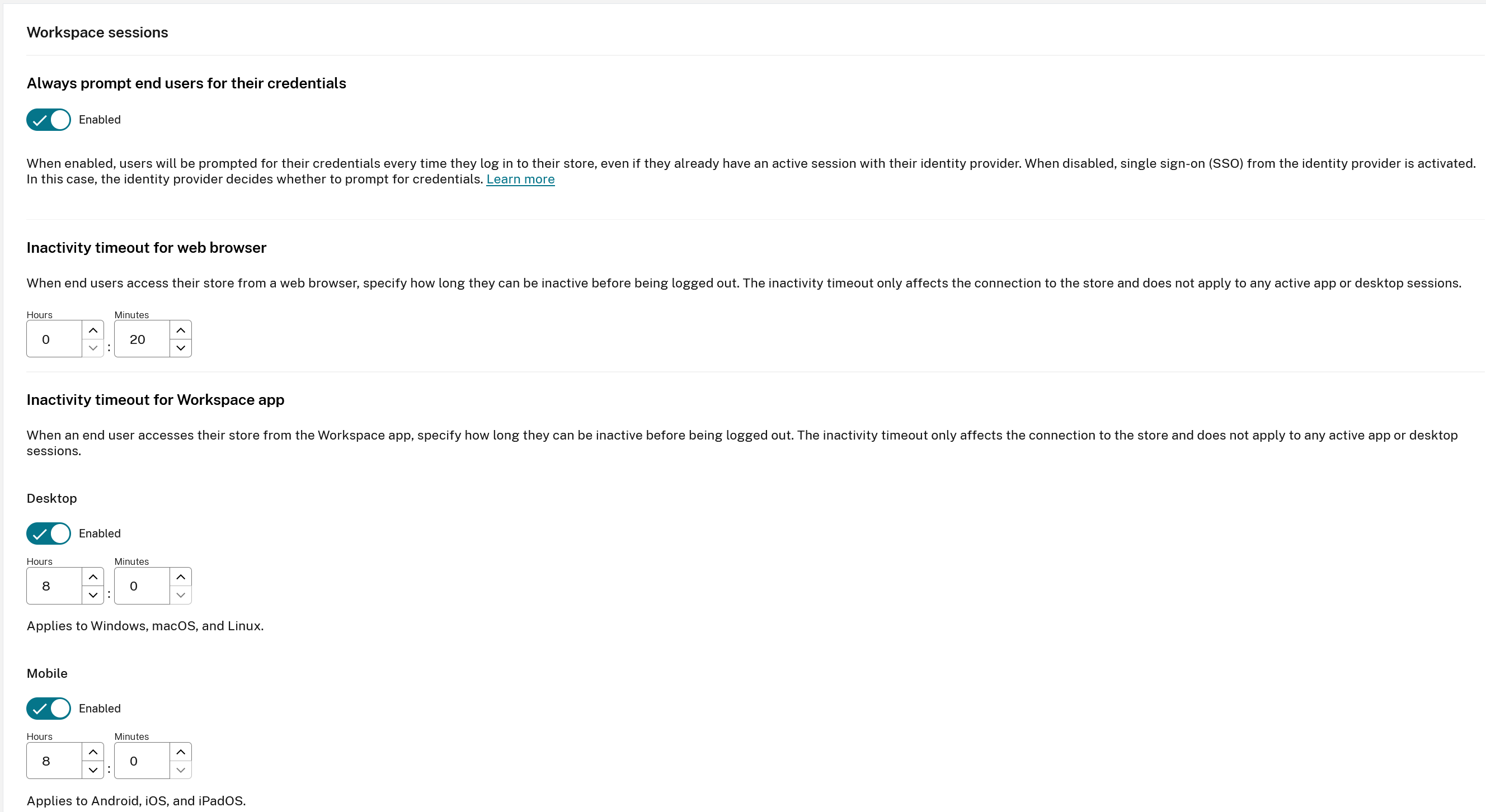
The stores inactivity timeout does not trigger an SLO request to log the end user out of the SAML IdP. The SAML IdP idle session timeout may be a different value to what is set inside store. It is recommended you should set them to be the same duration if possible.
Set Always Prompt End Users for their credentials to Enabled within toreFront Cloud → Customize → Preferences to ensure the end user is always prompted to reauthenticate even if a SAML provider session still exists for the user.
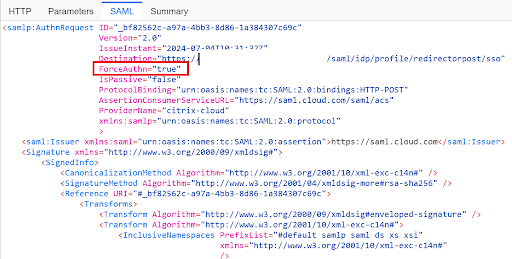
Setting Always Prompt End Users for their credentials to Enabled also sets ForceAuthn to True within the SAML request.
Share
Share
In this article
This Preview product documentation is Citrix Confidential.
You agree to hold this documentation confidential pursuant to the terms of your Citrix Beta/Tech Preview Agreement.
The development, release and timing of any features or functionality described in the Preview documentation remains at our sole discretion and are subject to change without notice or consultation.
The documentation is for informational purposes only and is not a commitment, promise or legal obligation to deliver any material, code or functionality and should not be relied upon in making Citrix product purchase decisions.
If you do not agree, select I DO NOT AGREE to exit.