
Citrix AnalyticsのSIEM向けデータエクスポート形式
Citrix Analytics for Security™ は、セキュリティ情報およびイベント管理 (SIEM) サービスとの統合を可能にします。この統合により、Citrix Analytics for Security は SIEM サービスにデータを送信し、組織のセキュリティリスク状況を把握するのに役立ちます。
現在、Citrix Analytics for Security を以下の SIEM サービスと統合できます。
データエクスポートオプションは、設定の下でグローバルに利用可能になりました。データソースイベントを表示するには、設定 > データエクスポート > データソースイベントに移動します。
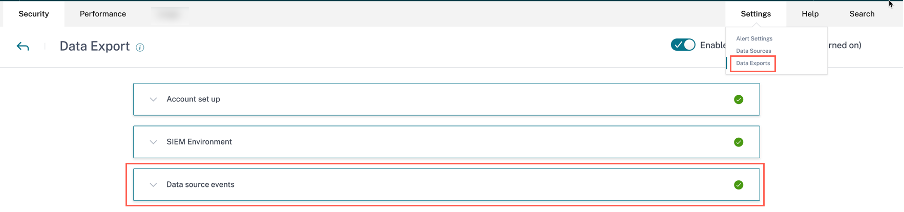
Citrix Analytics for Security が SIEM サービスに送信するリスクインサイトデータは、次の2種類です。
-
リスクインサイトイベント (デフォルトエクスポート)
-
データソースイベント (オプションエクスポート)
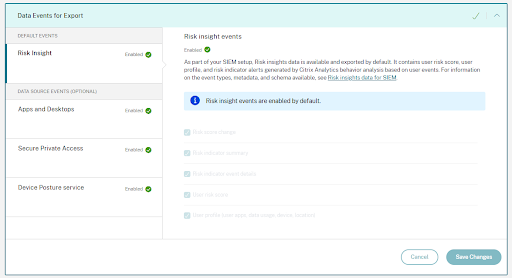
SIEM向けリスクインサイトデータ
アカウント設定とSIEMセットアップが完了すると、デフォルトのデータセット (リスクインサイトイベント) がSIEM展開に流れ込み始めます。リスクインサイトデータセットには、ユーザーリスクスコアイベント、ユーザープロファイルイベント、およびリスクインジケーターアラートが含まれます。これらは、Citrix Analyticsの機械学習アルゴリズムとユーザー行動分析によって、ユーザーイベントを活用して生成されます。
ユーザーのリスクインサイトデータセットには、以下が含まれます。
-
リスクスコアの変更: ユーザーのリスクスコアの変更を示します。ユーザーのリスクスコアの変更が3以上で、この変更が任意の割合で増加するか、10%を超えて減少した場合、データはSIEMサービスに送信されます。
-
リスクインジケーターの概要: ユーザーに対してトリガーされたリスクインジケーターの詳細。
-
リスクインジケーターイベントの詳細: リスクインジケーターに関連付けられたユーザーイベント。Citrix Analyticsは、各リスクインジケーターの発生につき最大1000件のイベント詳細をSIEMサービスに送信します。これらのイベントは発生順に送信されます。
-
ユーザーリスクスコアイベント: ユーザーの現在のリスクスコア。Citrix Analytics for Securityは、このデータを12時間ごとにSIEMサービスに送信します。
-
ユーザープロファイル: ユーザープロファイルデータは、以下に分類できます。
-
ユーザーアプリ: ユーザーが起動して使用したアプリケーション。Citrix Analytics for Securityは、このデータをCitrix Virtual Apps™から取得し、12時間ごとにSIEMサービスに送信します。
-
ユーザーデバイス: ユーザーに関連付けられたデバイス。Citrix Analytics for Securityは、このデータをCitrix Virtual AppsおよびCitrix Endpoint Management™から取得し、12時間ごとにSIEMサービスに送信します。
-
ユーザーの場所: ユーザーが最後に検出された都市。Citrix Analytics for Securityは、このデータをCitrix Virtual Apps and Desktops™およびCitrix DaaS(旧Citrix Virtual Apps and Desktopsサービス)から取得します。Citrix Analytics for Securityは、この情報を12時間ごとにSIEMサービスに送信します。
-
ユーザークライアントIP: ユーザーデバイスのクライアントIPアドレス。Citrix Analytics for Securityは、このデータをCitrix Virtual Apps and DesktopsおよびCitrix DaaS™(旧Citrix Virtual Apps and Desktopsサービス)から取得し、この情報を12時間ごとにSIEMサービスに送信します。
-
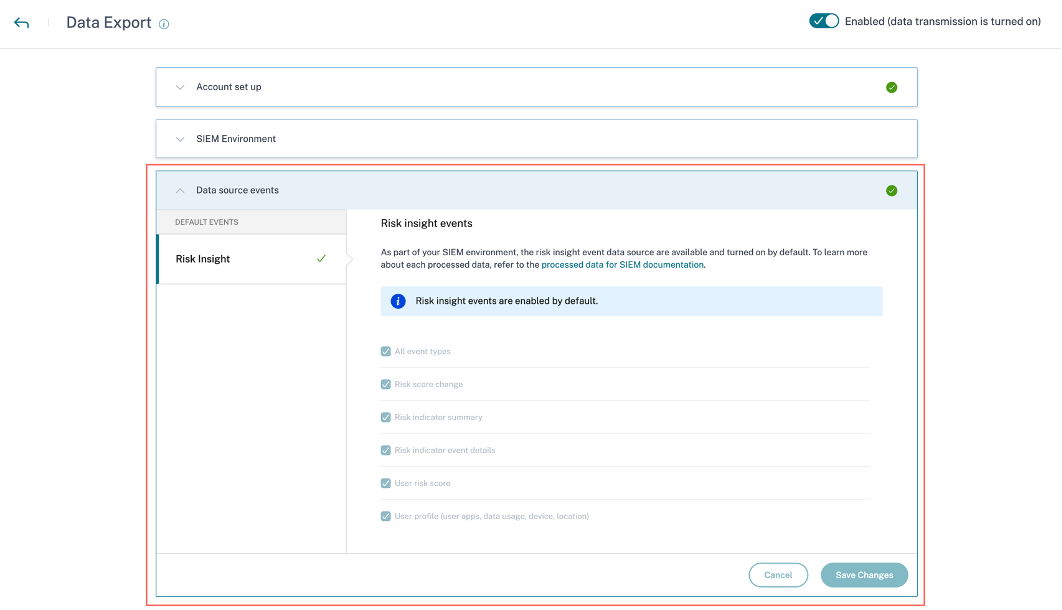
データソースイベントの基本設定を表示できるが構成できない場合は、必要な管理者権限がありません。 詳細については、「セキュリティ分析の管理者ロールの管理」を参照してください。
次の例では、変更を保存ボタンが無効になっています。リスクインサイトイベントはデフォルトで有効になっています。
リスクインサイトイベントのスキーマ詳細
次のセクションでは、Citrix Analytics for Securityによって生成される処理済みデータのスキーマについて説明します。
注記
以下のスキーマサンプルに示されているフィールド値は、あくまでも例示目的です。実際のフィールド値は、ユーザープロファイル、ユーザーイベント、およびリスクインジケーターに基づいて異なります。
以下の表は、すべてのユーザープロファイルデータ、ユーザーリスクスコア、およびリスクスコアの変更のスキーマ全体で共通のフィールド名について説明しています。
| フィールド名 | 説明 |
|---|---|
entity_id |
エンティティに関連付けられたID。この場合、エンティティはユーザーです。 |
entity_type |
リスクのあるエンティティ。この場合、エンティティはユーザーです。 |
event_type |
SIEMサービスに送信されるデータの種類。例:ユーザーの場所、ユーザーのデータ使用量、またはユーザーのデバイスアクセス情報。 |
tenant_id |
顧客の一意のID。 |
timestamp |
最近のユーザーアクティビティの日時。 |
version |
処理されたデータのスキーマバージョン。現在のスキーマバージョンは2です。 |
ユーザープロファイルデータスキーマ
ユーザーロケーションスキーマ
 {
   "tenant_id": "demo_tenant", "entity_id": "demo_user", "entity_type": "user", "timestamp": "2021-02-10T15:00:00Z", "event_type": "userProfileLocation", "country": "India", "city": "Bengaluru", "cnt": 4, "version": 2
   }
ユーザーロケーションのフィールド説明
| フィールド名 | 説明 |
|---|---|
event_type |
SIEMサービスに送信されるデータの種類。この場合、イベントタイプはユーザーのロケーションです。 |
country |
ユーザーがログインした国。 |
city |
ユーザーがログインした都市。 |
cnt |
過去12時間でそのロケーションにアクセスされた回数。 |
ユーザーのクライアントIPスキーマ
 {
   "client_ip": "149.147.136.10",
   "cnt": 3,
   "entity_id": "r2_up_user_1",
   "entity_type": "user",
   "event_type": "userProfileClientIps",
   "tenant_id": "xaxddaily1",
   "timestamp": "2023-09-18T10:45:00Z",
   "version": 2
 }
クライアントIPのフィールドの説明
| フィールド名 | 説明 |
|---|---|
client_ip |
ユーザーデバイスのIPアドレス。 |
cnt |
過去12時間以内にユーザーがデバイスにアクセスした回数。 |
entity_id |
エンティティに関連付けられたID。この場合、エンティティはユーザーです。 |
entity_type |
リスクのあるエンティティ。この場合、イベントタイプはユーザーのクライアントIPです。 |
event_type |
SIEMサービスに送信されるデータの種類。例: ユーザーの場所、ユーザーのデータ使用量、またはユーザーのデバイスアクセス情報。 |
tenant_id |
顧客の一意のID。 |
timestamp |
最近のユーザーアクティビティの日時。 |
version |
処理されたデータのスキーマバージョン。現在のスキーマバージョンは2です。 |
ユーザーデータ使用量スキーマ
 {
   "data_usage_bytes": 87555255, "deleted_file_cnt": 0, "downloaded_bytes": 87555255, "downloaded_file_cnt": 5, "entity_id": "demo@demo.com", "entity_type": "user", "event_type": "userProfileUsage", "shared_file_cnt": 0, "tenant_id": "demo_tenant", "timestamp": "2021-02-10T21:00:00Z", "uploaded_bytes": 0, "uploaded_file_cnt": 0, "version": 2
   }
ユーザーデータ使用量のフィールド説明
| フィールド名 | 説明 |
|---|---|
data_usage_bytes |
ユーザーが使用したデータ量(バイト単位)。これは、ユーザーのダウンロードおよびアップロードされたボリュームの合計です。 |
deleted_file_cnt |
ユーザーによって削除されたファイルの数。 |
downloaded_bytes |
ユーザーがダウンロードしたデータ量。 |
downloaded_file_count |
ユーザーがダウンロードしたファイルの数。 |
event_type |
SIEMサービスに送信されるデータの種類。この場合、イベントタイプはユーザーの使用状況プロファイルです。 |
shared_file_count |
ユーザーが共有したファイルの数。 |
uploaded_bytes |
ユーザーがアップロードしたデータの量。 |
uploaded_file_cnt |
ユーザーがアップロードしたファイルの数。 |
ユーザーデバイススキーマ
 {
   "cnt": 2, "device": "user1612978536 (Windows)", "entity_id": "demo", "entity_type": "user", "event_type": "userProfileDevice", "tenant_id": "demo_tenant", "timestamp": "2021-02-10T21:00:00Z", "version": 2
   }
ユーザーデバイスのフィールド説明。
| フィールド名 | 説明 |
|---|---|
cnt |
過去12時間でデバイスにアクセスされた回数。 |
device |
デバイスの名前。 |
event_type |
SIEMサービスに送信されるデータの種類。この場合、イベントタイプはユーザーのデバイスアクセス情報です。 |
ユーザーアプリのスキーマ
 {
   "tenant_id": "demo_tenant", "entity_id": "demo", "entity_type": "user", "timestamp": "2021-02-10T21:00:00Z", "event_type": "userProfileApp", "version": 2, "session_domain": "99e38d488136f62f828d4823edd120b4f32d724396a7410e6dd1b0", "user_samaccountname": "testnameeikragz779", "app": "Chromeeikragz779", "cnt": 189
   }
ユーザーアプリのフィールドの説明。
| フィールド名 | 説明 |
|---|---|
event_type |
SIEMサービスに送信されるデータの種類。この場合、イベントタイプはユーザーのデバイスアクセス情報です。 |
session_domain |
ユーザーがログオンしたセッションのID。 |
user_samaccountname |
Windows NT 4.0、Windows 95、Windows 98、LAN Managerなどの以前のバージョンのWindowsのクライアントおよびサーバーのログオン名。この名前は、Citrix StoreFrontへのログオン、およびリモートWindowsマシンへのログオンに使用されます。 |
app |
ユーザーがアクセスしたアプリケーションの名前。 |
cnt |
過去12時間でアプリケーションにアクセスされた回数。 |
ユーザーリスクスコアのスキーマ
 {
   "cur_riskscore": 7, "entity_id": "demo", "entity_type": "user", "event_type": "userProfileRiskscore", "last_update_timestamp": "2021-01-21T16:14:29Z", "tenant_id": "demo_tenant", "timestamp": "2021-02-10T20:45:00Z", "version": 2
   }
ユーザーリスクスコアのフィールド説明。
| フィールド名 | 説明 |
|---|---|
cur_riskscore |
ユーザーに割り当てられた現在のリスクスコア。リスクスコアは、ユーザーのアクティビティに関連する脅威の重大度に応じて0から100まで変化します。 |
event_type |
SIEMサービスに送信されるデータの種類。この場合、イベントタイプはユーザーのリスクスコアです。 |
last_update_timestamp |
ユーザーのリスクスコアが最後に更新された時刻。 |
timestamp |
ユーザーのリスクスコアイベントが収集され、SIEMサービスに送信される時刻。このイベントは12時間ごとにSIEMサービスに送信されます。 |
リスクスコア変更スキーマ
サンプル 1:
 {
   "alert_message": "Large risk score drop percent since last check", "alert_type": "riskscore_large_drop_pct", "alert_value": -21.73913, "cur_riskscore": 18, "entity_id": "demo_user", "entity_type": "user", "event_type": "riskScoreChange", "tenant_id": "demo_tenant", "timestamp": "2021-02-11T05:45:00Z", "version": 2
   }
サンプル 2:
 {
   "alert_message": "Risk score increase since last check", "alert_type": "riskscore_increase", "alert_value": 39.0, "cur_riskscore": 76, "entity_id": "demo_user", "entity_type": "user", "event_type": "riskScoreChange", "tenant_id": "demo_tenant", "timestamp": "2021-02-11T03:45:00Z", "version": 2
   }
リスクスコア変更のフィールド説明。
| フィールド名 | 説明 |
|---|---|
alert_message |
リスクスコア変更に対して表示されるメッセージ。 |
alert_type |
アラートがリスクスコアの増加によるものか、リスクスコアの割合の大幅な低下によるものかを示します。ユーザーのリスクスコアの変化が3以上であり、この変化がどのような割合であっても増加するか、または10%を超えて低下した場合、データはSIEMサービスに送信されます。 |
alert_value |
リスクスコア変更に割り当てられた数値。リスクスコア変更は、ユーザーの現在のリスクスコアと以前のリスクスコアの差です。アラート値は-100から100まで変化します。 |
cur_riskscore |
ユーザーに割り当てられた現在のリスクスコア。リスクスコアは、ユーザーのアクティビティに関連する脅威の重大度に応じて0から100まで変化します。 |
event_type |
SIEMサービスに送信されるデータの種類です。この場合、イベントタイプはユーザーのリスクスコアの変更です。 |
timestamp |
ユーザーのリスクスコアの最新の変更が検出された日時。 |
リスクインジケータスキーマ
リスクインジケータスキーマは、インジケータサマリースキーマとインジケータイベント詳細スキーマの2つの部分で構成されています。リスクインジケータに基づいて、スキーマ内のフィールドとその値がそれに応じて変化します。
次の表は、すべてのインジケータサマリースキーマに共通するフィールド名を示しています。
| フィールド名 | 説明 |
|---|---|
data source |
Citrix Analytics for Security にデータを送信する製品。例えば: Citrix Secure Private Access™、Citrix Gateway、および Citrix Apps and Desktops。 |
data_source_id |
データソースに関連付けられたID。ID 1 = シトリックス ゲートウェイ、ID 2 = シトリックス エンドポイント マネジメント、ID 3 = シトリックス アプリケーションズ アンド デスクトップス、ID 4 = シトリックス セキュア プライベート アクセス |
entity_type |
リスクのあるエンティティ。ユーザーである可能性があります。 |
entity_id |
リスクのあるエンティティに関連付けられたID。 |
event_type |
SIEMサービスに送信されるデータの種類。この場合、イベントタイプはリスクインジケーターの概要です。 |
indicator_category |
リスクインジケーターのカテゴリを示します。リスクインジケーターは、侵害されたエンドポイント、侵害されたユーザー、データ漏洩、内部脅威のいずれかのリスクカテゴリにグループ化されます。 |
indicator_id |
リスクインジケーターに関連付けられた一意のID。 |
indicator_category_id |
リスクインジケーターカテゴリに関連付けられたID。ID 1 = データ漏洩、ID 2 = 内部脅威、ID 3 = 侵害されたユーザー、ID 4 = 侵害されたエンドポイント |
indicator_name |
リスクインジケーターの名前。カスタムリスクインジケーターの場合、この名前はインジケーターの作成時に定義されます。 |
indicator_type |
リスクインジケーターがデフォルト(組み込み)かカスタムかを示します。 |
indicator_uuid |
リスクインジケーターインスタンスに関連付けられた一意のID。 |
indicator_vector_name |
リスクインジケーターに関連付けられたリスクベクトルを示します。リスクベクトルは、デバイスベースのリスクインジケーター、場所ベースのリスクインジケーター、ログオン失敗ベースのリスクインジケーター、IPベースのリスクインジケーター、データベースのリスクインジケーター、ファイルベースのリスクインジケーター、およびその他のリスクインジケーターです。 |
indicator_vector_id |
リスクベクトルに関連付けられたID。ID 1 = デバイスベースのリスクインジケーター、ID 2 = 場所ベースのリスクインジケーター、ID 3 = ログオン失敗ベースのリスクインジケーター、ID 4 = IPベースのリスクインジケーター、ID 5 = データベースのリスクインジケーター、ID 6 = ファイルベースのリスクインジケーター、ID 7 = その他のリスクインジケーター、ID 999 = 利用不可。 |
occurrence_details |
リスクインジケーターのトリガー条件に関する詳細。 |
risk_probability |
ユーザーイベントに関連するリスクの可能性を示します。値は0から1.0まで変化します。カスタムリスクインジケーターの場合、ポリシーベースのインジケーターであるため、risk_probabilityは常に1.0です。 |
severity |
リスクの重大度を示します。低、中、高のいずれかです。 |
tenant_id |
顧客の一意のID。 |
timestamp |
リスクインジケーターがトリガーされた日付と時刻。 |
ui_link |
Citrix Analyticsユーザーインターフェイス上のユーザータイムラインビューへのリンク。 |
observation_start_time |
Citrix Analyticsがユーザーアクティビティの監視を開始する時刻からタイムスタンプまでの時間。この期間中に異常な動作が検出された場合、リスクインジケーターがトリガーされます。 |
次の表は、すべてのインジケーターイベント詳細スキーマに共通するフィールド名について説明しています。
| フィールド名 | 説明 |
|---|---|
data_source_id |
データソースに割り当てられているIDです。ID 1 は Citrix Gateway、ID 2 は Citrix Endpoint Management、ID 3 は Citrix Apps and Desktops、ID 4 は Citrix Secure Private Access です。 |
indicator_category_id |
リスクインジケーターカテゴリに関連付けられたID。ID 1 = データ持ち出し、ID 2 = 内部脅威、ID 3 = 侵害されたユーザー、ID 4 = 侵害されたエンドポイント |
entity_id |
リスクのあるエンティティに関連付けられたID。 |
entity_type |
リスクのあるエンティティ。ユーザーである可能性があります。 |
event_type |
SIEMサービスに送信されるデータの種類。この場合、イベントタイプはリスクインジケーターイベントの詳細です。 |
indicator_id |
リスクインジケーターに関連付けられた一意のID。 |
indicator_uuid |
リスクインジケーターインスタンスに関連付けられた一意のID。 |
indicator_vector_name |
リスクインジケーターに関連付けられたリスクベクトルを示します。リスクベクトルは、デバイスベースのリスクインジケーター、場所ベースのリスクインジケーター、ログオン失敗ベースのリスクインジケーター、IPベースのリスクインジケーター、データベースのリスクインジケーター、ファイルベースのリスクインジケーター、およびその他のリスクインジケーターです。 |
indicator_vector_id |
リスクベクトルに関連付けられたID。ID 1 = デバイスベースのリスクインジケーター、ID 2 = 場所ベースのリスクインジケーター、ID 3 = ログオン失敗ベースのリスクインジケーター、ID 4 = IPベースのリスクインジケーター、ID 5 = データベースのリスクインジケーター、ID 6 = ファイルベースのリスクインジケーター、ID 7 = その他のリスクインジケーター、および ID 999 = 利用不可 |
tenant_id |
顧客の一意のID。 |
timestamp |
リスクインジケーターがトリガーされた日付と時刻。 |
version |
処理されたデータのスキーマバージョン。現在のスキーマバージョンは2です。 |
client_ip |
ユーザーデバイスのIPアドレス。 |
注
-
整数データ型のフィールド値が利用できない場合、割り当てられる値は-999です。例えば、
"latitude": -999、"longitude": -999。 -
文字列データ型のフィールド値が利用できない場合、割り当てられる値はNAです。例えば、
"city": "NA"、"region": "NA"。
Citrix Secure Private Accessリスクインジケータースキーマ
ブラックリストに登録されたURLへのアクセス試行リスクインジケータースキーマ
インジケーターサマリースキーマ
 {
   "tenant_id": "demo_tenant",
   "indicator_id": 401,
   "indicator_uuid": "8f2a39bd-c7c2-5555-a86a-5cfe5b64dfef",
   "indicator_category_id": 2,
   "indicator_vector": {
     "name": "Other Risk Indicators",
     "id": 7 },
   "data_source_id": 4,
   "timestamp": "2018-03-15T10:59:58Z",
   "event_type": "indicatorSummary",
   "entity_type": "user",
   "entity_id": "demo_user",
   "version": 2,
   "risk_probability": 1,
   "indicator_category": "Insider threats",
   "indicator_name": "Attempt to access blacklisted URL",
   "severity": "low",
   "data_source": "Citrix Secure Private Access",
   "ui_link": "https://analytics.cloud.com/user/",
   "indicator_type": "builtin",
   "occurrence_details": {
     "observation_start_time": "2018-03-15T10:44:59Z",
     "relevant_event_type": "Blacklisted External Resource Access"
   }
 }
インジケーターイベント詳細スキーマ
 {
   "tenant_id": "demo_tenant",
   "indicator_id": 401,
   "indicator_uuid": "c421f3f8-33d8-59b9-ad47-715b9d4f65f4",
   "indicator_category_id": 2,
   "indicator_vector": {
     "name": "Other Risk Indicators",
     "id": 7 },
   "data_source_id": 4,
   "timestamp": "2018-03-15T10:57:21Z",
   "event_type": "indicatorEventDetails",
   "entity_type": "user",
   "entity_id": "demo_user",
   "version": 2,
   "domain_name": "googleads.g.doubleclick.net",
   "executed_action": "blocked",
   "reason_for_action": "URL Category match",
   "client_ip": "157.xx.xxx.xxx"
 }
次の表は、ブラックリストに登録されたURLへのアクセス試行のサマリースキーマとイベント詳細スキーマに固有のフィールド名について説明しています。
| フィールド名 | 説明 |
|---|---|
observation_start_time |
Citrix Analyticsがユーザーアクティビティの監視を開始した時刻からタイムスタンプまでの時間。この期間中に異常な動作が検出された場合、リスクインジケーターがトリガーされます。 |
executed_action |
ブラックリストに登録されたURLに適用されたアクション。アクションには「許可」と「ブロック」が含まれます。 |
reason_for_action |
URLにアクションを適用する理由。 |
過剰なデータダウンロードのリスクインジケーターのスキーマ
インジケーターの概要スキーマ
 {
   "tenant_id": "demo_tenant",
   "indicator_id": 403,
   "indicator_uuid": "67d21b81-a89a-531e-af0b-c5688c2e9d40",
   "indicator_category_id": 2,
   "indicator_vector": {
     "name": "Other Risk Indicators",
     "id": 7 },
   "data_source_id": 4,
   "timestamp": "2018-03-16T10:59:59Z",
   "event_type": "indicatorSummary",
   "entity_type": "user",
   "entity_id": "demo_user",
   "version": 2,
   "risk_probability": 1,
   "indicator_category": "Insider threats",
   "indicator_name": "Excessive data download",
   "severity": "low",
   "data_source": "Citrix Secure Private Access",
   "ui_link": "https://analytics.cloud.com/user/",
   "indicator_type": "builtin",
   "occurrence_details": {
     "observation_start_time": "2018-03-16T10:00:00Z",
     "data_volume_in_bytes": 24000,
     "relevant_event_type": "External Resource Access"
   }
 }
インジケーターイベントの詳細スキーマ
 {
   "tenant_id": "demo_tenant",
   "indicator_id": 403,
   "indicator_uuid": "67d21b81-a89a-531e-af0b-c5688c2e9d40",
   "indicator_category_id": 2,
   "indicator_vector": {
     "name": "Other Risk Indicators",
     "id": 7 },
   "data_source_id": 4,
   "timestamp": "2018-03-16T10:30:00Z",
   "event_type": "indicatorEventDetails",
   "entity_type": "user",
   "entity_id": "demo_user",
   "version": 2,
   "domain_name": "www.facebook.com",
   "client_ip": "157.xx.xxx.xxx",
   "downloaded_bytes": 24000
 }
次の表は、過剰なデータダウンロードの概要スキーマとイベント詳細スキーマに固有のフィールド名について説明しています。
| フィールド名 | 説明 |
|---|---|
observation_start_time |
Citrix Analyticsがユーザーアクティビティの監視を開始した時刻からタイムスタンプまでの時間。この期間中に異常な動作が検出された場合、リスクインジケーターがトリガーされます。 |
data_volume_in_bytes |
ダウンロードされたデータのバイト単位の量。 |
relevant_event_type |
ユーザーイベントのタイプを示します。 |
domain_name |
データがダウンロードされたドメインの名前。 |
downloaded_bytes |
ダウンロードされたデータの量(バイト単位)。 |
不審なアップロード量リスクインジケーターのスキーマ
インジケーターサマリーのスキーマ
 {
   "tenant_id": "demo_tenant",
   "indicator_id": 402,
   "indicator_uuid": "4f2a249c-9d05-5409-9c5f-f4c764f50e67",
   "indicator_category_id": 2,
   "indicator_vector": {
     "name": "Other Risk Indicators",
     "id": 7 },
   "data_source_id": 4,
   "timestamp": "2018-03-16T10:59:59Z",
   "event_type": "indicatorSummary",
   "entity_type": "user",
   "entity_id": "demo_user",
   "version": 2,
   "risk_probability": 1,
   "indicator_category": "Insider threats",
   "indicator_name": "Unusual upload volume",
   "severity": "low",
   "data_source": "Citrix Secure Private Access",
   "ui_link": "https://analytics.cloud.com/user/",
   "indicator_type": "builtin",
   "occurrence_details": {
     "observation_start_time": "2018-03-16T10:00:00Z",
     "data_volume_in_bytes": 24000,
     "relevant_event_type": "External Resource Access"
   }
 }
インジケーターイベント詳細のスキーマ
 {
   "tenant_id": "demo_tenant",
   "indicator_id": 402,
   "indicator_uuid": "c6abf40c-9b62-5db4-84bc-5b2cd2c0ca5f",
   "indicator_category_id": 2,
   "indicator_vector": {
     "name": "Other Risk Indicators",
     "id": 7 },
   "data_source_id": 4,
   "timestamp": "2018-03-16T10:30:00Z",
   "event_type": "indicatorEventDetails",
   "entity_type": "user",
   "entity_id": "demo_user",
   "version": 2,
   "domain_name": "www.facebook.com",
   "client_ip": "157.xx.xxx.xxx",
   "uploaded_bytes": 24000
 }
次の表は、不審なアップロード量に関するサマリースキーマとイベント詳細スキーマに固有のフィールド名について説明しています。
| フィールド名 | 説明 |
|---|---|
observation_start_time |
Citrix Analyticsがユーザーアクティビティの監視を開始した時刻からタイムスタンプまでの時間。この期間中に異常な動作が検出された場合、リスクインジケーターがトリガーされます。 |
data_volume_in_bytes |
アップロードされたデータの量(バイト単位)。 |
relevant_event_type |
ユーザーイベントのタイプを示します。 |
domain_name |
データがアップロードされるドメインの名前。 |
uploaded_bytes |
アップロードされるデータのバイト単位の量。 |
Citrix Endpoint Management リスクインジケータースキーマ
ジェイルブレイクまたはルート化されたデバイス検出インジケータースキーマ
インジケーターサマリースキーマ
 {
   "data_source": "Citrix Endpoint Management",
   "data_source_id": 2,
   "indicator_id": 200,
   "indicator_name": "Jailbroken / Rooted Device Detected",
   "entity_id": "demo_user",
   "entity_type": "user",
   "event_type": "indicatorSummary",
   "indicator_category": "Compromised endpoints",
   "indicator_category_id": 4,
   "indicator_vector": {
     "name": "Other Risk Indicators",
     "id": 7 },
   "indicator_type": "builtin",
   "indicator_uuid": "aa872f86-a991-4219-ad01-2a070b6e633d",
   "occurrence_details": {},
   "risk_probability": 1.0,
   "severity": "low",
   "tenant_id": "demo_tenant",
   "timestamp": "2021-04-13T17:49:05Z",
   "ui_link": "https://analytics.cloud.com/user/",
   "version": 2
 }
インジケーターイベント詳細スキーマ
{
   "indicator_id": 200,
   "client_ip": "122.xx.xx.xxx",
   "data_source_id": 2,
   "entity_id": "demo_user",
   "entity_type": "user",
   "event_type": "indicatorEventDetails",
   "indicator_category_id": 4,
   "indicator_vector": {
     "name": "Other Risk Indicators",
     "id": 7 },
   "indicator_uuid": "9aaaa9e1-39ad-4daf-ae8b-2fa2caa60732",
   "tenant_id": "demo_tenant",
   "timestamp": "2021-04-09T17:50:35Z",
   "version": 2
 }
ブラックリストに登録されたアプリが検出されたデバイス
インジケーターサマリースキーマ
{
   "data_source": "Citrix Endpoint Management",
   "data_source_id": 2,
   "indicator_id": 201,
   "indicator_name": "Device with Blacklisted Apps Detected",
   "entity_id": "demo_user",
   "entity_type": "user",
   "event_type": "indicatorSummary",
   "indicator_category": "Compromised endpoints",
   "indicator_category_id": 4,
   "indicator_vector": {
     "name": "Other Risk Indicators",
     "id": 7 },
   "indicator_type": "builtin",
   "indicator_uuid": "3ff7bd54-4319-46b6-8b98-58a9a50ae9a7",
   "occurrence_details": {},
   "risk_probability": 1.0,
   "severity": "low",
   "tenant_id": "demo_tenant",
   "timestamp": "2021-04-13T17:49:23Z",
   "ui_link": "https://analytics.cloud.com/user/",
   "version": 2
 }
インジケーターイベント詳細スキーマ
{
   "indicator_id": 201,
   "client_ip": "122.xx.xx.xxx",
   "data_source_id": 2,
   "entity_id": "demo_user",
   "entity_type": "user",
   "event_type": "indicatorEventDetails",
   "indicator_category_id": 4,
   "indicator_vector": {
     "name": "Other Risk Indicators",
     "id": 7 },
   "indicator_uuid": "743cd13a-2596-4323-8da9-1ac279232894",
   "tenant_id": "demo_tenant",
   "timestamp": "2021-04-09T17:50:39Z",
   "version": 2
 }
管理対象外デバイスが検出されました
インジケーターサマリースキーマ
{
   "data_source": "Citrix Endpoint Management",
   "data_source_id": 2,
   "indicator_id": 203,
   "indicator_name": "Unmanaged Device Detected",
   "entity_id": "demo_user",
   "entity_type": "user",
   "event_type": "indicatorSummary",
   "indicator_category": "Compromised endpoints",
   "indicator_category_id": 4,
   "indicator_vector": {
     "name": "Other Risk Indicators",
     "id": 7 },
   "indicator_type": "builtin",
   "indicator_uuid": "e28b8186-496b-44ff-9ddc-ae50e87bd757",
   "occurrence_details": {},
   "risk_probability": 1.0,
   "severity": "low",
   "tenant_id": "demo_tenant",
   "timestamp": "2021-04-13T12:56:30Z",
   "ui_link": "https://analytics.cloud.com/user/",
   "version": 2
 }
インジケーターイベント詳細スキーマ
{
   "indicator_id": 203,
   "client_ip": "127.xx.xx.xxx",
   "data_source_id": 2,
   "entity_id": "demo_user",
   "entity_type": "user",
   "event_type": "indicatorEventDetails",
   "indicator_category_id": 4,
   "indicator_vector": {
     "name": "Other Risk Indicators",
     "id": 7 },
   "indicator_uuid": "dd280122-04f2-42b4-b9fc-92a715c907a0",
   "tenant_id": "demo_tenant",
   "timestamp": "2021-04-09T18:41:30Z",
   "version": 2
 }
Citrix Gatewayリスクインジケーターのスキーマ
EPAスキャン失敗リスクインジケーターのスキーマ
インジケーターサマリーのスキーマ
{
   "tenant_id": "demo_tenant",
   "indicator_id": 100,
   "indicator_uuid": "3c17454c-86f5-588a-a4ac-0342693d8a70",
   "indicator_category_id": 3,
   "indicator_vector": {
     "name": "Other Risk Indicators",
     "id": 7 },
   "data_source_id": 1,
   "timestamp": "2017-12-21T07:14:59Z",
   "event_type": "indicatorSummary",
   "entity_type": "user",
   "entity_id": "demo_user",
   "version": 2,
   "risk_probability": 1,
   "indicator_category": "Compromised users",
   "indicator_name": "EPA scan failure",
   "severity": "low",
   "data_source": "Citrix Gateway",
   "ui_link": "https://analytics.cloud.com/user/",
   "indicator_type": "builtin",
   "occurrence_details": {
     "event_description": "Post auth failed, no quarantine",
     "observation_start_time": "2017-12-21T07:00:00Z",
     "relevant_event_type": "EPA Scan Failure at Logon"
   }
 }
インジケーターイベント詳細スキーマ
{
   "tenant_id": "demo_tenant",
   "indicator_id": 100,
   "indicator_uuid": "3c17454c-86f5-588a-a4ac-0342693d8a70",
   "indicator_category_id": 3,
   "indicator_vector": {
     "name": "Other Risk Indicators",
     "id": 7 },
   "data_source_id": 1,
   "timestamp": "2017-12-21T07:12:00Z",
   "event_type": "indicatorEventDetails",
   "entity_type": "user",
   "entity_id": "demo_user",
   "version": 2,
   "event_description": "Post auth failed, no quarantine",
   "gateway_domain_name": "10.102.xx.xx",
   "gateway_ip": "56.xx.xxx.xx",
   "policy_name": "postauth_act_1",
   "client_ip": "210.91.xx.xxx",
   "country": "United States",
   "city": "San Jose",
   "region": "California",
   "cs_vserver_name": "demo_vserver",
   "device_os": "Windows OS",
   "security_expression": "CLIENT.OS(Win12) EXISTS",
   "vpn_vserver_name": "demo_vpn_vserver",
   "vserver_fqdn": "10.xxx.xx.xx"
 }
この表は、EPAスキャン失敗リスクインジケーターのサマリースキーマとイベント詳細スキーマに固有のフィールド名を説明しています。
| フィールド名 | 説明 |
|---|---|
event_description |
認証後の失敗や隔離グループなしなど、EPAスキャン失敗の理由を説明します。 |
relevant_event_type |
EPAスキャン失敗イベントのタイプを示します。 |
gateway_domain_name |
Citrix Gatewayのドメイン名。 |
gateway_ip |
Citrix Gateway の IP アドレス。 |
policy_name |
Citrix Gateway で構成されている EPA スキャンポリシー名。 |
country |
ユーザーアクティビティが検出された国。 |
city |
ユーザーアクティビティが検出された都市。 |
region |
ユーザーアクティビティが検出された地域。 |
cs_vserver_name |
コンテンツスイッチ仮想サーバーの名前。 |
device_os |
ユーザーデバイスのオペレーティングシステム。 |
security_expression |
Citrix Gateway で構成されているセキュリティ式。 |
vpn_vserver_name |
Citrix Gateway仮想サーバーの名前。 |
vserver_fqdn |
Citrix Gateway仮想サーバーのFQDN。 |
過剰な認証失敗リスクインジケータスキーマ
インジケータサマリースキーマ
{
   "tenant_id": "demo_tenant",
   "indicator_id": 101,
   "indicator_uuid": "4bc0f759-93e0-5eea-9967-ed69de9dd09a",
   "indicator_category_id": 3,
   "indicator_vector": {
     "name": "Logon-Failure-Based Risk Indicators",
     "id": 3 },
   "data_source_id": 1,
   "timestamp": "2017-12-21T07:14:59Z",
   "event_type": "indicatorSummary",
   "entity_type": "user",
   "entity_id": "demo_user",
   "version": 2,
   "risk_probability": 1,
   "indicator_category": "Compromised users",
   "indicator_name": "Excessive authentication failures",
   "severity": "medium",
   "data_source": "Citrix Gateway",
   "ui_link": "https://analytics.cloud.com/user/”,
   "indicator_type": "builtin",
   "occurrence_details": {
     "observation_start_time": "2017-12-21T07:00:00Z",
     "relevant_event_type": "Logon Failure"
   }
 }
インジケータイベント詳細スキーマ
 {
   "tenant_id": "demo_tenant",
   "indicator_id": 101,
   "indicator_uuid": "a391cd1a-d298-57c3-a17b-01f159b26b99",
   "indicator_category_id": 3,
   "indicator_vector": {
     "name": "Logon-Failure-Based Risk Indicators",
     "id": 3 },
   "data_source_id": 1,
   "timestamp": "2017-12-21T07:10:00Z",
   "event_type": "indicatorEventDetails",
   "entity_type": "user",
   "entity_id": "demo-user",
   "version": 2,
   "event_description": "Bad (format) password passed to nsaaad",
   "authentication_stage": "Secondary",
   "authentication_type": "LDAP",
   "auth_server_ip": "10.xxx.x.xx",
   "client_ip": "24.xxx.xxx.xx",
   "gateway_ip": "24.xxx.xxx.xx",
   "vserver_fqdn": "demo-fqdn.citrix.com",
   "vpn_vserver_name": "demo_vpn_vserver",
   "cs_vserver_name": "demo_cs_vserver",
   "gateway_domain_name": "xyz",
   "country": "United States",
   "region": "California",
   "city": "San Jose",
   "nth_failure": 5
 }
次の表は、過剰な認証失敗のサマリースキーマとイベント詳細スキーマに固有のフィールド名について説明しています。
| フィールド名 | 説明 |
|---|---|
relevant_event_type |
ログオン失敗などのイベントの種類を示します。 |
event_description |
パスワードの誤りなど、過剰な認証失敗イベントの理由を説明します。 |
authentication_stage |
認証ステージがプライマリ、セカンダリ、またはターシャリのいずれであるかを示します。 |
authentication_type |
LDAP、ローカル、OAuthなどの認証タイプを示します。 |
auth_server_ip |
認証サーバーのIPアドレス。 |
gateway_domain_name |
Citrix Gatewayのドメイン名。 |
gateway_ip |
Citrix GatewayのIPアドレス。 |
cs_vserver_name |
コンテンツスイッチ仮想サーバーの名前。 |
vpn_vserver_name |
Citrix Gateway仮想サーバーの名前。 |
vserver_fqdn |
Citrix Gateway仮想サーバーのFQDN。 |
nth_failure |
ユーザー認証が失敗した回数。 |
country |
ユーザーアクティビティが検出された国。 |
city |
ユーザーアクティビティが検出された都市。 |
region |
ユーザーアクティビティが検出された地域。 |
不可能な移動リスクインジケーター
インジケーターサマリースキーマ
 {
   "tenant_id": "demo_tenant",
   "indicator_id": "111",
   "indicator_uuid": "83d68a6d-6588-5b77-9118-8a9e6a5b462b",
   "indicator_category_id": 3,
   "indicator_vector": {
     "name": "Location-Based Risk Indicators",
     "id": 2
   },
   "data_source_id": 1,
   "timestamp": "2020-06-06T12:14:59Z",
   "event_type": "indicatorSummary",
   "entity_type": "user",
   "entity_id": "demo_user",
   "version": 2,
   "risk_probability": 1,
   "indicator_category": "Compromised users",
   "indicator_name": "Impossible travel",
   "severity": "medium",
   "data_source": "Citrix Gateway",
   "ui_link": "https://analytics.cloud.com/user/",
   "indicator_type": "builtin",
   "occurrence_details": {
     "relevant_event_type": "Impossible travel",
     "distance": 7480.44718,
     "observation_start_time": "2020-06-06T12:00:00Z",
     "historical_logon_locations": "[{\"country\":\"United States\",\"region\":\"Florida\",\"city\":\"Miami\",\"latitude\":25.7617,\"longitude\":-80.191,\"count\":28},{\"country\":\"United States\",\"latitude\":37.0902,\"longitude\":-95.7129,\"count\":2}]",
     "historical_observation_period_in_days": 30
   }
 }
インジケーターイベント詳細スキーマ
 {
   "tenant_id": "demo_tenant",
   "indicator_id": "111",
   "indicator_uuid": "83d68a6d-6588-5b77-9118-8a9e6a5b462b",
   "pair_id": 2,
   "indicator_category_id": 3,
   "indicator_vector": {
     "name": "Location-Based Risk Indicators",
     "id": 2
   },
   "data_source_id": 1,
   "timestamp": "2020-06-06T05:05:00Z",
   "event_type": "indicatorEventDetails",
   "entity_type": "user",
   "entity_id": "demo_user",
   "version": 2,
   "client_ip": "95.xxx.xx.xx",
   “ip_organization”: “global telecom ltd”,
   “ip_routing_type”: “mobile gateway”,
   "country": "Norway",
   "region": "Oslo",
   "city": "Oslo",
   "latitude": 59.9139,
   "longitude": 10.7522,
   "device_os": "Linux OS",
   "device_browser": "Chrome 62.0.3202.94"
 }
次の表は、不可能な移動のサマリースキーマとイベント詳細スキーマに固有のフィールド名について説明しています。
| フィールド名 | 説明 |
|---|---|
distance |
不可能な移動に関連するイベント間の距離 (km)。 |
historical_logon_locations |
ユーザーがアクセスした場所と、観測期間中に各場所がアクセスされた回数。 |
historical_observation_period_in_days |
各場所は30日間監視されます。 |
relevant_event_type |
ログオンなどのイベントの種類を示します。 |
observation_start_time |
Citrix Analyticsがユーザーアクティビティの監視を開始した時刻からタイムスタンプまでの時間。この期間中に異常な動作が検出された場合、リスクインジケーターがトリガーされます。 |
country |
ユーザーがログオンした国。 |
city |
ユーザーがログオンした都市。 |
region |
ユーザーがログオンした地域を示します。 |
latitude |
ユーザーがログオンした場所の緯度を示します。 |
longitude |
ユーザーがログオンした場所の経度を示します。 |
device_browser |
ユーザーが使用したWebブラウザ。 |
device_os |
ユーザーデバイスのオペレーティングシステム。 |
ip_organization |
クライアントIPアドレスの登録組織 |
ip_routing_type |
クライアントIPルーティングタイプ |
不審なIPからのログオンリスクインジケータースキーマ
インジケーターサマリースキーマ
 {
   "tenant_id": "demo_tenant",
   "indicator_id": 102,
   "indicator_uuid": "0100e910-561a-5ff3-b2a8-fc556d199ba5",
   "indicator_category_id": 3,
   "indicator_vector": {
     "name": "IP-Based Risk Indicators",
     "id": 4 },
   "data_source_id": 1,
   "timestamp": "2019-10-10T10:14:59Z",
   "event_type": "indicatorSummary",
   "entity_type": "user",
   "entity_id": "demo_user",
   "version": 2,
   "risk_probability": 0.91,
   "indicator_category": "Compromised users",
   "indicator_name": "Logon from suspicious IP",
   "severity": "medium",
   "data_source": "Citrix Gateway",
   "ui_link": "https://analytics.cloud.com/user/",
   "indicator_type": "builtin",
   "occurrence_details": {
     "relevant_event_type": "Logon",
     "client_ip": "1.0.xxx.xx",
     "observation_start_time": "2019-10-10T10:00:00Z",
     "suspicion_reasons": "brute_force|external_threat"
   }
 }
インジケーターイベント詳細スキーマ
 {
   "tenant_id": "demo_tenant",
   "indicator_id": 102,
   "indicator_uuid": "4ba77b6c-bac0-5ad0-9b4a-c459a3e2ec33",
   "indicator_category_id": 3,
   "indicator_vector": {
     "name": "IP-Based Risk Indicators",
     "id": 4 },
   "data_source_id": 1,
   "timestamp": "2019-10-10T10:11:00Z",
   "event_type": "indicatorEventDetails",
   "entity_type": "user",
   "entity_id": "demo_user",
   "version": 2,
   "suspicion_reasons": "external_threat",
   "gateway_ip": "gIP1",
   "client_ip": "128.0.xxx.xxx",
   "country": "Sweden",
   "city": "Stockholm",
   "region": "Stockholm",
   "webroot_reputation": 14,
   "webroot_threat_categories": "Windows Exploits|Botnets|Proxy",
   "device_os": "Windows OS",
   "device_browser": "Chrome"
 }
以下の表は、サマリースキーマと、疑わしいIPからのログインのイベント詳細スキーマに固有のフィールド名について説明しています。
| フィールド名 | 説明 |
|---|---|
suspicious_reasons |
IPアドレスが疑わしいと識別された理由。 |
webroot_reputation |
脅威インテリジェンスプロバイダーであるWebrootが提供するIPレピュテーションインデックス。 |
webroot_threat_categories |
脅威インテリジェンスプロバイダーであるWebrootによって、疑わしいIPに対して識別された脅威カテゴリ。 |
device_os |
ユーザーデバイスのオペレーティングシステム。 |
device_browser |
使用されたWebブラウザ。 |
country |
ユーザーアクティビティが検出された国。 |
city |
ユーザーアクティビティが検出された都市。 |
region |
ユーザーアクティビティが検出された地域。 |
不審な認証失敗リスクインジケーターのスキーマ
インジケーターサマリーのスキーマ
 {
   "tenant_id": "demo_tenant",
   "indicator_id": 109,
   "indicator_uuid": "dc0174c9-247a-5e48-a2ab-d5f92cd83d0f",
   "indicator_category_id": 3,
   "indicator_vector": {
     "name": "Logon-Failure-Based Risk Indicators",
     "id": 3 },
   "data_source_id": 1,
   "timestamp": "2020-04-01T06:44:59Z",
   "event_type": "indicatorSummary",
   "entity_type": "user",
   "entity_id": "demo_user",
   "version": 2,
   "risk_probability": 1,
   "indicator_category": "Compromised users",
   "indicator_name": "Unusual authentication failure",
   "severity": "medium",
   "data_source": "Citrix Gateway",
   "ui_link": "https://analytics.cloud.com/user/",
   "indicator_type": "builtin",
   "occurrence_details": {
     "relevant_event_type": "Logon Failure",
     "observation_start_time": "2020-04-01T05:45:00Z"
   }
 }
インジケーターイベント詳細のスキーマ
 {
   "tenant_id": "demo_tenant",
   "indicator_id": 109,
   "indicator_uuid": "ef4b9830-39d6-5b41-bdf3-84873a77ea9a",
   "indicator_category_id": 3,
   "indicator_vector": {
     "name": "Logon-Failure-Based Risk Indicators",
     "id": 3 },
   "data_source_id": 1,
   "timestamp": "2020-04-01T06:42:00Z",
   "event_type": "indicatorEventDetails",
   "entity_type": "user",
   "entity_id": "demo_user",
   "version": 2,
   "event_description": "Success",
   "authentication_stage": "Secondary",
   "authentication_type": "LDAP",
   "client_ip": "99.xxx.xx.xx",
   "country": "United States",
   "city": "San Jose",
   "region": "California",
   "device_os": "Windows OS ",
   "device_browser": "Chrome",
   "is_risky": "false"
 }
次の表は、不審な認証失敗のサマリースキーマとイベント詳細スキーマに固有のフィールド名について説明しています。
| フィールド名 | 説明 |
|---|---|
relevant_event_type |
ログオン失敗などのイベントの種類を示します。 |
event_description |
ログオンが成功したか失敗したかを示します |
authentication_stage |
認証段階がプライマリ、セカンダリ、またはターシャリのいずれであるかを示します。 |
authentication_type |
LDAP、ローカル、OAuthなどの認証の種類を示します。 |
is_risky |
ログオンが成功した場合、is_risky の値は false です。ログオンが失敗した場合、is_risky の値は true です。 |
device_os |
ユーザーデバイスのオペレーティングシステム。 |
device_browser |
ユーザーが使用するWebブラウザ。 |
country |
ユーザーアクティビティが検出された国。 |
city |
ユーザーアクティビティが検出された都市。 |
region |
ユーザーアクティビティが検出された地域。 |
不審なログオンのリスクインジケーター
インジケーターの概要スキーマ
{
   "tenant_id": "demo_tenant",
   "indicator_id": "110",
   "indicator_uuid": "67fd935-a6a3-5397-b596-636aa1588c",
   "indicator_category_id": 3,
   "indicator_vector": [
     {
       "name": "Location-Based Risk Indicators",
       "id": 2
     },
     {
       "name": "IP-Based Risk Indicators",
       "id": 4
     },
     {
       "name": "Other Risk Indicators",
       "id": 7
     }
   ],
   "data_source_id": 1,
   "timestamp": "2020-06-06T12:14:59Z",
   "event_type": "indicatorSummary",
   "entity_type": "user",
   "entity_id": "demo_user",
   "version": 2,
   "risk_probability": 0.71,
   "indicator_category": "Compromised users",
   "indicator_name": "Suspicious logon",
   "severity": "medium",
   "data_source": "Citrix Gateway",
   "ui_link": "https://analytics.cloud.com/user/",
   "indicator_type": "builtin",
   "occurrence_details": {
     "observation_start_time": "2020-06-06T12:00:00Z",
     "relevant_event_type": "Logon",
     "event_count": 1,
     "historical_observation_period_in_days": 30,
     "country": "United States",
     "region": "Florida",
     "city": "Miami",
     "historical_logon_locations": "[{\"country\":\"United States\",\"region\":\"New York\",\"city\":\"New York City\",\"latitude\":40.7128,\"longitude\":-74.0060,\"count\":9}]",
     "user_location_risk": 75,
     "device_id": "",
     "device_os": "Windows OS",
     "device_browser": "Chrome",
     "user_device_risk": 0,
     "client_ip": "99.xxx.xx.xx",
     "user_network_risk": 75,
     "webroot_threat_categories": "Phishing",
     "suspicious_network_risk": 89
   }
 }
インジケーターイベントの詳細スキーマ
{
   "tenant_id": "demo_tenant",
   "indicator_id": "110",
   "indicator_uuid": "67fd6935-a6a3-5397-b596-63856aa1588c",
   "indicator_category_id": 3,
   "indicator_vector": [
     {
       "name": "Location-Based Risk Indicators",
       "id": 2
     },
     {
       "name": "IP-Based Risk Indicators",
       "id": 4
     },
     {
       "name": "Other Risk Indicators",
       "id": 7
     }
   ],
   "data_source_id": 1,
   "timestamp": "2020-06-06T12:08:40Z",
   "event_type": "indicatorEventDetails",
   "entity_type": "user",
   "entity_id": "demo_user",
   "version": 2,
   "country": "United States",
   "region": "Florida",
   "city": "Miami",
   "latitude": 25.7617,
   "longitude": -80.1918,
   "device_browser": "Chrome",
   "device_os": "Windows OS",
   "device_id": "NA",
   "client_ip": "99.xxx.xx.xx"
 }
次の表は、不審なログオンの概要スキーマとイベント詳細スキーマに固有のフィールド名について説明しています。
| フィールド名 | 説明 |
|---|---|
historical_logon_locations |
ユーザーがアクセスした場所と、観測期間中に各場所がアクセスされた回数。 |
historical_observation_period_in_days |
各場所は30日間監視されます。 |
relevant_event_type |
ログオンなどのイベントの種類を示します。 |
observation_start_time |
Citrix Analyticsがユーザーアクティビティの監視を開始した時刻からタイムスタンプまでの時間。この期間中に異常な動作が検出された場合、リスクインジケーターがトリガーされます。 |
occurrence_event_type |
ユーザーイベントのタイプ(アカウントログオンなど)を示します。 |
country |
ユーザーがログオンした国。 |
city |
ユーザーがログオンした都市。 |
region |
ユーザーがログオンした地域を示します。 |
latitude |
ユーザーがログオンした場所の緯度を示します。 |
longitude |
ユーザーがログオンした場所の経度を示します。 |
device_browser |
ユーザーが使用したWebブラウザ。 |
device_os |
ユーザーのデバイスのオペレーティングシステム。 |
device_id |
ユーザーが使用したデバイスの名前。 |
user_location_risk |
ユーザーがログオンした場所の疑わしさのレベルを示します。低い疑わしさのレベル: 0~69、中程度の疑わしさのレベル: 70~89、高い疑わしさのレベル: 90~100 |
user_device_risk |
ユーザーがログオンしたデバイスの疑わしさのレベルを示します。低い疑わしさのレベル: 0~69、中程度の疑わしさのレベル: 70~89、高い疑わしさのレベル: 90~100 |
user_network_risk |
ユーザーがログオンしたネットワークまたはサブネットの疑わしさのレベルを示します。低い疑わしさのレベル: 0~69、中程度の疑わしさのレベル: 70~89、高い疑わしさのレベル: 90~100 |
suspicious_network_risk |
Webroot IP脅威インテリジェンスフィードに基づいたIP脅威レベルを示します。低い脅威レベル: 0~69、中程度の脅威レベル: 70~89、高い脅威レベル: 90~100 |
webroot_threat_categories |
Webroot IP脅威インテリジェンスフィードに基づいたIPアドレスから検出された脅威の種類を示します。脅威カテゴリには、スパムソース、Windowsエクスプロイト、Web攻撃、ボットネット、スキャナー、サービス拒否、レピュテーション、フィッシング、プロキシ、未指定、モバイル脅威、Torプロキシがあります。 |
Citrix DaaSおよびCitrix Virtual Apps and Desktopsのリスクインジケータースキーマ
不可能な移動のリスクインジケーター
インジケーター概要スキーマ
{
   "tenant_id": "demo_tenant",
   "indicator_id": "313",
   "indicator_uuid": "c78d1dd4-5e70-5642-ba6f-1cdf31bc6ab2",
   "indicator_category_id": 3,
   "indicator_vector": {
     "name": "Location-Based Risk Indicators",
     "id": 2
   },
   "data_source_id": 3,
   "timestamp": "2020-06-06T12:14:59Z",
   "event_type": "indicatorSummary",
   "entity_type": "user",
   "entity_id": "demo_user",
   "version": 2,
   "risk_probability": 1,
   "indicator_category": "Compromised users",
   "indicator_name": "Impossible travel",
   "severity": "medium",
   "data_source": "Apps and Desktops",
   "ui_link": "https://analytics.cloud.com/user/",
   "indicator_type": "builtin",
   "occurrence_details": {
     "relevant_event_type": "Impossible travel",
     "distance": 7480.44718,
     "observation_start_time": "2020-06-06T12:00:00Z",
     "historical_logon_locations": "[{\"country\":\"United States\",\"region\":\"Florida\",\"city\":\"Miami\",\"latitude\":25.7617,\"longitude\":-80.191,\"count\":28},{\"country\":\"United States\",\"latitude\":37.0902,\"longitude\":-95.7129,\"count\":2}]",
     "historical_observation_period_in_days": 30
   }
 }
インジケーターイベント詳細スキーマ
 {
   "tenant_id": "demo_tenant",
   "indicator_id": "313",
   "indicator_uuid": "c78d1dd4-5e70-5642-ba6f-1cdf31bc6ab2",
   "pair_id": 2,
   "indicator_category_id": 3,
   "indicator_vector": {
     "name": "Location-Based Risk Indicators",
     "id": 2
   },
   "data_source_id": 3,
   "timestamp": "2020-06-06T05:05:00Z",
   "event_type": "indicatorEventDetails",
   "entity_type": "user",
   "entity_id": "demo_user",
   "version": 2,
   "occurrence_event_type": "Account.Logon",
   "client_ip": "95.xxx.xx.xx",
   “ip_organization”: “global telecom ltd”,
   “ip_routing_type”: “mobile gateway”,
   "country": "Norway",
   "region": "Oslo",
   "city": "Oslo",
   "latitude": 59.9139,
   "longitude": 10.7522,
   "device_id": "device1",
   "receiver_type": "XA.Receiver.Linux",
   "os": "Linux OS",
   "browser": "Chrome 62.0.3202.94"
 }
次の表は、サマリースキーマと、不可能移動のイベント詳細スキーマに固有のフィールド名について説明しています。
| フィールド名 | 説明 |
|---|---|
distance |
不可能移動に関連するイベント間の距離 (km)。 |
historical_logon_locations |
ユーザーがアクセスした場所と、観測期間中に各場所がアクセスされた回数。 |
historical_observation_period_in_days |
各場所は30日間監視されます。 |
relevant_event_type |
ログオンなどのイベントの種類を示します。 |
observation_start_time |
Citrix Analyticsがユーザーアクティビティの監視を開始した時刻からタイムスタンプまでの時間。この期間中に異常な動作が検出された場合、リスクインジケーターがトリガーされます。 |
country |
ユーザーがログオンした国。 |
city |
ユーザーがログオンした都市。 |
region |
ユーザーがログオンした地域を示します。 |
latitude |
ユーザーがログオンした場所の緯度を示します。 |
longitude |
ユーザーがログオンした場所の経度を示します。 |
browser |
ユーザーが使用したWebブラウザ。 |
os |
ユーザーのデバイスのオペレーティングシステム。 |
device_id |
ユーザーが使用したデバイスの名前。 |
receiver_type |
ユーザーのデバイスにインストールされているCitrix Workspace™アプリまたはCitrix Receiver™の種類。 |
ip_organization |
クライアントIPアドレスの登録組織 |
ip_routing_type |
クライアントIPルーティングタイプ |
潜在的なデータ持ち出しリスクインジケーター
インジケーターサマリースキーマ
 {
   "tenant_id": "demo_tenant",
   "indicator_id": 303,
   "indicator_uuid": "fb649ff7-5b09-5f48-8a04-12836b9eed85",
   "indicator_category_id": 1,
   "indicator_vector": {
     "name": "Data-Based Risk Indicators",
     "id": 5 },
   "data_source_id": 3,
   "timestamp": "2018-04-02T10:59:59Z",
   "event_type": "indicatorSummary",
   "entity_type": "user",
   "entity_id": "demo_user",
   "version": 2,
   "risk_probability": 1,
   "indicator_category": "Data exfiltration",
   "indicator_name": "Potential data exfiltration",
   "severity": "low",
   "data_source": "Citrix Apps and Desktops",
   "ui_link": "https://analytics.cloud.com/user/ ",
   "indicator_type": "builtin",
   "occurrence_details": {
     "relevant_event_type": "Download/Print/Copy",
     "observation_start_time": "2018-04-02T10:00:00Z",
     "exfil_data_volume_in_bytes": 1172000
   }
 }
インジケーターイベント詳細スキーマ
 {
   "tenant_id": "demo_tenant",
   "indicator_id": 303,
   "indicator_uuid": "fb649ff7-5b09-5f48-8a04-12836b9eed85",
   "indicator_category_id": 1,
   "indicator_vector": {
     "name": "Data-Based Risk Indicators",
     "id": 5 },
   "data_source_id": 3,
   "timestamp": "2018-04-02T10:57:36Z",
   "event_type": "indicatorEventDetails",
   "entity_type": "user",
   "entity_id": "demo_user",
   "version": 2,
   "occurrence_event_type": "App.SaaS.Clipboard",
   "file_size_in_bytes": 98000,
   "file_type": "text",
   "device_id": "dvc5",
   "receiver_type": "XA.Receiver.Windows",
   "app_url": "https://www.citrix.com",
   "client_ip": "10.xxx.xx.xxx",
   "entity_time_zone": "Pacific Standard Time"
 }
次の表は、潜在的なデータ持ち出しのサマリースキーマとイベント詳細スキーマに固有のフィールドについて説明しています。
| フィールド名 | 説明 |
|---|---|
observation_start_time |
Citrix Analyticsがユーザーアクティビティの監視を開始した時刻からタイムスタンプまでの時間。この期間中に異常な動作が検出された場合、リスクインジケーターがトリガーされます。 |
relevant_event_type |
データのダウンロード、印刷、コピーなどのユーザーアクティビティを示します。 |
exfil_data_volume_in_bytes |
データ漏洩の量。 |
occurrence_event_type |
SaaSアプリでのクリップボード操作など、データ漏洩がどのように発生したかを示します。 |
file_size_in_bytes |
ファイルのサイズ。 |
file_type |
ファイルの種類。 |
device_id |
ユーザーデバイスのID。 |
receiver_type |
ユーザーデバイスにインストールされているCitrix WorkspaceアプリまたはCitrix Receiver。 |
app_url |
ユーザーがアクセスしたアプリケーションのURL。 |
entity_time_zone |
ユーザーのタイムゾーン。 |
不審なログオンリスクインジケーターのスキーマ
インジケーターの概要スキーマ
{
   "tenant_id": "tenant_1",
   "indicator_id": "312",
   "indicator_uuid": "1b97c3be-abcd-efgh-ijkl-1234567890",
   "indicator_category_id": 3,
   "indicator_vector":
   [
     {
       "name": "Other Risk Indicators",
       "id": 7
     },
     {
       "name":"Location-Based Risk Indicators",
       "id":2
     },
     {
       "name":"IP-Based Risk Indicators",
       "id":4
     },
     {
       "name": "Device-Based Risk Indicators",
       "id": 1
     },
   ],
   "data_source_id": 3,
   "timestamp": "2020-06-06T12:14:59Z",
   "event_type": "indicatorSummary",
   "entity_type": "user",
   "entity_id": "user2",
   "version": 2,
   "risk_probability": 0.78,
   "indicator_category": "Compromised users",
   "indicator_name": "Suspicious logon",
   "severity": "medium",
   "data_source": "Citrix Apps and Desktops",
   "ui_link": "https://analytics.cloud.com/user/ ",
   "indicator_type": "builtin",
   "occurrence_details":
   {
     "user_location_risk": 0,
     "city": "Some_city",
     "observation_start_time": "2020-06-06T12:00:00Z",
     "event_count": 1,
     "user_device_risk": 75,
     "country": "United States",
     "device_id": "device2",
     "region": "Some_Region",
     "client_ip": "99.xx.xx.xx",
     "webroot_threat_categories": "'Spam Sources', 'Windows Exploits', 'Web Attacks', 'Botnets', 'Scanners', 'Denial of Service'",
     "historical_logon_locations": "[{\"country\":\"United States\",\"latitude\":45.0,\"longitude\":45.0,\"count\":12},{\"country\":\"United States\",\"region\":\"Some_Region_A\",\"city\":\"Some_City_A\",\"latitude\":0.0,\"longitude\":0.0,\"count\":8}]",
     "relevant_event_type": "Logon",
     "user_network_risk": 100,
     "historical_observation_period_in_days": 30,
     "suspicious_network_risk": 0
   }
 }
インジケーターイベントの詳細スキーマ
{
   "tenant_id": "tenant_1",
   "indicator_id": "312",
   "indicator_uuid": "1b97c3be-abcd-efgh-ijkl-1234567890",
   "indicator_category_id": 3,
   "indicator_vector":
   [
     {
       "name": "Other Risk Indicators",
       "id": 7
     },
     {
       "name":"Location-Based Risk Indicators",
       "id":2
     },
     {
       "name":"IP-Based Risk Indicators",
       "id":4
     },
     {
       "name": "Device-Based Risk Indicators",
       "id": 1
     },
   ],
   "data_source_id": 3,
   "timestamp": "2020-06-06 12:02:30",
   "event_type": "indicatorEventDetails",
   "entity_type": "user",
   "entity_id": "user2",
   "version": 2,
   "occurrence_event_type": "Account.Logon",
   "city": "Some_city",
   "country": "United States",
   "region": "Some_Region",
   "latitude": 37.751,
   "longitude": -97.822,
   "browser": "Firefox 1.3",
   "os": "Windows OS",
   "device_id": "device2",
   "receiver_type": "XA.Receiver.Chrome",
   "client_ip": "99.xxx.xx.xx"
 }
次の表は、不審なログオンの概要スキーマとイベント詳細スキーマに固有のフィールド名について説明しています。
| フィールド名 | 説明 |
|---|---|
historical_logon_locations |
ユーザーがアクセスした場所と、観測期間中に各場所がアクセスされた回数。 |
historical_observation_period_in_days |
各場所は30日間監視されます。 |
relevant_event_type |
ログオンなどのイベントの種類を示します。 |
observation_start_time |
Citrix Analyticsがユーザーアクティビティの監視を開始した時刻からタイムスタンプまでの時間。この期間中に異常な動作が検出された場合、リスクインジケーターがトリガーされます。 |
occurrence_event_type |
アカウントログオンなどのユーザーイベントの種類を示します。 |
country |
ユーザーがログオンした国。 |
city |
ユーザーがログオンした都市。 |
region |
ユーザーがログオンした地域を示します。 |
latitude |
ユーザーがログオンした場所の緯度を示します。 |
longitude |
ユーザーがログオンした場所の経度を示します。 |
browser |
ユーザーが使用したWebブラウザ。 |
os |
ユーザーデバイスのオペレーティングシステム。 |
device_id |
ユーザーが使用しているデバイスの名前。 |
receiver_type |
ユーザーのデバイスにインストールされているCitrix WorkspaceアプリまたはCitrix Receiverのタイプ。 |
user_location_risk |
ユーザーがログオンした場所の疑わしさのレベルを示します。疑わしさのレベル(低):0~69、疑わしさのレベル(中):70~89、疑わしさのレベル(高):90~100 |
user_device_risk |
ユーザーがログオンしたデバイスの疑わしさのレベルを示します。疑わしさのレベル(低):0~69、疑わしさのレベル(中):70~89、疑わしさのレベル(高):90~100 |
user_network_risk |
ユーザーがログオンしたネットワークまたはサブネットの疑わしさのレベルを示します。疑わしさのレベル(低):0~69、疑わしさのレベル(中):70~89、疑わしさのレベル(高):90~100 |
suspicious_network_risk |
Webroot IP脅威インテリジェンスフィードに基づくIP脅威レベルを示します。脅威レベル(低):0~69、脅威レベル(中):70~89、脅威レベル(高):90~100 |
webroot_threat_categories |
Webroot IP脅威インテリジェンスフィードに基づいてIPアドレスから検出された脅威の種類を示します。脅威カテゴリには、スパムソース、Windowsエクスプロイト、Web攻撃、ボットネット、スキャナー、サービス拒否、レピュテーション、フィッシング、プロキシ、未指定、モバイル脅威、Torプロキシがあります。 |
Microsoft Active Directoryインジケーター
インジケーターサマリーのスキーマ
{
   "data_source": "Microsoft Graph Security",
   "entity_id": "demo_user",
   "entity_type": "user",
   "event_type": "indicatorSummary",
   "indicator_category": "Compromised users",
   "indicator_id": 1000,
   "indicator_name": "MS Active Directory Indicator",
   "indicator_vector": {
     "name": "IP-Based Risk Indicators",
     "id": 4 },
   "indicator_type": "builtin",
   "indicator_uuid": "9880f479-9fbe-4ab0-8348-a613f9de5eba",
   "occurrence_details": {},
   "risk_probability": 1.0,
   "severity": "low",
   "tenant_id": "demo_tenant",
   "timestamp": "2021-01-27T16:03:46Z",
   "ui_link": "https://analytics-daily.cloud.com/user/",
   "version": 2
 }
インジケーターイベント詳細のスキーマ
{
   "entity_id": "demo_user",
   "entity_type": "user",
   "event_type": "indicatorEventDetails",
   "indicator_id": 1000,
   "indicator_vector": {
     "name": "IP-Based Risk Indicators",
     "id": 4 },
   "indicator_uuid": "9880f479-9fbe-4ab0-8348-a613f9de5eba",
   "tenant_id": "demo_tenant",
   "timestamp": "2021-01-27T16:03:46Z",
   "version": 2
 }
カスタムリスクインジケーターのスキーマ
以下のセクションでは、カスタムリスクインジケーターのスキーマについて説明します。
注
現在、Citrix Analyticsは、Citrix DaaSおよびCitrix Virtual Apps and Desktopsのカスタムリスクインジケーターに関連するデータをSIEMサービスに送信しています。
次の表は、カスタムリスクインジケーターサマリーのスキーマのフィールド名を示しています。
| フィールド名 | 説明 |
|---|---|
data source |
Citrix Analytics for Security にデータを送信する製品です。例として、Citrix Secure Private Access、Citrix Gateway、および Citrix Apps and Desktops などがあります。 |
data_source_id |
データソースに関連付けられているID。ID 1 = シトリックス ゲートウェイ、ID 2 = シトリックス エンドポイント マネジメント、ID 3 = シトリックス アプリケーションズ アンド デスクトップス、ID 4 = シトリックス セキュア プライベート アクセス |
entity_id |
リスクのあるエンティティに関連付けられたID。 |
entity_type |
リスクのあるエンティティ。この場合、エンティティはユーザーです。 |
event_type |
SIEMサービスに送信されるデータの種類。この場合、イベントタイプはリスクインジケーターの概要です。 |
indicator_category |
リスクインジケーターのカテゴリを示します。リスクインジケーターは、侵害されたエンドポイント、侵害されたユーザー、データ漏洩、または内部脅威のいずれかのリスクカテゴリに分類されます。 |
indicator_id |
リスクインジケーターに関連付けられた一意のID。 |
indicator_category_id |
リスクインジケーターカテゴリに関連付けられたID。ID 1 = データ漏洩、ID 2 = 内部脅威、ID 3 = 侵害されたユーザー、ID 4 = 侵害されたエンドポイント |
indicator_name |
リスクインジケーターの名前。カスタムリスクインジケーターの場合、この名前はインジケーターの作成時に定義されます。 |
indicator_type |
リスクインジケーターがデフォルト(組み込み)かカスタムかを示します。 |
indicator_uuid |
リスクインジケーターインスタンスに関連付けられた一意のID。 |
occurrence_details |
リスクインジケーターのトリガー条件に関する詳細。 |
pre_configured |
カスタムリスクインジケーターが事前設定されているかどうかを示します。 |
risk_probability |
ユーザーイベントに関連するリスクの可能性を示します。値は0から1.0まで変化します。カスタムリスクインジケーターの場合、ポリシーベースのインジケーターであるため、risk_probabilityは常に1.0です。 |
severity |
リスクの重大度を示します。低、中、高のいずれかです。 |
tenant_id |
顧客の一意のID。 |
timestamp |
リスクインジケーターがトリガーされた日時。 |
ui_link |
Citrix Analyticsユーザーインターフェース上のユーザータイムラインビューへのリンク。 |
version |
処理されたデータのスキーマバージョン。現在のスキーマバージョンは2です。 |
次の表は、カスタムリスクインジケーターイベント詳細スキーマ全体で共通のフィールド名について説明しています。
| フィールド名 | 説明 |
|---|---|
data_source_id |
データソースに関連付けられているID。ID 1 = シトリックス ゲートウェイ、ID 2 = シトリックス エンドポイント マネジメント、ID 3 = シトリックス アプリケーションズ アンド デスクトップス、ID 4 = シトリックス セキュア プライベート アクセス |
indicator_category_id |
リスクインジケーターカテゴリに関連付けられたID。ID 1 = データ持ち出し、ID 2 = 内部脅威、ID 3 = 侵害されたユーザー、ID 4 = 侵害されたエンドポイント |
event_type |
SIEMサービスに送信されるデータの種類。この場合、イベントタイプはリスクインジケーターイベントの詳細です。 |
tenant_id |
顧客の一意のID。 |
entity_id |
リスクのあるエンティティに関連付けられたID。 |
entity_type |
リスクのあるエンティティ。この場合はユーザーです。 |
indicator_id |
リスクインジケーターに関連付けられた一意のID。 |
indicator_uuid |
リスクインジケーターインスタンスに関連付けられた一意のID。 |
timestamp |
リスクインジケーターがトリガーされた日付と時刻。 |
version |
処理されたデータのスキーマバージョン。現在のスキーマバージョンは2です。 |
event_id |
ユーザーイベントに関連付けられたID。 |
occurrence_event_type |
セッションログオン、セッション起動、アカウントログオンなどのユーザーイベントのタイプを示します。 |
product |
Windows用Citrix Workspaceアプリなど、Citrix Workspaceアプリのタイプを示します。 |
client_ip |
ユーザーデバイスのIPアドレス。 |
session_user_name |
Citrix Apps and Desktopsセッションに関連付けられているユーザー名。 |
city |
ユーザーアクティビティが検出された都市の名前。 |
country |
ユーザーアクティビティが検出された国の名前。 |
device_id |
ユーザーが使用したデバイスの名前。 |
os_name |
ユーザーデバイスにインストールされているオペレーティングシステム。詳細については、「Apps and Desktopsのセルフサービス検索」を参照してください。 |
os_version |
ユーザーのデバイスにインストールされているオペレーティングシステムのバージョンです。詳細については、「アプリとデスクトップのセルフサービス検索」を参照してください。 |
os_extra_info |
ユーザーのデバイスにインストールされているオペレーティングシステムに関連付けられている追加の詳細です。詳細については、「アプリとデスクトップのセルフサービス検索」を参照してください。 |
Citrix DaaSおよびCitrix Virtual Apps and Desktopsのカスタムリスクインジケーター
インジケーターサマリースキーマ
 {
   "data_source": " Citrix Apps and Desktops",
   "data_source_id": 3,
   "entity_id": "demo_user",
   "entity_type": "user",
   "event_type": "indicatorSummary",
   "indicator_category": "Compromised users",
   "indicator_category_id": 3,
   "indicator_id": "ca97a656ab0442b78f3514052d595936",
   "indicator_name": "Demo_user_usage",
   "indicator_type": "custom",
   "indicator_uuid": "8e680e29-d742-4e09-9a40-78d1d9730ea5",
   "occurrence_details": {
     "condition": "User-Name ~ demo_user", "happen": 0, "new_entities": "", "repeat": 0, "time_quantity": 0, "time_unit": "", "type": "everyTime"},
   "pre_configured": "N",
   "risk_probability": 1.0,
   "severity": "low",
   "tenant_id": "demo_tenant",
   "timestamp": "2021-02-10T14:47:25Z",
   "ui_link": "https://analytics.cloud.com/user/ ",
   "version": 2
 }
セッションログオンイベントのインジケーターイベント詳細スキーマ
{
   "event_type": "indicatorEventDetails",
   "data_source_id": 3,
   "indicator_category_id": 3,
   "tenant_id": "demo_tenant",
   "entity_id": "demo_user",
   "entity_type": "user",
   "indicator_id": "9033b2f6a8914a9282937b35ce497bcf",
   "timestamp": "2021-03-19T10:08:05Z",
   "indicator_uuid": "e0abfcb4-fd41-4612-ad59-ef7567508ac0",
   "version": 2,
   "event_id": "8fc3dd5e-d049-448a-ab70-0fc4d554e41e",
   "occurrence_event_type": "Session.Logon",
   "product": "XA.Receiver.Windows",
   "client_ip": "103.xx.xxx.xxx",
   "session_user_name": "user01",
   "city": "Mumbai",
   "country": "India",
   "device_id": "5-Synthetic_device",
   "os_name": "Windows NT 6.1",
   "os_version": "7601",
   "os_extra_info": "Service Pack 1",
   "app_name": "notepad",
   "launch_type": "Application",
   "domain": "test_domain",
   "server_name": "SYD04-MS1-S102",
   "session_guid": "f466e318-9065-440c-84a2-eec49d978a96",
 }
次の表は、セッションログオンイベントのイベント詳細スキーマに固有のフィールド名について説明しています。
| フィールド名 | 説明 |
|---|---|
app_name |
起動されたアプリケーションまたはデスクトップの名前。 |
launch_type |
アプリケーションまたはデスクトップのいずれかを示します。 |
domain |
リクエストを送信したサーバーのドメイン名。 |
server_name |
サーバー名。 |
session_guid |
アクティブなセッションのGUID。 |
セッション起動イベントのインジケーターイベント詳細スキーマ
{
   "event_type": "indicatorEventDetails",
   "data_source_id": 3,
   "indicator_category_id": 3,
   "tenant_id": "demo_tenant",
   "entity_id": "demo_user",
   "entity_type": "user",
   "indicator_id": "9033b2f6a8914a9282937b35ce497bcf",
   "timestamp": "2021-03-19T10:08:05Z",
   "indicator_uuid": "e0abfcb4-fd41-4612-ad59-ef7567508ac0",
   "version": 2,
   "event_id": "8fc3dd5e-d049-448a-ab70-0fc4d554e41e",
   "occurrence_event_type": "Session.Launch",
   "product": "XA.Receiver.Windows",
   "client_ip": "103.xx.xxx.xxx",
   "session_user_name": "user01",
   "city": "Mumbai",
   "country": "India",
   "device_id": "5-Synthetic_device",
   "os_name": "Windows NT 6.1",
   "os_version": "7601",
   "os_extra_info": "Service Pack 1",
   "app_name": "notepad",
   "launch_type": "Application",
 }
次の表は、セッション起動イベントのイベント詳細スキーマに固有のフィールド名について説明しています。
| フィールド名 | 説明 |
|---|---|
app_name |
起動されたアプリケーションまたはデスクトップの名前。 |
launch_type |
アプリケーションまたはデスクトップのいずれかを示します。 |
アカウントログオンイベントのインジケーターイベント詳細スキーマ
{
   "event_type": "indicatorEventDetails",
   "data_source_id": 3,
   "indicator_category_id": 3,
   "tenant_id": "demo_tenant",
   "entity_id": "demo_user",
   "entity_type": "user",
   "indicator_id": "9033b2f6a8914a9282937b35ce497bcf",
   "timestamp": "2021-03-19T10:08:05Z",
   "indicator_uuid": "e0abfcb4-fd41-4612-ad59-ef7567508ac0",
   "version": 2,
   "event_id": "8fc3dd5e-d049-448a-ab70-0fc4d554e41e",
   "occurrence_event_type": "Account.Logon",
   "product": "XA.Receiver.Windows",
   "client_ip": "103.xx.xxx.xxx",
   "session_user_name": "user01",
   "city": "Mumbai",
   "country": "India",
   "device_id": "5-Synthetic_device",
   "os_name": "Windows NT 6.1",
   "os_version": "7601",
   "os_extra_info": "Service Pack 1",
   "app_name": "notepad",
 }
次の表は、アカウントログオンイベントのイベント詳細スキーマに固有のフィールド名について説明しています。
| フィールド名 | 説明 |
|---|---|
app_name |
起動されたアプリケーションまたはデスクトップの名前。 |
セッション終了イベントのインジケーターイベント詳細スキーマ
{
   "event_type": "indicatorEventDetails",
   "data_source_id": 3,
   "indicator_category_id": 3,
   "tenant_id": "demo_tenant",
   "entity_id": "demo_user",
   "entity_type": "user",
   "indicator_id": "9033b2f6a8914a9282937b35ce497bcf",
   "timestamp": "2021-03-19T10:08:05Z",
   "indicator_uuid": "e0abfcb4-fd41-4612-ad59-ef7567508ac0",
   "version": 2,
   "event_id": "8fc3dd5e-d049-448a-ab70-0fc4d554e41e",
   "occurrence_event_type": "Session.End",
   "product": "XA.Receiver.Windows",
   "client_ip": "103.xx.xxx.xxx",
   "session_user_name": "user01",
   "city": "Mumbai",
   "country": "India",
   "device_id": "5-Synthetic_device",
   "os_name": "Windows NT 6.1",
   "os_version": "7601",
   "os_extra_info": "Service Pack 1",
   "app_name": "notepad",
   "launch_type": "Application",
   "domain": "test_domain",
   "server_name": "test_server",
   "session_guid": "f466e318-9065-440c-84a2-eec49d978a96",
 }
次の表は、セッション終了イベントのイベント詳細スキーマに固有のフィールド名について説明しています。
| フィールド名 | 説明 |
|---|---|
app_name |
起動されたアプリケーションまたはデスクトップの名前。 |
launch_type |
アプリケーションまたはデスクトップのいずれかを示します。 |
domain |
リクエストを送信したサーバーのドメイン名。 |
server_name |
サーバーの名前。 |
session_guid |
アクティブセッションのGUID。 |
アプリ起動イベントのインジケーターイベント詳細スキーマ
{
   "event_type": "indicatorEventDetails",
   "data_source_id": 3,
   "indicator_category_id": 3,
   "tenant_id": "demo_tenant",
   "entity_id": "demo_user",
   "entity_type": "user",
   "indicator_id": "9033b2f6a8914a9282937b35ce497bcf",
   "timestamp": "2021-03-19T10:08:05Z",
   "indicator_uuid": "e0abfcb4-fd41-4612-ad59-ef7567508ac0",
   "version": 2,
   "event_id": "8fc3dd5e-d049-448a-ab70-0fc4d554e41e",
   "occurrence_event_type": "App.Start",
   "product": "XA.Receiver.Windows",
   "client_ip": "103.xx.xxx.xxx",
   "session_user_name": "user01",
   "city": "Mumbai",
   "country": "India",
   "device_id": "5-Synthetic_device",
   "os_name": "Windows NT 6.1",
   "os_version": "7601",
   "os_extra_info": "Service Pack 1",
   "app_name": "notepad",
   "launch_type": "Application",
   "domain": "test_domain",
   "server_name": "test_server",
   "session_guid": "f466e318-9065-440c-84a2-eec49d978a96",
   "module_file_path": "/root/folder1/folder2/folder3"
 }
次の表は、アプリ起動イベントのイベント詳細スキーマに固有のフィールド名について説明しています。
| フィールド名 | 説明 |
|---|---|
app_name |
起動されたアプリケーションまたはデスクトップの名前。 |
launch_type |
アプリケーションまたはデスクトップのいずれかを示します。 |
domain |
リクエストを送信したサーバーのドメイン名。 |
server_name |
サーバーの名前。 |
session_guid |
アクティブセッションのGUID。 |
module_file_path |
使用されているアプリケーションのパス。 |
アプリ終了イベントのインジケーターイベント詳細スキーマ
{
   "event_type": "indicatorEventDetails",
   "data_source_id": 3,
   "indicator_category_id": 3,
   "tenant_id": "demo_tenant",
   "entity_id": "demo_user",
   "entity_type": "user",
   "indicator_id": "9033b2f6a8914a9282937b35ce497bcf",
   "timestamp": "2021-03-19T10:08:05Z",
   "indicator_uuid": "e0abfcb4-fd41-4612-ad59-ef7567508ac0",
   "version": 2,
   "event_id": "8fc3dd5e-d049-448a-ab70-0fc4d554e41e",
   "occurrence_event_type": "App.End",
   "product": "XA.Receiver.Windows",
   "client_ip": "103.xx.xxx.xxx",
   "session_user_name": "user01",
   "city": "Mumbai",
   "country": "India",
   "device_id": "5-Synthetic_device",
   "os_name": "Windows NT 6.1",
   "os_version": "7601",
   "os_extra_info": "Service Pack 1",
   "app_name": "notepad",
   "launch_type": "Application",
   "domain": "test_domain",
   "server_name": "test_server",
   "session_guid": "f466e318-9065-440c-84a2-eec49d978a96",
   "module_file_path": "/root/folder1/folder2/folder3"
 }
次の表は、アプリ終了イベントのイベント詳細スキーマに固有のフィールド名について説明しています。
| フィールド名 | 説明 |
|---|---|
app_name |
起動されたアプリケーションまたはデスクトップの名前。 |
launch_type |
アプリケーションまたはデスクトップのいずれかを示します。 |
domain |
リクエストを送信したサーバーのドメイン名。 |
server_name |
サーバーの名前。 |
session_guid |
アクティブセッションのGUID。 |
module_file_path |
使用されているアプリケーションのパス。 |
ファイルダウンロードイベントのインジケーターイベント詳細スキーマ
{
   "event_type": "indicatorEventDetails",
   "data_source_id": 3,
   "indicator_category_id": 3,
   "tenant_id": "demo_tenant",
   "entity_id": "demo_user",
   "entity_type": "user",
   "indicator_id": "9033b2f6a8914a9282937b35ce497bcf",
   "timestamp": "2021-03-19T10:08:05Z",
   "indicator_uuid": "e0abfcb4-fd41-4612-ad59-ef7567508ac0",
   "version": 2,
   "event_id": "8fc3dd5e-d049-448a-ab70-0fc4d554e41e",
   "occurrence_event_type": "File.Download",
   "product": "XA.Receiver.Windows",
   "client_ip": "103.xx.xxx.xxx",
   "session_user_name": "user01",
   "city": "Mumbai",
   "country": "India",
   "device_id": "5-Synthetic_device",
   "os_name": "Windows NT 6.1",
   "os_version": "7601",
   "os_extra_info": "Service Pack 1",
   "file_download_file_name": "File5.txt",
   "file_download_file_path": "/root/folder1/folder2/folder3",
   "file_size_in_bytes": 278,
   "launch_type": "Desktop",
   "domain": "test_domain",
   "server_name": "test_server",
   "session_guid": "f466e318-9065-440c-84a2-eec49d978a96",
   "device_type": "USB"
 }
次の表は、ファイルダウンロードイベントのイベント詳細スキーマに固有のフィールド名について説明しています。
| フィールド名 | 説明 |
|---|---|
file_download_file_name |
ダウンロードファイルの名前。 |
file_download_file_path |
ファイルがダウンロードされる宛先パス。 |
launch_type |
アプリケーションまたはデスクトップのいずれかを示します。 |
domain |
リクエストを送信したサーバーのドメイン名。 |
server_name |
サーバー名。 |
session_guid |
アクティブセッションのGUID。 |
device_type |
ファイルがダウンロードされたデバイスの種類を示します。 |
印刷イベントのインジケーターイベント詳細スキーマ
{
   "event_type": "indicatorEventDetails",
   "data_source_id": 3,
   "indicator_category_id": 3,
   "tenant_id": "demo_tenant",
   "entity_id": "demo_user",
   "entity_type": "user",
   "indicator_id": "9033b2f6a8914a9282937b35ce497bcf",
   "timestamp": "2021-03-19T10:08:05Z",
   "indicator_uuid": "e0abfcb4-fd41-4612-ad59-ef7567508ac0",
   "version": 2,
   "event_id": "8fc3dd5e-d049-448a-ab70-0fc4d554e41e",
   "occurrence_event_type": "Printing",
   "product": "XA.Receiver.Windows",
   "client_ip": "103.xx.xxx.xxx",
   "session_user_name": "user01",
   "city": "Mumbai",
   "country": "India",
   "device_id": "5-Synthetic_device",
   "os_name": "Windows NT 6.1",
   "os_version": "7601",
   "os_extra_info": "Service Pack 1",
   "printer_name": "Test-printer",
   "launch_type": "Desktop",
   "domain": "test_domain",
   "server_name": "test_server",
   "session_guid": "f466e318-9065-440c-84a2-eec49d978a96",
   "job_details_size_in_bytes": 454,
   "job_details_filename": "file1.pdf",
   "job_details_format": "PDF"
 }
次の表は、印刷イベントのイベント詳細スキーマに固有のフィールド名について説明しています。
| フィールド名 | 説明 |
|---|---|
printer_name |
印刷ジョブに使用されたプリンターの名前。 |
launch_type |
アプリケーションまたはデスクトップのいずれかを示します。 |
domain |
リクエストを送信したサーバーのドメイン名。 |
server_name |
サーバーの名前。 |
session_guid |
アクティブなセッションのGUID。 |
job_details_size_in_bytes |
ファイルやフォルダーなどの印刷ジョブのサイズ。 |
job_details_filename |
印刷されたファイルの名前。 |
job_details_format |
印刷ジョブの形式。 |
アプリSaaS起動イベントのインジケーターイベント詳細スキーマ
{
   "event_type": "indicatorEventDetails",
   "data_source_id": 3,
   "indicator_category_id": 3,
   "tenant_id": "demo_tenant",
   "entity_id": "demo_user",
   "entity_type": "user",
   "indicator_id": "9033b2f6a8914a9282937b35ce497bcf",
   "timestamp": "2021-03-19T10:08:05Z",
   "indicator_uuid": "e0abfcb4-fd41-4612-ad59-ef7567508ac0",
   "version": 2,
   "event_id": "8fc3dd5e-d049-448a-ab70-0fc4d554e41e",
   "occurrence_event_type": "App.SaaS.Launch",
   "product": "XA.Receiver.Windows",
   "client_ip": "103.xx.xxx.xxx",
   "session_user_name": "user01",
   "city": "Mumbai",
   "country": "India",
   "device_id": "5-Synthetic_device",
   "os_name": "Windows NT 6.1",
   "os_version": "7601",
   "os_extra_info": "Service Pack 1",
   "launch_type": "Desktop",
 }
次の表は、アプリSaaS起動イベントのイベント詳細スキーマに固有のフィールド名について説明しています。
| フィールド名 | 説明 |
|---|---|
launch_type |
アプリケーションまたはデスクトップのいずれかを示します。 |
アプリSaaS終了イベントのインジケーターイベント詳細スキーマ
{
   "event_type": "indicatorEventDetails",
   "data_source_id": 3,
   "indicator_category_id": 3,
   "tenant_id": "demo_tenant",
   "entity_id": "demo_user",
   "entity_type": "user",
   "indicator_id": "9033b2f6a8914a9282937b35ce497bcf",
   "timestamp": "2021-03-19T10:08:05Z",
   "indicator_uuid": "e0abfcb4-fd41-4612-ad59-ef7567508ac0",
   "version": 2,
   "event_id": "8fc3dd5e-d049-448a-ab70-0fc4d554e41e",
   "occurrence_event_type": "App.SaaS.End",
   "product": "XA.Receiver.Windows",
   "client_ip": "103.xx.xxx.xxx",
   "session_user_name": "user01",
   "city": "Mumbai",
   "country": "India",
   "device_id": "5-Synthetic_device",
   "os_name": "Windows NT 6.1",
   "os_version": "7601",
   "os_extra_info": "Service Pack 1",
   "launch_type": "Desktop",
 }
次の表は、アプリSaaS終了イベントのイベント詳細スキーマに固有のフィールド名について説明しています。
| フィールド名 | 説明 |
|---|---|
launch_type |
アプリケーションまたはデスクトップのいずれかを示します。 |
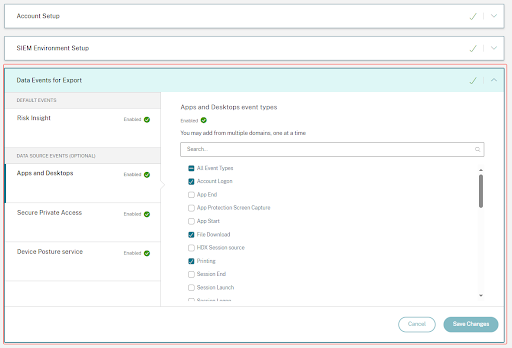
データソースイベント
さらに、データエクスポート機能を構成して、Citrix Analytics for Securityが有効な製品データソースからユーザーイベントをエクスポートできます。Citrix環境で何らかのアクティビティを実行すると、データソースイベントが生成されます。エクスポートされたイベントは、セルフサービスビューで利用可能な未処理のリアルタイムユーザーおよび製品使用状況データです。これらのイベントに含まれるメタデータは、より深い脅威分析、新しいダッシュボードの作成、およびセキュリティとITインフラ全体での他のCitrix以外のデータソースイベントとの関連付けにさらに使用できます。
現在、Citrix Analytics for Securityは、Citrix Virtual Apps and DesktopsデータソースのユーザーイベントをSIEMに送信します。
データソースイベントのスキーマ詳細
シトリックス バーチャルアプリおよびデスクトップ イベント
ユーザーが仮想アプリまたは仮想デスクトップを使用すると、ユーザーイベントはCitrix Analytics for Securityでリアルタイムに受信されます。詳細については、「Citrix Virtual Apps and DesktopsおよびCitrix DaaSデータソース」を参照してください。SIEMでCitrix Virtual Apps and Desktopsに関連付けられている次のユーザーイベントを表示できます。
-
すべてのイベントタイプ
-
アカウントログオン
-
アプリ (開始、起動、終了)
-
クリップボード
-
ファイル (印刷、ダウンロード)
-
HDX™セッションソース
-
印刷
-
セッション (ログオン、起動、終了、終了)
-
VDAデータ
-
VDAプロセス作成
イベントとその属性の詳細については、「Virtual Apps and Desktopsのセルフサービス検索」を参照してください。
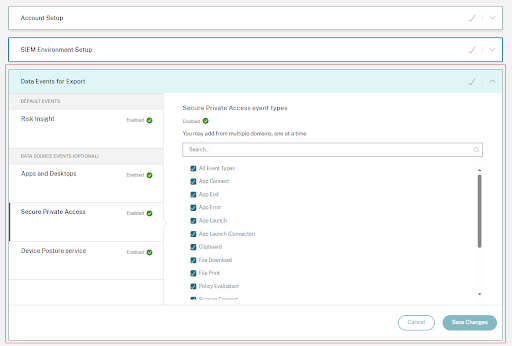
Secure Private Accessイベント
ユーザーイベントは、ユーザーがCitrix Workspace App、Citrix Secure Accessクライアント、またはCitrix Enterprise BrowserなどのCitrix Secure Private Accessを介してアプリケーションにアクセスすると、Citrix Analytics for Securityでリアルタイムに受信されます。SIEMでSecure Private Accessに関連する以下のユーザーイベントを表示できます。
-
すべてのイベントタイプ
-
アカウントログオン
-
アプリ (接続、起動、終了、エラー)
-
ファイル (印刷、ダウンロード)
-
ポリシー評価
-
クリップボード
-
セッション (接続、起動)
-
URL
-
ユーザーログイン
-
SPAサービスログ
デバイスポスチャサービスイベント
ユーザーイベントは、Citrix Endpoint Analysis (EPA) クライアントがCitrix Virtual Apps and DesktopsまたはCitrix Secure Private Accessリソースへのアクセスを試みるデバイスに対してポスチャチェックを実行したときに生成されます。SIEMでデバイスポスチャサービスに関連する以下のユーザーイベントを表示できます。
-
すべてのイベントタイプ
-
デバイスポスチャ評価
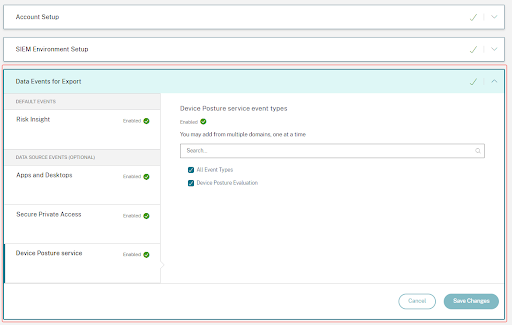
テナントで有効になっているイベントタイプを確認し、それらがSIEMに流れていることを確認できます。該当するイベントタイプを設定または削除し、「変更を保存」ボタンをクリックして設定を適用できます。