This content has been machine translated dynamically.
Dieser Inhalt ist eine maschinelle Übersetzung, die dynamisch erstellt wurde. (Haftungsausschluss)
Cet article a été traduit automatiquement de manière dynamique. (Clause de non responsabilité)
Este artículo lo ha traducido una máquina de forma dinámica. (Aviso legal)
此内容已经过机器动态翻译。 放弃
このコンテンツは動的に機械翻訳されています。免責事項
이 콘텐츠는 동적으로 기계 번역되었습니다. 책임 부인
Este texto foi traduzido automaticamente. (Aviso legal)
Questo contenuto è stato tradotto dinamicamente con traduzione automatica.(Esclusione di responsabilità))
This article has been machine translated.
Dieser Artikel wurde maschinell übersetzt. (Haftungsausschluss)
Ce article a été traduit automatiquement. (Clause de non responsabilité)
Este artículo ha sido traducido automáticamente. (Aviso legal)
この記事は機械翻訳されています.免責事項
이 기사는 기계 번역되었습니다.책임 부인
Este artigo foi traduzido automaticamente.(Aviso legal)
这篇文章已经过机器翻译.放弃
Questo articolo è stato tradotto automaticamente.(Esclusione di responsabilità))
Translation failed!
ドメイン非参加
本記事では、システム要件セクションに記載されている要件に加えて、Citrix Virtual Apps and Desktops を使用したドメイン非参加カタログを作成するための要件について説明します。
-
要件
- コントロールプレーン: サポートされる構成を参照
- VDAの種類: シングルセッション (デスクトップのみ) またはマルチセッション (アプリおよびデスクトップ)
- VDAバージョン: 2311以降
- プロビジョニングの種類: Machine Creation Services™ (MCS)、永続および非永続
- 割り当ての種類: 専用およびプール
- ホスティングプラットフォーム: MCSでサポートされるすべてのプラットフォーム
- Rendezvous V2が有効になっていること
制限事項
- サービス継続性はサポートされません
- マルチセッションのドメイン非参加VDAを使用する場合、ローカルユーザーのプロファイルデータは保持されず、ログオフ時に削除されます
VDAのインストールと構成
VDAをインストールするには、次の手順に従います。
-
インストールウィザードで次のオプションを選択していることを確認します。
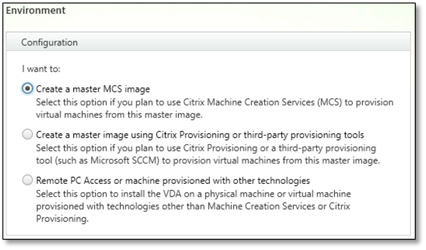
- 環境ページで、[マスターMCSイメージの作成] を選択します。
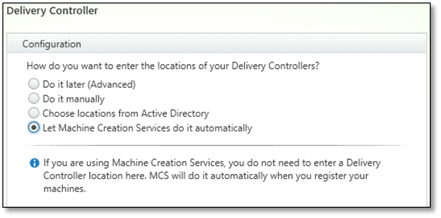
- Delivery Controller™ページで、[Machine Creation Servicesで自動的に実行する] を選択します。
次のステップ
リソースの場所とホスティング接続が利用可能になったら、IDプールを作成します。ドメイン非参加マシンIDのIDプールの作成について詳しくは、ドメイン非参加マシンIDのIDプールを参照してください。
共有
共有
この記事の概要
This Preview product documentation is Citrix Confidential.
You agree to hold this documentation confidential pursuant to the terms of your Citrix Beta/Tech Preview Agreement.
The development, release and timing of any features or functionality described in the Preview documentation remains at our sole discretion and are subject to change without notice or consultation.
The documentation is for informational purposes only and is not a commitment, promise or legal obligation to deliver any material, code or functionality and should not be relied upon in making Citrix product purchase decisions.
If you do not agree, select I DO NOT AGREE to exit.