This content has been machine translated dynamically.
Dieser Inhalt ist eine maschinelle Übersetzung, die dynamisch erstellt wurde. (Haftungsausschluss)
Cet article a été traduit automatiquement de manière dynamique. (Clause de non responsabilité)
Este artículo lo ha traducido una máquina de forma dinámica. (Aviso legal)
此内容已经过机器动态翻译。 放弃
このコンテンツは動的に機械翻訳されています。免責事項
이 콘텐츠는 동적으로 기계 번역되었습니다. 책임 부인
Este texto foi traduzido automaticamente. (Aviso legal)
Questo contenuto è stato tradotto dinamicamente con traduzione automatica.(Esclusione di responsabilità))
This article has been machine translated.
Dieser Artikel wurde maschinell übersetzt. (Haftungsausschluss)
Ce article a été traduit automatiquement. (Clause de non responsabilité)
Este artículo ha sido traducido automáticamente. (Aviso legal)
この記事は機械翻訳されています.免責事項
이 기사는 기계 번역되었습니다.책임 부인
Este artigo foi traduzido automaticamente.(Aviso legal)
这篇文章已经过机器翻译.放弃
Questo articolo è stato tradotto automaticamente.(Esclusione di responsabilità))
Translation failed!
许可证激活服务
许可证激活服务 (LAS) 是一种新型的基于云的许可解决方案,它提供了传统 Citrix® 旧版许可的替代方案。LAS 引入了新的激活模块,确保了无缝且现代的许可证管理方法。
LAS 简化了 Citrix 许可体验。不再需要在 License Server 上生成、下载或安装许可证访问代码或文件。您只需升级您的 License Server 并向 Citrix Cloud 注册。一旦兼容产品指向 License Server,它们就可以自动激活。
激活后,License Server 会定期与许可证激活服务通信,以保持其激活状态最新。LAS 采用云技术构建,可提高性能并确保零停机时间。如果由于任何原因 License Server 或 LAS 无法访问,系统将进入许可证缓存模式,该模式旨在保护系统免受未授权状态并避免中断。有关更多信息,请参阅 许可证缓存模式。
有关 LAS 的更多详细信息,请参阅许可文档 许可证激活服务。
有关许可的常见问题,请参阅 许可常见问题。
先决条件
- 将 License Server 安装或更新到版本 11.17.2 build 53100 或更高版本。
- License Server 需要可靠且持续的互联网连接。
注意事项
- 在 Web Studio 提示激活之前,所有 Delivery Controllers 都必须与 LAS 兼容。单个站点可以使用旧版许可证或 LAS。
- 您可以将多个 License Server 注册到相同的 Citrix Cloud ID (CCID) 或 OrgID。但是,一个站点只能配置为指向一个 License Server。
限制
- 迁移到 LAS 会将 Product Edition 设置为 Premium,并将 License Model 设置为 Concurrent,但这在将来可能会发生变化。请勿使用 PowerShell 修改许可证配置,因为这可能会影响注册和会话启动。
- 您只能使用 Web Studio 将您的 Citrix Virtual Apps and Desktops™ 站点从现有旧版许可证迁移到 LAS。
关键步骤
- 安装或升级许可证服务器到版本 11.17.2 build 53100 或更高版本,并按照 如何为许可证激活服务配置许可证服务器 中所述的说明配置 LAS。
-
安装 Citrix Virtual Apps™ and Desktops 2411 或更高版本。安装核心组件,例如 Citrix Delivery Controller、Citrix Studio、Web Studio 和 Citrix Director。
注意:
Citrix Virtual Apps and Desktops 站点中的所有 Delivery Controller 都必须与 LAS 兼容。
-
安装所需组件后,使用 Citrix Site Manager 创建站点。有关创建站点的信息,请参阅 创建站点。如果许可证服务器配置为使用 LAS,则 Metainstaller 会显示授权。授权会随其相应的许可证到期日期一起提供。
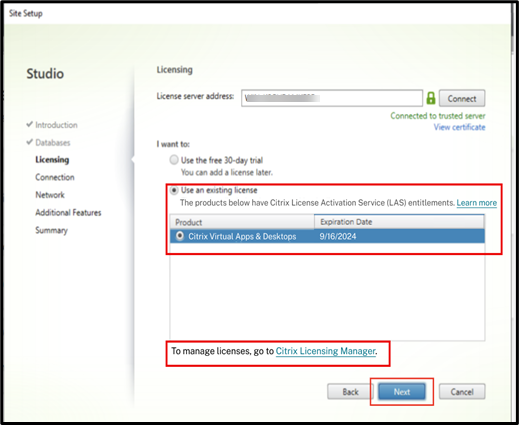
注意:
如果许可证服务器未升级到最新的许可证服务器版本,您会收到错误消息。
- 检查许可详细信息。
- 将旧版许可迁移到 LAS。
检查许可详细信息
创建站点后,使用 Web Studio 检查许可详细信息。
- 在 Web Studio 中,选择“许可”节点。
-
在“概览”选项卡上,检查 Citrix Virtual Apps and Desktops 站点是否具有相应的许可证,或者在使用 LAS 功能时许可证是否已过期。
检查许可详细信息(/en-us/citrix-virtual-apps-desktops/media/licensing-overview.png)
如果 LAS 不可达,您可能会看到错误消息:
LAS 不可达(/en-us/citrix-virtual-apps-desktops/media/las-not-reachable.png)
如果许可证服务器不可用,您可能会看到错误消息:
许可证服务器不可用(/en-us/citrix-virtual-apps-desktops/media/license-server-unavailable-1.png)
如果您的许可证服务器仍在使用旧的传统许可证,并且 Citrix Virtual Apps and Desktops 站点支持 LAS,则 Web Studio 会提示您将许可证服务器注册到 Citrix Cloud。
注册许可证服务器以使用 LAS(/en-us/citrix-virtual-apps-desktops/media/register-license-server.png)
将传统许可迁移到 LAS
如果您已将许可证服务器注册到 Citrix Cloud 并拥有必要的权利,则必须按照以下特定顺序将现有 Citrix Virtual Apps and Desktops 站点从传统许可迁移到 LAS,而不会影响用户会话。
- 升级许可证服务器: 将许可证服务器升级到最低支持版本。
- 升级交付控制器: 将站点中的所有交付控制器升级到支持 LAS 的版本。
-
删除交付组许可证分配:
- 在单击迁移到 LAS 之前,请手动删除站点级别以下设置的任何许可证分配(即,删除交付组级别的许可证分配)。
- 确认分配: 验证 LAS 分配是否准确。
-
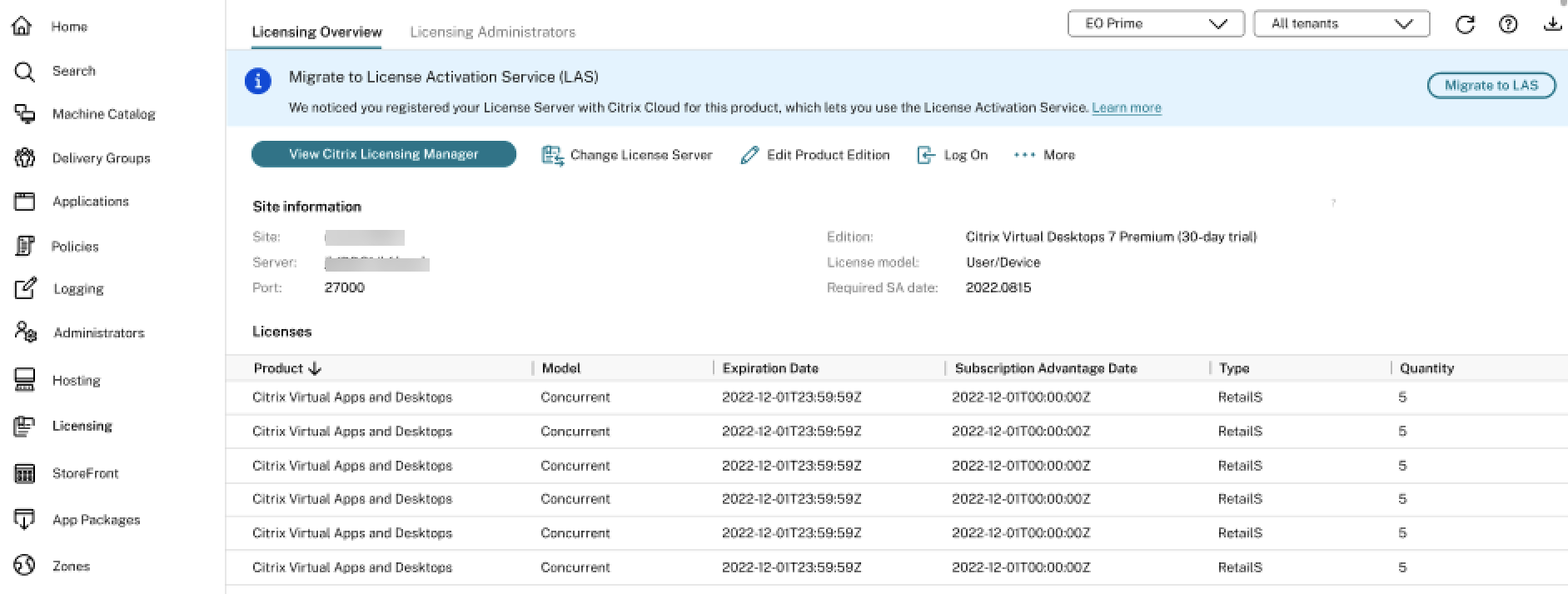
单击迁移到 LAS:
-
完成上述步骤后,单击迁移到 LAS。
-
迁移到 LAS 后,Citrix Virtual Apps and Desktops 站点的许可证版本将设置为 Citrix Virtual Apps and Desktops Premium,许可证模型将配置为并发。
-
从 LAS 回滚到旧版许可
要从 LAS 回滚到旧版许可,请执行以下操作:
-
运行以下 PowerShell 命令。
Set-ConfigSite -UseLicenseActivationService $false <!--NeedCopy--> -
在 Web Studio 中配置旧版许可证。
注意:
这些步骤仅用于临时故障排除。旧版许可证文件即将终止使用 (EOL),并且在 April 15, 2026 之后将无法运行。为确保服务不中断,我们建议迁移到许可证激活服务 (LAS)。有关详细信息,请参阅公告。
升级的重要注意事项
当您从任何早期 Citrix Virtual Apps and Desktops 版本升级到 2411 及更高版本时,请将许可证服务器升级到最新版本(版本 11.2.17 build 53100 或更高版本)。
-
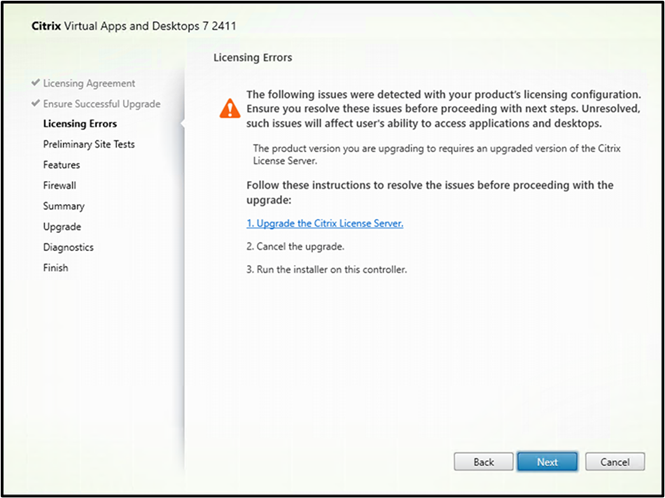
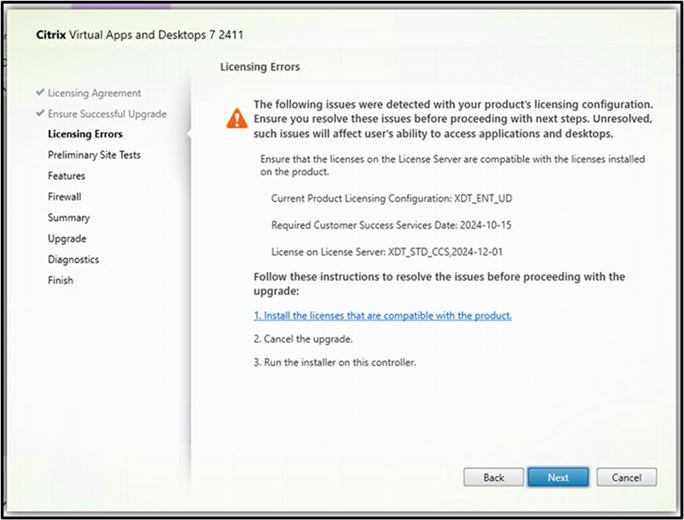
使用元安装程序 UI 升级时,许可错误页面上会出现以下错误:
-
如果您未升级到最新许可证服务器版本:
-
如果存在任何不兼容性,例如许可证服务器过时或许可证不可用:
-
-
如果您正在使用命令行进行升级,请运行以下命令以避免升级失败(假设您位于已装载 ISO 中的 \x64 文件夹内):
-
运行以下命令:
\x64\Licensing\CitrixLicensing.exe /quiet
<!--NeedCopy-->
如果您已将许可二进制文件复制到任何本地驱动器,则运行以下命令:
\x64\Licensing\CitrixLicensing.exe /quiet /l install.log <!--NeedCopy--> -
运行以下命令:
\x64\XenDesktop Setup\XenDesktopServerSetup.exe  /components "CONTROLLER,DESKTOPSTUDIO,DESKTOPDIRECTOR" /CONFIGURE_FIREWALL
<!--NeedCopy-->
卸载核心组件
升级期间,如果您首先使用命令 \x64\Licensing\CitrixLicensing.exe /quiet 或 \x64\Licensing\CitrixLicensing.exe /quiet /l install.log 安装了许可证服务器,然后安装了核心组件,则请按照相同的顺序进行卸载:
-
使用命令行卸载许可证服务器:
CitrixLicensing.exe /quiet /uninstall /l uninstall.log <!--NeedCopy--> -
使用 GUI 或命令行卸载组件。有关信息,请参阅 删除组件。
如果您使用命令行 XenDesktopServerSetup.exe 或 removeall 卸载许可证服务器和组件,则清理注册表项和剩余文件。
要清理注册表项:
-
搜索注册表项
Citrix Licensing并删除该条目。通常,您可以在以下位置找到该条目:"Computer\HKEY_LOCAL_MACHINE\SOFTWARE\WOW6432Node\Microsoft\Windows\CurrentVersion\Uninstall\ <!--NeedCopy--> -
删除注册表项中 Uninstall String 指向的文件夹。
故障排除
如果 Citrix Cloud 中许可证服务器的状态显示为非绿色,请执行以下操作以了解可能存在问题的激活的详细信息:
- 在 Citrix Cloud 中,导航到 许可 > 许可部署 > 许可证服务器。
-
单击 Citrix Virtual Apps and Desktops 旁边的展开按钮 >,查看已激活的 Delivery Controller 列表。
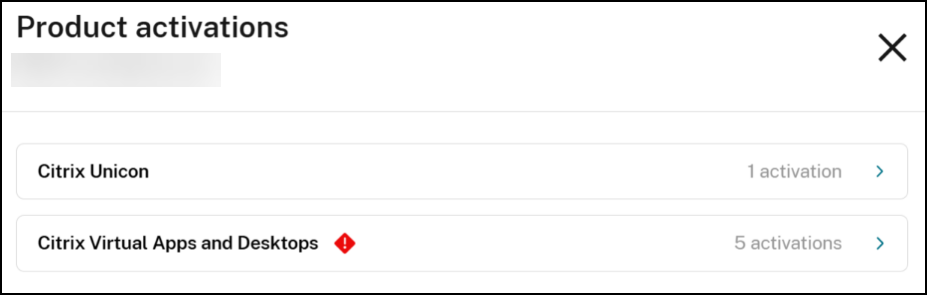
-
单击激活旁边的查看详细信息以查看详细信息。
ID 是用于标识激活的唯一标识符。
提供了以下详细信息:
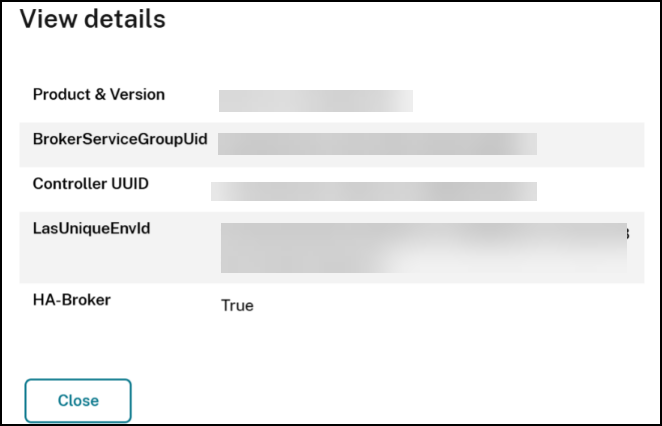
- 产品和版本:产品配置为在通过 LAS 激活时使用的 Product_Edition_Model 和 Burn In Date。BurnInDate 通常是产品的发布日期。
- BrokerServiceGroupUid:Broker Service Group 的唯一标识符。
- 控制器 UUID:Delivery Controller 的 UUID。
- LasUniqueEnvId:LAS 为激活提供的实例的唯一 ID。
- HA-Broker:指示它是 HA 代理还是主代理的 True 或 False。
要将已激活的主机详细信息与实际主机进行映射,请在该主机上运行以下命令。
-
Get-BrokerSite:将屏幕上显示的 BrokerServiceGroupUid 值与命令的BrokerServiceGroupId输出进行比较。 -
Get-BrokerController:将屏幕上显示的 Controller UUID 值与命令的 UUID 输出进行比较。
与许可事件相关的事件查看器日志
| 事件 ID | 描述 |
|---|---|
| 1112 | Citrix Broker Service 未能为用户与资源建立连接。站点的产品和版本许可配置不允许此类型的资源。请检查是否已为此站点选择了正确的许可证。 |
| 1150 | Citrix Broker Service 已成功联系许可证服务器。 |
| 1151 | Citrix Broker Service 无法联系许可证服务器。请确保许可证服务器正常运行,并且 XenDesktop 配置中标识许可证服务器的详细信息正确无误。 |
| 1152 | 此 XenDesktop 站点在许可证服务器上没有所需的现有产品许可证。请使用许可证管理控制台将相关产品许可证添加到许可证服务器。 |
| 1153 | 此 XenDesktop 站点的许可证已过期。Citrix Broker Service 将从许可证服务器请求新许可证。 |
| 1154 | 此控制器已进入许可证缓存模式,因为它无法联系许可证服务器。在此控制器停止提供桌面和应用程序会话之前,您还有 2 小时。 |
| 1155 | Citrix Broker Service 现在将停止提供桌面和应用程序会话。此控制器不再处于或无法进入许可证缓存模式,因为与许可证服务器的通信持续失败。请确保许可证服务器正常运行,如有必要,请使用许可证管理控制台将相关许可证添加到许可证服务器。 |
| 1156 | Citrix Broker Service 正在成功与许可证服务器通信。此控制器不再处于许可证缓存模式。 |
| 1157 | 正在运行的许可证服务器版本低于 Citrix Broker Service 的版本,因此不兼容。请升级您的许可证服务器,或在 XenDesktop 配置中指定具有正确版本的许可证服务器位置。 |
| 1158 | Citrix Broker Service 检测到您已超出此版本在此站点许可证服务器上可用的许可证数量。许可证服务器已授予您透支许可证。 |
| 1159 | Citrix Broker Service 拒绝了桌面连接,因为此站点已安装的许可证数量已超出最大值。此版本已安装了三个许可证,但此版本允许的最大许可证数量为两个。请从许可证服务器中删除相关许可证以符合许可证限制。 |
| 1160 | Citrix Broker Service 在管理许可证时遇到内部错误。请确保许可证服务器正常运行,并且 XenDesktop 配置中标识许可证服务器的详细信息正确无误。重新启动 Citrix Broker Service 也可能解决此问题。如果此问题仍然存在,请重新安装 Citrix XenDesktop Controller。请参阅 Citrix 知识库文章 CTX126990。 |
| 1161 | 许可证初始化错误。请检查许可证服务器连接。 |
| 1162 | 停止许可时出错。检查许可证服务器连接。 |
| 1163 | 没有可用的连接许可证。要解决此问题,请通过关闭不需要的会话来释放许可证,或添加更多许可证。 |
| 1164 | 签出连接许可证时出错。检查许可证服务器连接。 |
| 1165 | 签入连接许可证时出错。检查许可证服务器连接。 |
| 1166 | 检查许可证可用性时出错。检查许可证服务器连接。 |
| 1167 | 启动许可失败。检查许可证服务器连接。 |
| 1168 | 读取许可用户通知设置时出错。检查许可证服务器连接。 |
| 1169 | 由于在许可证服务器上未找到合适的许可证,此控制器已进入开箱即用许可证缓存模式。在此控制器停止提供桌面和应用程序会话之前,您还有 2 小时。 |
| 1170 | Citrix Broker Service 已成功在许可证服务器上检测到合适的许可证。此控制器不再处于开箱即用许可证缓存模式。 |
| 1171 | 未指定许可证服务器。Citrix Broker Service 无法向用户提供桌面和应用程序,直到指定有效的许可证服务器。您可以在 Citrix Studio 中或使用 Citrix PowerShell SDK cmdlet Set-ConfigSite 指定许可证服务器。 |
| 1172 | 检查许可证服务器适用性时出错。Citrix Broker Service 在检查计算机是否适合用作许可证服务器时收到意外响应。请检查控制器是否可以联系到该计算机,以及该计算机上的任何防火墙是否允许来自控制器的连接。如果许可证服务器已安装在该计算机上,请检查其配置和运行是否正确。 |
| 1173 | 此 XenDesktop 站点在许可证服务器上没有所需的启动许可证。使用许可证管理控制台将相关许可证添加到许可证服务器。 |
| 1174 | 此 XenDesktop 站点配置的产品版本不支持应用程序;应用程序资源将不可用。 |
| 1176 | 配置的产品版本不支持多会话计算机。注册被拒绝。 |
| 1177 | 配置的产品版本不支持单会话计算机。注册被拒绝。 |
| 1178 | 配置的产品版本不支持 RemotePC。注册被拒绝。 |
| 1179 | 配置的产品版本不支持预配到云系统中的计算机。注册被拒绝。 |
| 1180 | 此 XenDesktop 站点的配置产品版本不支持单会话(工作站操作系统)计算机上的应用程序。应用程序资源启动被拒绝。 |
| 1181 | 此 XenDesktop 站点的配置产品版本不支持多会话(服务器操作系统)计算机上的应用程序。应用程序资源启动被拒绝。 |
| 1182 | 此 XenDesktop 站点的配置产品版本不支持单会话(工作站操作系统)计算机上的桌面。桌面资源启动被拒绝。 |
| 1183 | 此 XenDesktop 站点的配置产品版本不支持多会话(服务器操作系统)计算机上的桌面。桌面资源启动被拒绝。 |
| 1196 | 由于许可证服务器上所有可用许可证已用尽,此控制器已进入许可证突发模式。请添加更多许可证以解决此问题。此控制器停止提供桌面和应用程序会话前,您还有 2 小时。 |
| 1197 | Citrix Broker Service 现在将停止提供桌面和应用程序会话。由于许可证服务器上的许可证不足,此控制器不再处于或无法进入许可证突发模式。请使用许可证管理控制台将相关许可证添加到许可证服务器。 |
| 1198 | Citrix Broker Service 正在成功地从许可证服务器使用许可证。服务器上有足够的许可证来满足当前需求。此控制器不再处于因许可证耗尽而导致的许可证突发模式。 |
| 1199 | Citrix Broker Service 现在将停止提供桌面和应用程序会话。此控制器不再处于或无法进入许可证缓存模式,因为许可证服务器上未安装任何许可证。使用许可证管理控制台将相关许可证添加到许可证服务器。 |
| 1205 | 您的软件维护已过期。您的 Citrix 环境目前不受支持。检查您的许可证服务器以查找过期许可证并将其删除。在用户开始收到警告消息之前,有 30 天的许可证缓存模式。 |
| 1206 | 许可证证书哈希无效。您的 Citrix 许可证证书哈希无效。 |
| 1300 | Citrix Broker Service 现在将停止提供桌面和应用程序会话。许可证服务器的系统时钟存在问题。 |
| 1301 | 许可证服务器的系统时钟问题已得到纠正。Citrix Broker Service 现在将恢复正常运行。 |
| 1302 | 此控制器再次未能签入或签出连接许可证。先前检测到的故障仍然存在。为避免过多的事件日志记录,服务将抑制相关消息(事件 ID 1163、1164、1165),直到问题解决。许可证尝试将继续。 |
| 1303 | 此控制器不再抑制相关消息(事件 ID 1163、1164、1165)。 |
| 1304 | Citrix Broker Service 已成功联系 LAS。 |
| 1305 | Citrix Broker Service 无法联系 LAS。请确保 LAS 正常运行,并且 XenDesktop 配置中标识 LAS 的详细信息正确无误。 |
更多信息
有关检查站点的 LAS 状态或验证站点是否处于许可证缓存模式的信息,请参阅:
有关命令的详细信息,请参阅:
共享
共享
This Preview product documentation is Citrix Confidential.
You agree to hold this documentation confidential pursuant to the terms of your Citrix Beta/Tech Preview Agreement.
The development, release and timing of any features or functionality described in the Preview documentation remains at our sole discretion and are subject to change without notice or consultation.
The documentation is for informational purposes only and is not a commitment, promise or legal obligation to deliver any material, code or functionality and should not be relied upon in making Citrix product purchase decisions.
If you do not agree, select I DO NOT AGREE to exit.