This content has been machine translated dynamically.
Dieser Inhalt ist eine maschinelle Übersetzung, die dynamisch erstellt wurde. (Haftungsausschluss)
Cet article a été traduit automatiquement de manière dynamique. (Clause de non responsabilité)
Este artículo lo ha traducido una máquina de forma dinámica. (Aviso legal)
此内容已经过机器动态翻译。 放弃
このコンテンツは動的に機械翻訳されています。免責事項
이 콘텐츠는 동적으로 기계 번역되었습니다. 책임 부인
Este texto foi traduzido automaticamente. (Aviso legal)
Questo contenuto è stato tradotto dinamicamente con traduzione automatica.(Esclusione di responsabilità))
This article has been machine translated.
Dieser Artikel wurde maschinell übersetzt. (Haftungsausschluss)
Ce article a été traduit automatiquement. (Clause de non responsabilité)
Este artículo ha sido traducido automáticamente. (Aviso legal)
この記事は機械翻訳されています.免責事項
이 기사는 기계 번역되었습니다.책임 부인
Este artigo foi traduzido automaticamente.(Aviso legal)
这篇文章已经过机器翻译.放弃
Questo articolo è stato tradotto automaticamente.(Esclusione di responsabilità))
Translation failed!
将旧版 MMC 组策略模板迁移到 Web Studio
注意:
从版本 2511 开始,Citrix Web Studio™(基于 Web)是 Citrix Virtual Apps and Desktops™ 的唯一管理控制台。Citrix Studio(基于 MMC)已从安装程序中删除。本文仅适用于 Web Studio。有关 Citrix Studio 的信息,请参阅 Citrix Virtual Apps and Desktops 7 2212 或更早版本中的相应文章。
旧版 MMC Studio 组策略模板存储在运行 MMC Studio 的本地计算机上的管理员用户配置文件中。Web Studio 模板存储在站点数据库中,所有管理员都可以从任何计算机访问。由于这两种格式之间不存在直接的导出或导入路径,因此请使用策略作为中介来迁移旧版模板。
开始之前
- 确保您可以访问存储旧版模板的 MMC Studio 安装。
- 确保 Web Studio 可以访问相同的 Citrix Virtual Apps and Desktops™ 站点。
- 记下旧版模板中的设置,以便在迁移后进行验证。
迁移模板
- 在 MMC Studio 中,导航到要迁移的模板。
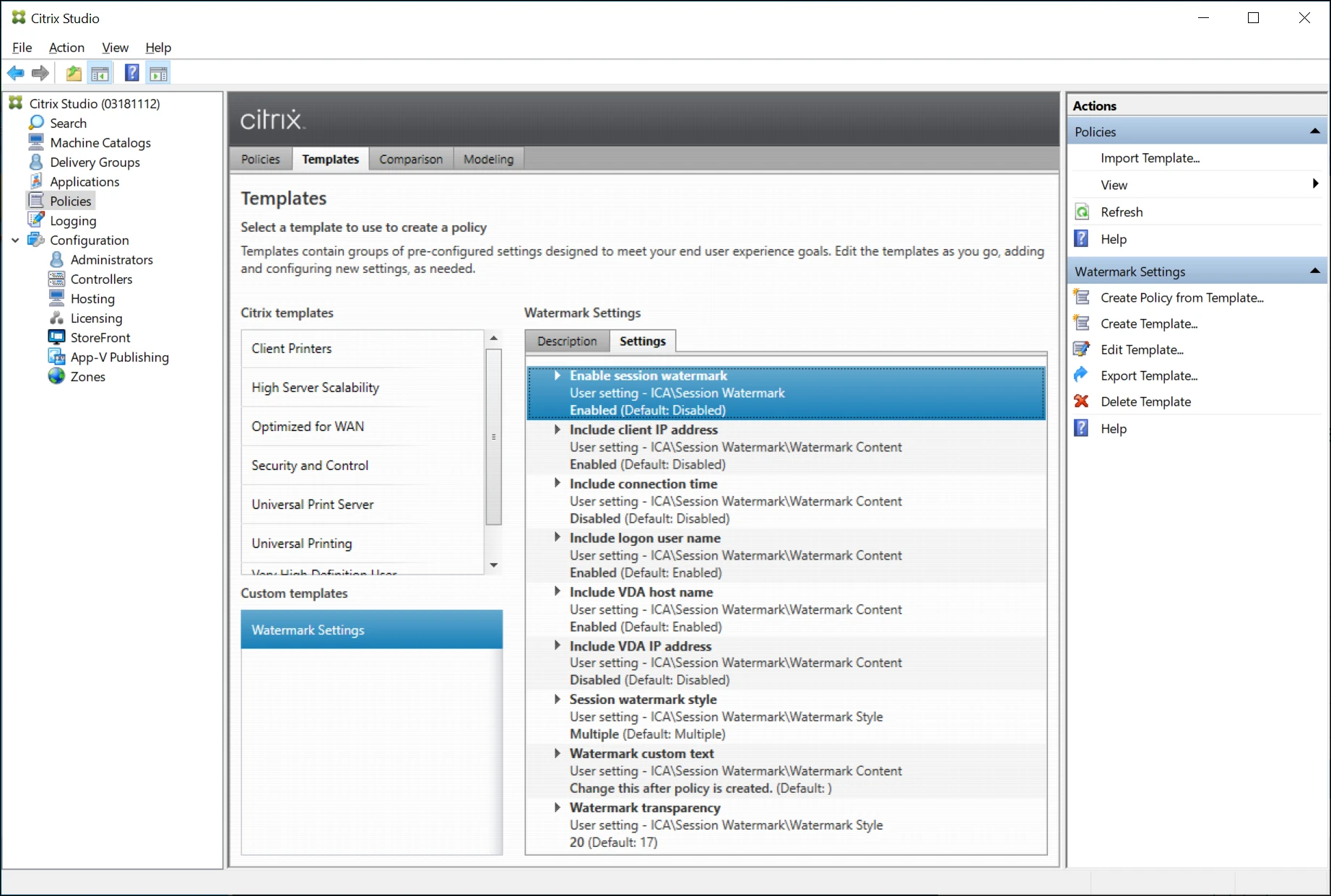
- 在操作窗格中,选择从模板创建策略。
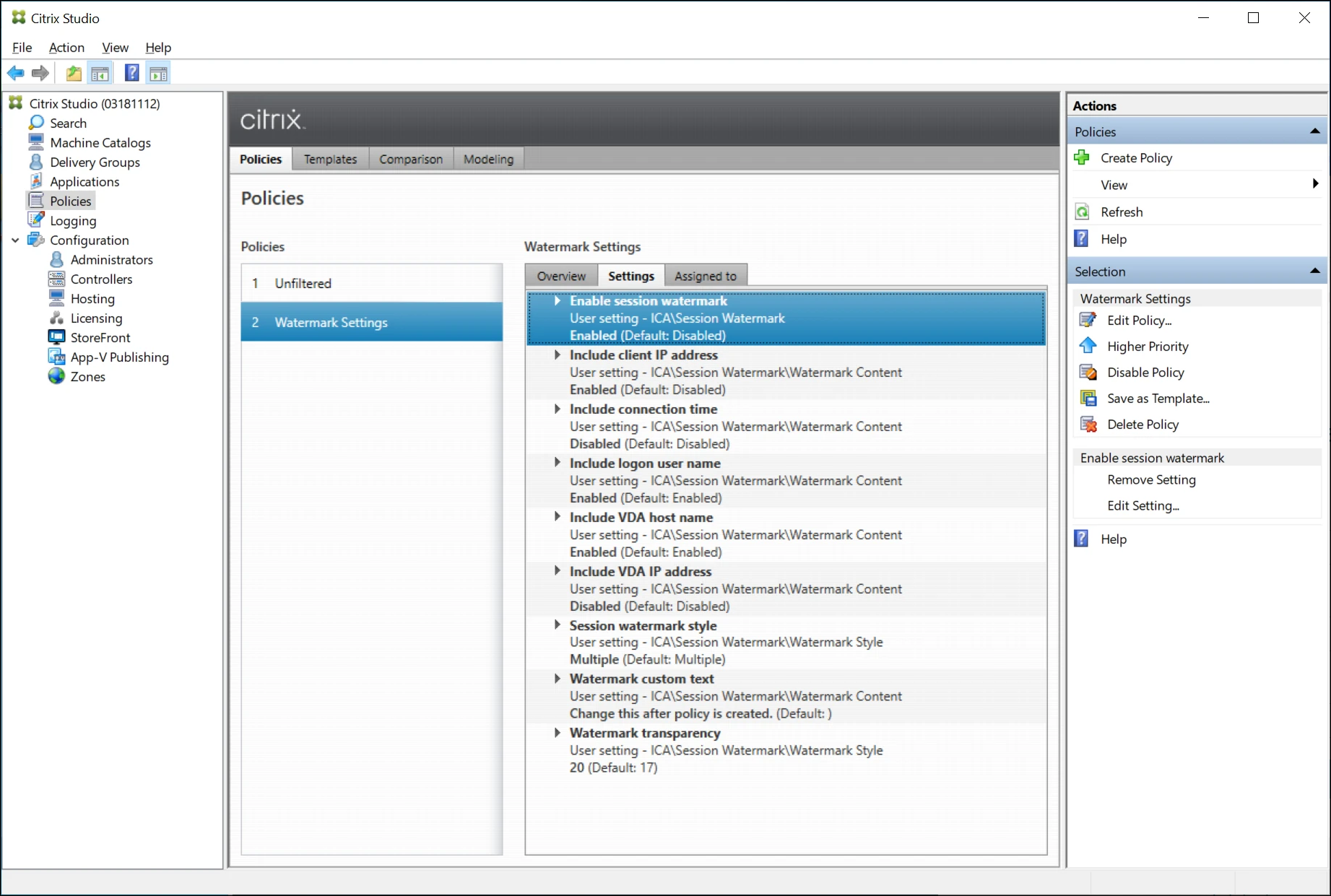
- 按照向导创建策略。为方便起见,请使用与模板相同的名称。
- 等待最多 5 分钟,策略才会显示在 Web Studio 中。此时间是站点服务将策略数据从 MMC 格式转换为 Web Studio 格式所需的。
- 打开 Web Studio 并在左侧窗格中选择策略。
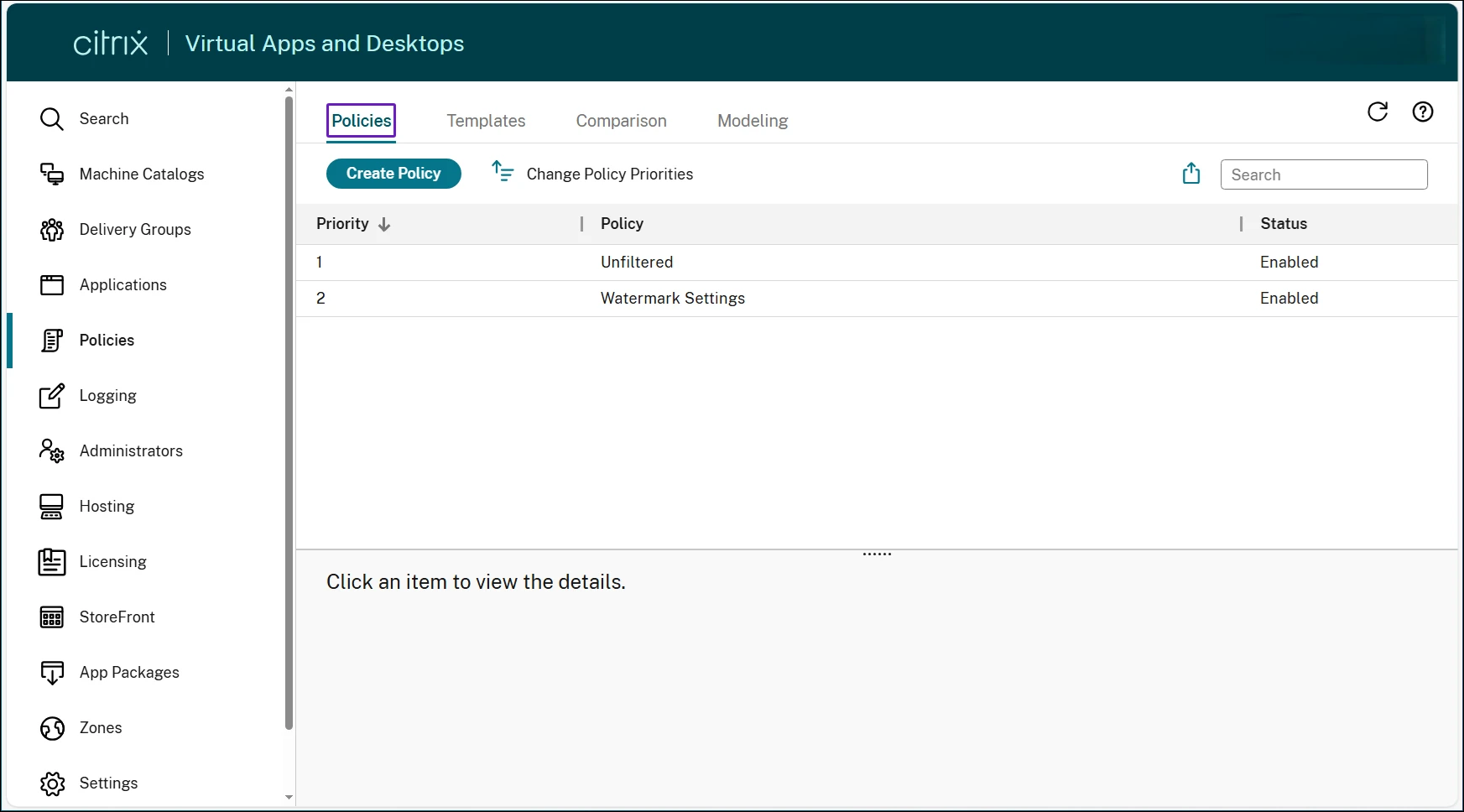
- 确认策略在策略列表中可见。
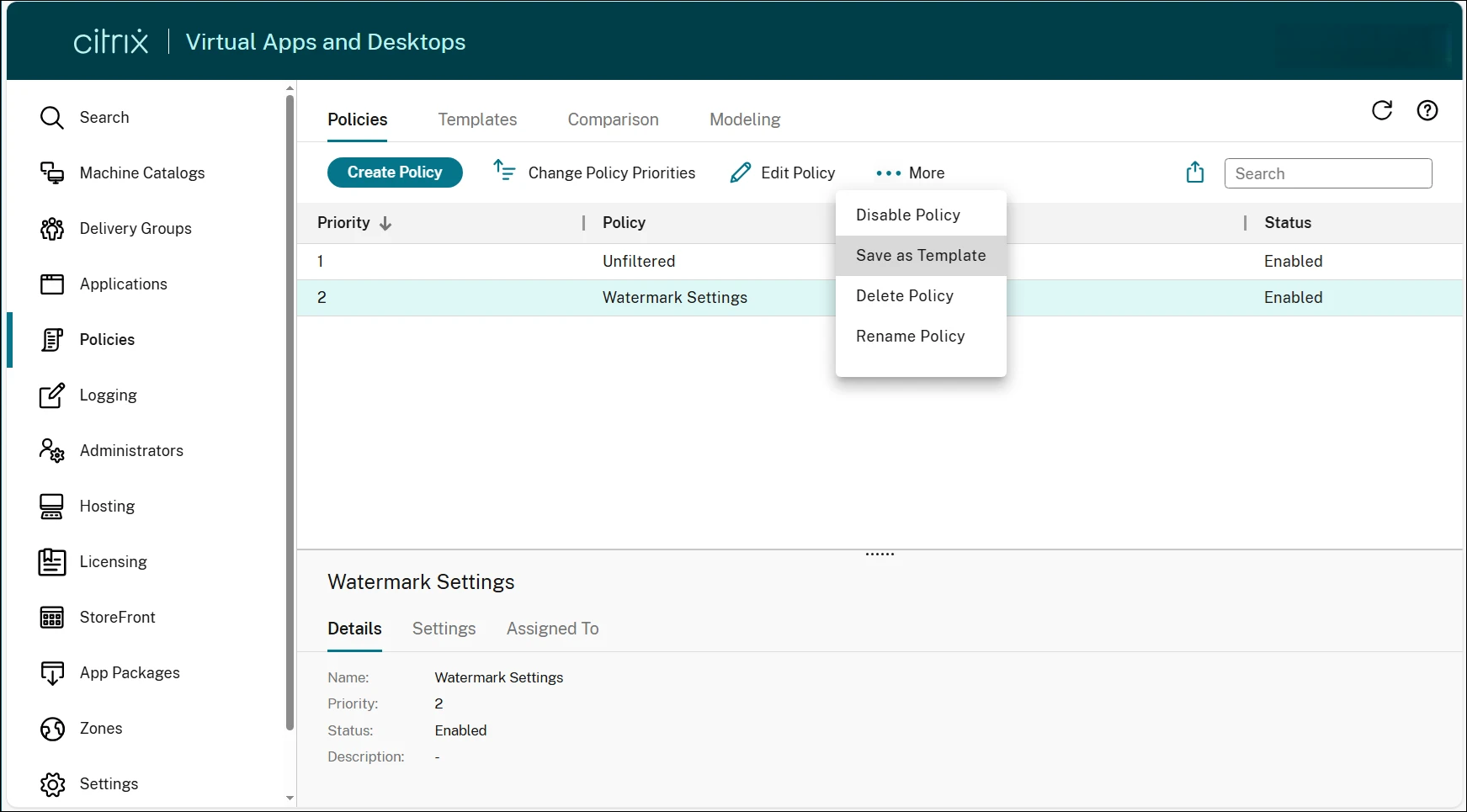
- 选择策略,然后在功能区中选择“… 更多”,并单击“另存为模板”。
- 按照向导创建 Web Studio 模板。
迁移后,模板存储在站点数据库中,并且可供从任何计算机使用 Web Studio 的所有管理员访问。
验证迁移
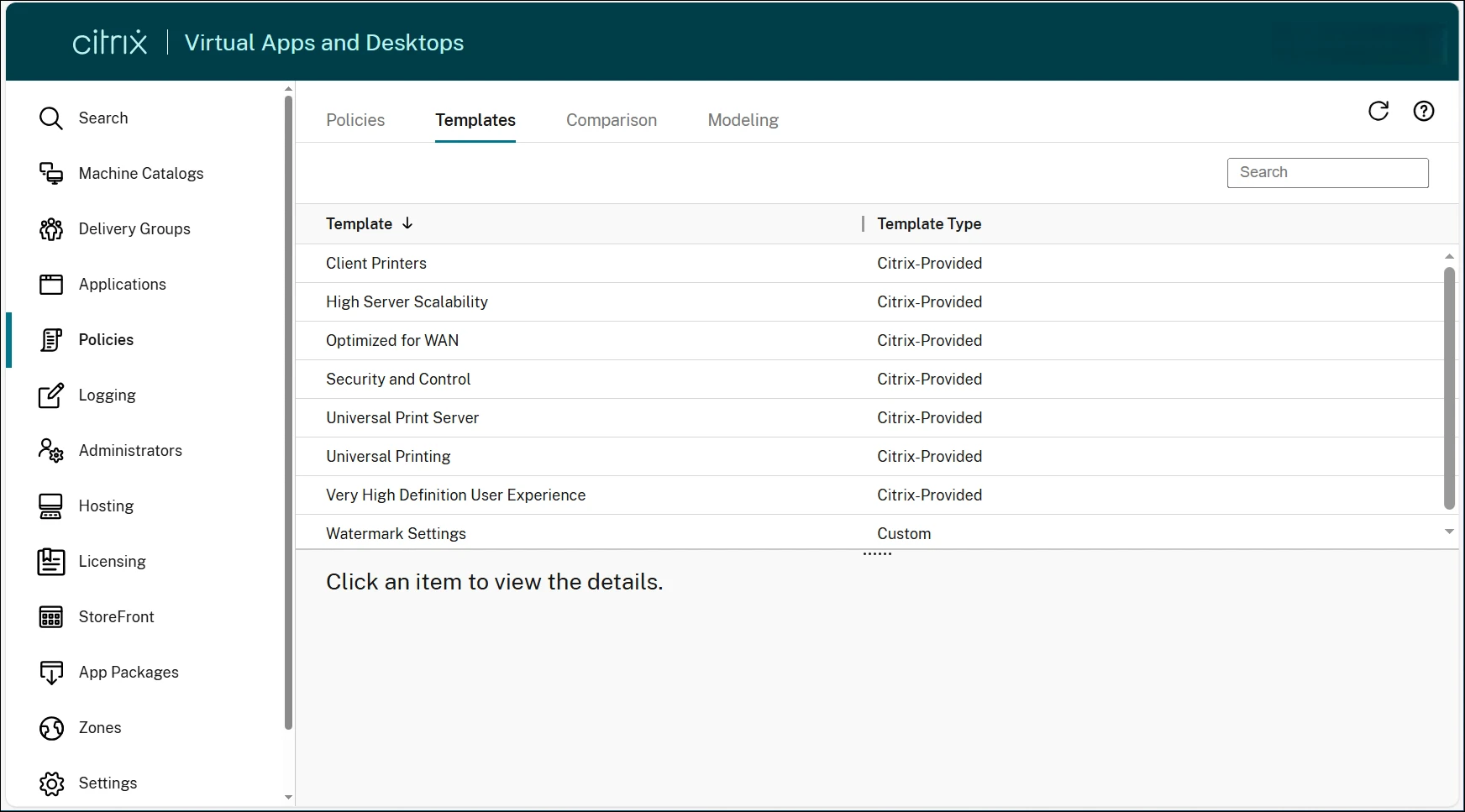
- 在 Web Studio 中,在“策略”节点中选择“模板”选项卡。
- 确认迁移的模板可见。
- 将设置与原始 MMC 模板进行比较,以确认它们匹配。
验证迁移后,您可以停用原始 MMC 模板。MMC 模板仍保留在创建它的计算机本地。
示例
以下示例说明如何迁移名为“水印设置”的模板,该模板包含跨多个站点共享的水印配置。
-
在 MMC Studio 中,找到“水印设置”模板。在“操作”窗格中,单击“从模板创建策略”。
-
按照向导创建策略。为方便起见,将策略命名为“水印设置”以匹配模板。
-
等待最多 5 分钟,然后打开 Web Studio。验证策略“水印设置”是否显示在策略列表中。
注意:
此时,模板尚未显示在模板选项卡上。策略是中间步骤 — 您将在下一步中使用它来创建 Web Studio 模板。
-
选择 Watermark Settings 策略,然后在功能区中选择… 更多,然后单击另存为模板。
-
按照向导创建 Web Studio 模板。
-
选择模板选项卡。Watermark Settings 模板现在对所有可以访问站点的管理员可见并可访问。
相关内容
有关在 Web Studio 中管理模板的详细信息,请参阅管理策略模板。
This Preview product documentation is Citrix Confidential.
You agree to hold this documentation confidential pursuant to the terms of your Citrix Beta/Tech Preview Agreement.
The development, release and timing of any features or functionality described in the Preview documentation remains at our sole discretion and are subject to change without notice or consultation.
The documentation is for informational purposes only and is not a commitment, promise or legal obligation to deliver any material, code or functionality and should not be relied upon in making Citrix product purchase decisions.
If you do not agree, select I DO NOT AGREE to exit.