
设置远程 PowerShell SDK
先决条件
-
确保 Citrix Infrastructure Monitor 已安装在 StoreFront™ 或 Provisioning Service 计算机上。
-
您必须首先在同一资源位置内任何已加入域的计算机上安装远程 PowerShell SDK。有关详细信息,请参阅 SDK 和 API 文档。
设置远程 PowerShell SDK
执行以下步骤并在安装了远程 PowerShell SDK 的设备上运行 PowerShell 命令:
-
使用您的 Citrix Cloud 凭据登录到 Citrix Cloud™ 控制台。
-
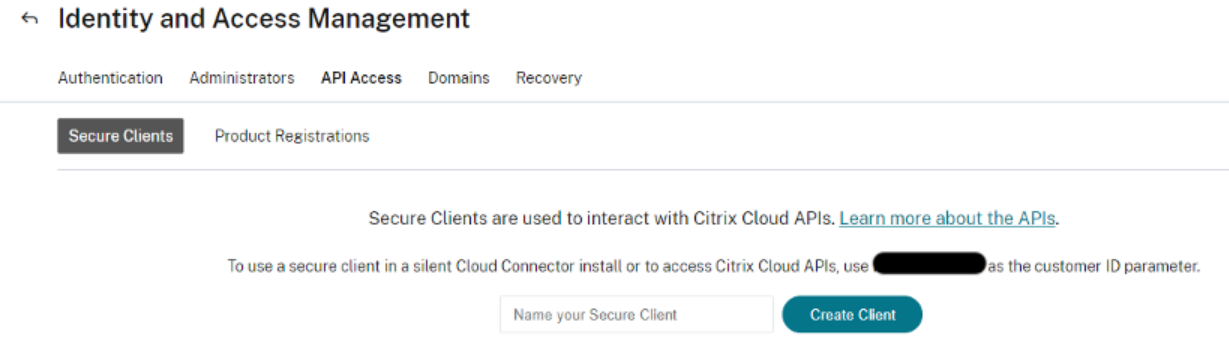
导航到 Identity and Access Management(身份和访问管理)。
-
转到 API access(API 访问)选项卡 > Secure Clients(安全客户端) > Name your Secure Client(命名您的安全客户端),然后单击 Create Client(创建客户端)。
-
创建客户端后,可以以 CSV 文件的形式下载 ID 和密钥以供将来使用。
-
要设置与 Citrix Cloud 环境的连接,请使用上一步中创建的客户端密钥。在 PowerShell 中使用的示例命令如下:
Set-XDCredentials -CustomerId “<customerid>” -SecureClientFile “c:\temp\secureclient.csv” -ProfileType CloudAPI –StoreAs “default” -
使用以下 PowerShell 命令列出本地计算机中存储的 PowerShell Citrix Cloud 配置文件:
Get-XDCredentials -ListProfiles下图显示了在 PowerShell 中输入的上述命令:
有关更多信息,请参阅 Citrix DaaS 远程 PowerShell SDK。